Azure Logic Apps
An Azure service that automates the access and use of data across clouds without writing code.
This browser is no longer supported.
Upgrade to Microsoft Edge to take advantage of the latest features, security updates, and technical support.
' cx='32' cy='32' r='32' /%3E%3Ctext x='50%25' y='55%25' dominant-baseline='middle' text-anchor='middle' fill='%23FFF' %3ELM%3C/text%3E%3C/svg%3E)
followed Azure's quickstart to create a Logic App that should trigger on RSS updates and send me an email. When I hit "Run" the workflow works correctly and I get an email. But I don't get any emails except when I run it manually, even though there have been RSS updates.
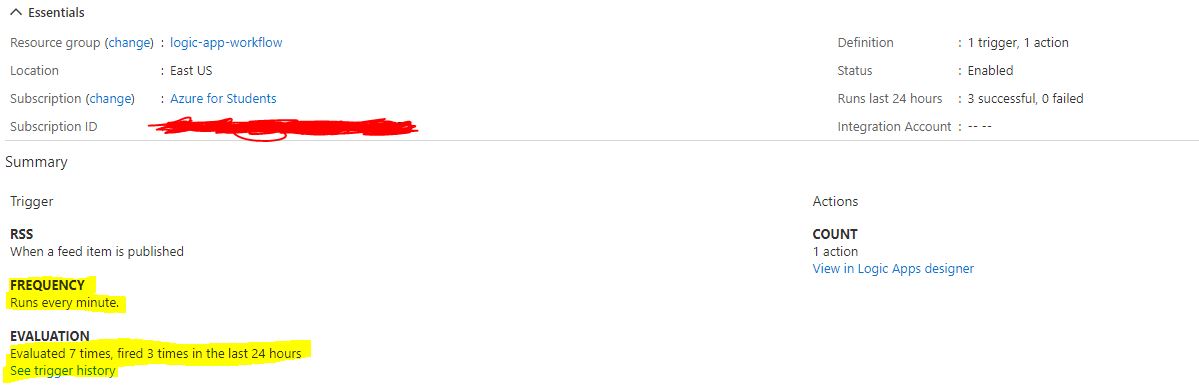
If I look at the overview page, it says that the trigger has been evaluated 7 times and fired 3 times (the 3 times I ran it manually, and all 7 evaluations are on the same minutes that I did the manual runs... it never evaluated by itself) even though I've created the logic app more than an hour ago and configured it to evaluate with a frequency of 1 minute. The app is on "Enabled" status. (see image below)
Why is the trigger not being evaluated automatically?
EDIT: Since I posted this questions, the app has made 2 evaluations automatically, but it looks like it does it every 30 minutes instead of every 1 minute. Maybe this is related to the fact that I have a student subscription?

Hi @Lautaro Mosse ,
According to the description you provided above, it seems like the issue is in the RSS feed. Please check the "Known Issues and Limitations" section and sinceProperty from the below link:
https://learn.microsoft.com/en-us/connectors/rss/#known-issues-and-limitations
Hope this helps!
----------
If the response helps, please "accept as answer" and "up-vote" the same! Thanks!
I see on your link that it says
Minimum polling interval of the RSS trigger (in seconds) 1800
Which is 30 minutes and coincides with what I've experienced. Thanks!