Surface Pro 11 5G stopped working on T-Mobile - No Service

Anonymous
2024-12-30T16:05:24+00:00

I have had the Surface Pro 11 for several months now and was on my second road trip with it during the Christmas week when during the middle of work, my 5G connection dropped.
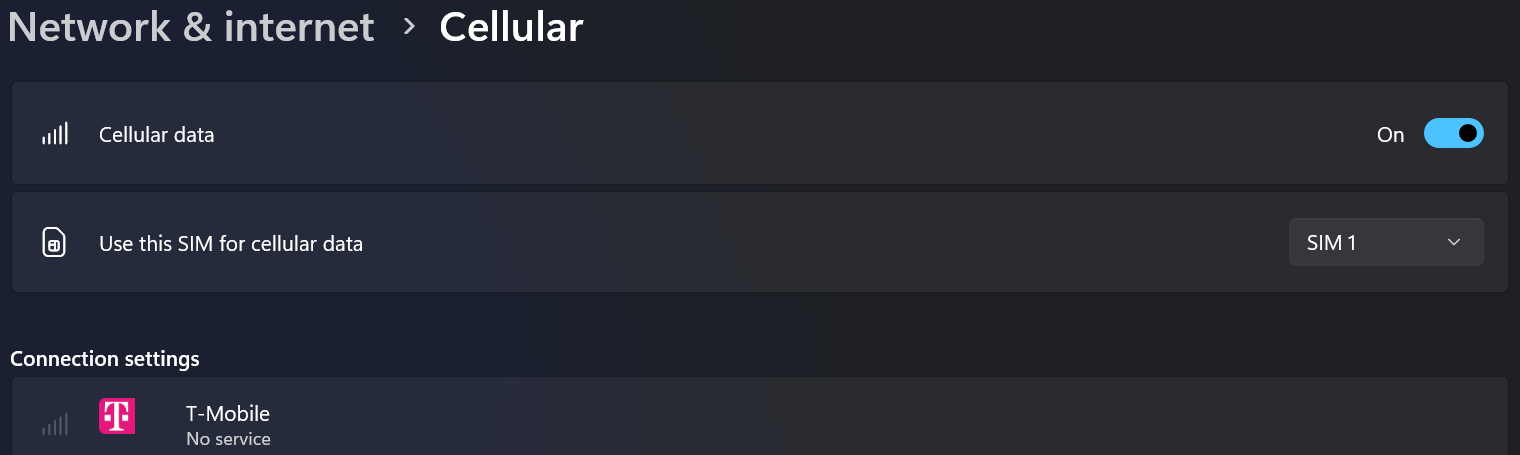
It recognizes the sim as T-Mobile but always shows no service. Rebooting, reseating the sim and reinstalling the "Surface 5G Mobile Broadband" driver has not resulted in any connection. I have checked with T-Mobile and my account and line are fine. I was only at 11GB of a 75GB plan.

In the System Event Logs, I do see a lot of Smart Card Service errors, event id 610 with different descriptions:

1.

Log Name: System

Source: Microsoft-Windows-Smartcard-Server

Date: 12/30/2024 10:47:12 AM

Event ID: 610

Task Category: None

Level: Error

Keywords: Classic

User: N/A

Computer: OneThree-SP11

Description:

Smart Card Reader 'Microsoft UICC ISO Reader c793387e 0' rejected IOCTL POWER: The data area passed to a system call is too small. If this error persists, your smart card or reader may not be functioning correctly.

Command Header: 00 00 00 00

Event Xml:

610

0

2

0

0

0x80000000000000

454132

The data area passed to a system call is too small.

Microsoft UICC ISO Reader c793387e 0

POWER

00 00 00 00

2.

Log Name: System

Source: Microsoft-Windows-Smartcard-Server

Date: 12/30/2024 10:47:02 AM

Event ID: 610

Task Category: None

Level: Error

Keywords: Classic

User: N/A

Computer: OneThree-SP11

Description:

Smart Card Reader 'Microsoft UICC ISO Reader c793387e 0' rejected IOCTL TRANSMIT: Access is denied. If this error persists, your smart card or reader may not be functioning correctly.

Command Header: 00 a4 04 00

Event Xml:

610

0

2

0

0

0x80000000000000

454129

Access is denied.

Microsoft UICC ISO Reader c793387e 0

TRANSMIT

00 a4 04 00

3.

Log Name: System

Source: Microsoft-Windows-Smartcard-Server

Date: 12/30/2024 10:47:02 AM

Event ID: 610

Task Category: None

Level: Error

Keywords: Classic

User: N/A

Computer: OneThree-SP11

Description:

Smart Card Reader 'Microsoft UICC ISO Reader c793387e 0' rejected IOCTL TRANSMIT: The parameter is incorrect. If this error persists, your smart card or reader may not be functioning correctly.

Command Header: 00 ca 7f 68

Event Xml:

610

0

2

0

0

0x80000000000000

454128

The parameter is incorrect.

Microsoft UICC ISO Reader c793387e 0

TRANSMIT

00 ca 7f 68

Removing the card and disabling cellular stops the generation of the errors. I thought about switching to an eSim, but T-Mobile said the Surface Pro 11 was not compatible. I have yet to order a physical SIM as I would like to see if it is a software issue. I don't want to pay for a replacement only to have the same issue.

Surface | Surface Pro | Network

Locked Question. This question was migrated from the Microsoft Support Community. You can vote on whether it's helpful, but you can't add comments or replies or follow the question.

0 comments No comments

31 answers

Sort by: Most helpful
  1. Anonymous
    2025-04-12T19:15:35+00:00

    I have tried the eSim to SIM1 and that is not working. I have been searching for a SIM card to see if that will work. Bottom line is it appears Microsoft and T-Mobile have a problem. I have a problem as well: I spent a ton of money on something that isn't working! This is frustrating. How can this be 2025 and we have what seems to be simple connection issues?

    Was this answer helpful?

    2 people found this answer helpful.
    0 comments No comments
  2. Anonymous
    2025-01-22T04:59:13+00:00

    I have had this same issue since mid December, about 2 weeks or so with my new Surface Pro 11 5g. I am currently in Korea using a SK Telecom SIM. The same SIM worked fine with my previous Surface Pro 9 SQ3 and X.

    For the 1st 2 weeks cellular worked fine and then all of a sudden I got the "No Service" issue. Reinserting the SIM, restarts, factory reset, etc. did not work. SK Telecom suggested that the SIM card could be faulty, and issued a new SIM card which worked fine. I had believed it was a faulty SIM card but after about 2 weeks cellular stopped working again with "No Service" and no reset, reinstall, drivers, etc could fix it. I recalled how it worked with a new SIM card and so I had another data SIM card which I inserted and it worked fine. Right after I reinserted the original SIM and it was working fine like before again. Very weird.

    Yesterday I had the same issue yet again, "No Service". This time I was at work and did not have another working SIM available to swap back and forth to get it working. However, I did have an old non-activated SIM which I inserted - obviously "No Service" since it's not activated. But then I swapped back to the original SIM and wow, it's working again!

    It seems the cellular hardware stops reading the SIM card correctly after a certain duration and it needs a different, new SIM for it to start working properly again. I don't know how this mechanism works but I also have the same errors in the System Log of Event Viewer as the Tboggs13 noted in the initial note above. And since even a factory reset and reverting back to older drivers, etc. hasn't resolved this either, it must be hardware or firmware related.

    I have submitted this issue to Microsoft Support, but am unsure if and when we will see a solution. For the time being, I will have to swap out the SIM card every 2 weeks or so when this happens again - this will get me by for now but this is quite frustrating. There is obviously an issues with the new Surface Pro 11 cellular hardware and I hope they will come through with a fix or replacement. Hate seeing something like this with a new device, let alone a device I was so looking forward to.

    Was this answer helpful?

    1 person found this answer helpful.
    0 comments No comments
  3. Anonymous
    2025-01-19T18:03:26+00:00

    I'm having the same exact issue on my SP11 Pro with a T-mobile SIM. Was working fine up until an update on January 10th or so. I'm going to try and rollback to early January and see if that fixes it.

    I couldn't tie my issue to a particular update but would be curious if you identify it. Also, if doing a system restore resolves the issue, I will enable recovery points. Doing a system restore is what I had to resort to and that is a bit painful if it happens more than once.

    Was this answer helpful?

    1 person found this answer helpful.
    0 comments No comments
  4. Anonymous
    2025-01-18T21:55:05+00:00

    I'm having the same exact issue on my SP11 Pro with a T-mobile SIM. Was working fine up until an update on January 10th or so. I'm going to try and rollback to early January and see if that fixes it.

    Was this answer helpful?

    1 person found this answer helpful.
    0 comments No comments
  5. Anonymous
    2025-01-11T04:36:45+00:00

    Update:

    I did a full reset - deleted all files and reinstalled, and (for now) I have connection again.

    In a work environment so did an Intune Wipe, which is supposed to be a factory reset and it did not resolve the issue.

    If they know it is an update causing a file corruption, there should be a way to repair it without wiping the entire computer. Very frustrating.

    I did another full reset, this time from the PC Reset menu and still no luck. T-Mobile sim shows "No Service". Contacted Microsoft support and they asked if I had tried a sim from another carrier. I know I tried this before the resets, but hadn't since the resets. Swapped T-Mobile for AT&T and the AT&T sim connected. Shutdown the device and swapped back to T-Mobile - it connected!

    I will need to do more testing, the download speeds are fine for 5G, 100mbps+, but the upload is atrocious. It's 0.03mbps. Yikes!

    Was this answer helpful?

    1 person found this answer helpful.
    0 comments No comments