Developer technologies | .NET | Xamarin
A Microsoft framework for building cross-platform mobile apps using .NET and C# with native performance and user interfaces.
This browser is no longer supported.
Upgrade to Microsoft Edge to take advantage of the latest features, security updates, and technical support.
' cx='32' cy='32' r='32' /%3E%3Ctext x='50%25' y='55%25' dominant-baseline='middle' text-anchor='middle' fill='%23FFF' %3ERA%3C/text%3E%3C/svg%3E)
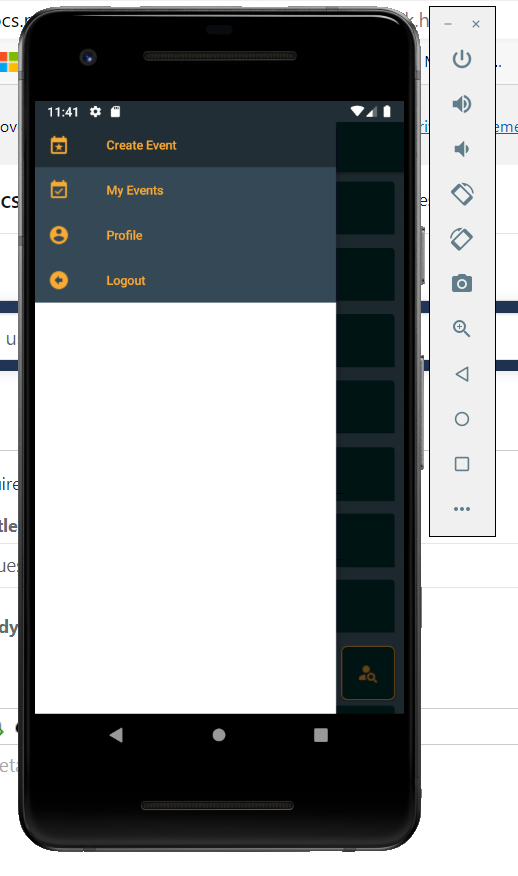
Hello, I am using Xamarin Shell navigation, and I change all possible resources to set my app colors, but the fly menu is still White and accept my color only if there is an item as you can see. How can I change this white color?
' cx='32' cy='32' r='32' /%3E%3Ctext x='50%25' y='55%25' dominant-baseline='middle' text-anchor='middle' fill='%23FFF' %3EJ%3C/text%3E%3C/svg%3E)
Hello,
Welcome to our Microsoft Q&A platform!
@Radoslav Atanasov Shell includes the FlyoutItemLayoutStyle class, which could be automatically applied to the FlyoutItem object.
Check the code:
   <Shell ...>
       <Shell.Resources>
           ...
           <ResourceDictionary>
               <Style Class="FlyoutItemLabelStyle" TargetType="Label">
                   <Setter Property="TextColor" Value="DarkCyan"></Setter>
               </Style>
           </ResourceDictionary>
       </Shell.Resources>


       <FlyoutItem Title="page_1">
           <ShellContent Title="page_1" ContentTemplate="{DataTemplate local:Page1}" />
       </FlyoutItem>
       <FlyoutItem Title="page_2">
           <ShellContent Title="page_2" ContentTemplate="{DataTemplate local:MainPage}" />
       </FlyoutItem>
   </Shell>
Best Regards,
Jarvan Zhang
If the response is helpful, please click "Accept Answer" and upvote it.
Note: Please follow the steps in our documentation to enable e-mail notifications if you want to receive the related email notification for this thread.