
Your code does the right thing for me.
Do you have some other code that you've not shown?
This browser is no longer supported.
Upgrade to Microsoft Edge to take advantage of the latest features, security updates, and technical support.
' cx='32' cy='32' r='32' /%3E%3Ctext x='50%25' y='55%25' dominant-baseline='middle' text-anchor='middle' fill='%23FFF' %3ETC%3C/text%3E%3C/svg%3E)
When I created listbox using the following code, I got an unexpected wrong listbox as the picture shown.
-----------------------------
case WM_CREATE:
        //
        hListBox = CreateWindowW(_T("LISTBOX"), NULL, WS_CHILD | WS_VISIBLE | WS_VSCROLL | WS_TABSTOP| LBS_STANDARD,
                     20, 20, 260, 280,
                     hWnd, (HMENU)10000,
                     (HINSTANCE)GetWindowLong(hWnd, GWL_HINSTANCE),
                     NULL);
	SendMessage(hListBox, LB_ADDSTRING, 0, (LPARAM)_T("China"));
        SendMessage(hListBox, LB_ADDSTRING, 0, (LPARAM)_T("America"));
	SendMessage(hListBox, LB_ADDSTRING, 0, (LPARAM)_T("England"));
        break;
-------------------------------------------
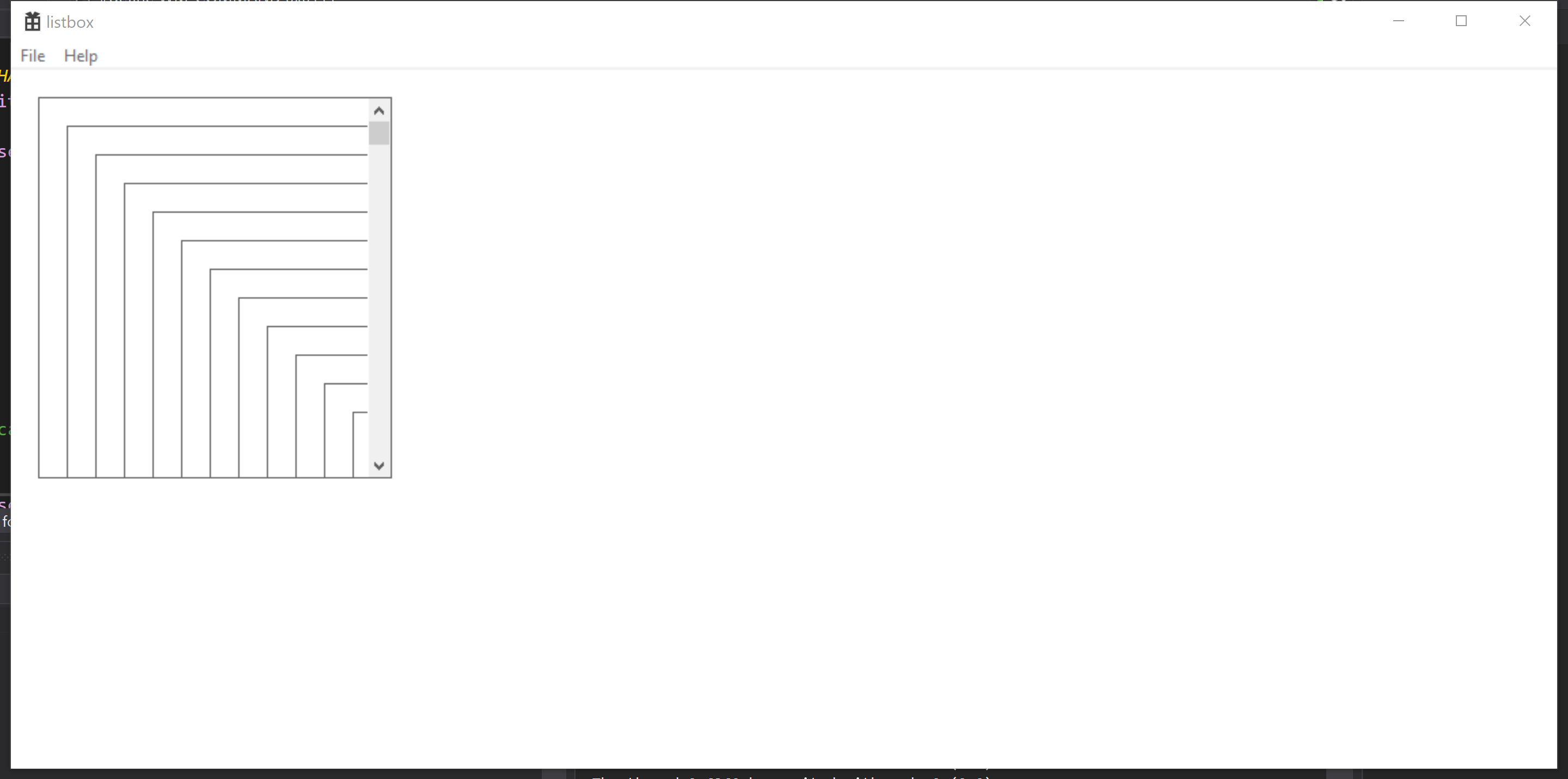

Hello @Tom Chen , your exact presented code piece works for me without reproducing this issue. So could you show a mini, complete and reproducible code sample?

Maybe it is caused by other, incorrect handlers. Do you process other messages inside this window procedure?
there is a piece in the following section and the definition are "TCHAR buf[200] = _T("");" HWND hListBox=NULL;
Microsoft Visual Studio Community 2019
Version 16.8.3
case WM_COMMAND
....
case 10000:
if (LBN_SELCHANGE == wmEvent)
{
WPARAM nCurIndex = (WPARAM)SendMessage((HWND)lParam, LB_GETCURSEL, 0, 0);
SendMessage((HWND)lParam, LB_GETTEXT, nCurIndex, (LPARAM)buf);
MessageBox(0, buf, 0, 0);
}
break;
....
' cx='32' cy='32' r='32' /%3E%3Ctext x='50%25' y='55%25' dominant-baseline='middle' text-anchor='middle' fill='%23FFF' %3EDL%3C/text%3E%3C/svg%3E)
That's not a problem either.
Try starting from a new project and just add the bits you've shown here to see if you can reproduce it.
I do not handle any other message, I just create a window desktop application, want to test the creating listbox function, I used this version, which version do you use?
Microsoft Visual Studio Community 2019
Version 16.8.3
I use Visual Studio 2019 too.
You can also make an archive and publish your problematic project to OneDrive or other repository, and give us the link to download it.
Or show the full code file here.

(HINSTANCE)GetWindowLong(hWnd, GWL_HINSTANCE),
This line of code used to create the Listbox would be a problem in a 64-bit build. Use GetWindowLongPtr instead.
Also, is there a reason to call CreateWindowW to specify UNICODE when the rest of the code appears to use the generics (e.g., TCHAR, _T() macro, etc.)?
Your code does the right thing for me.
Do you have some other code that you've not shown?