Share via

Sync issue in Mail app

Anonymous
2021-09-09T15:14:12+00:00

Windows Insider Dev build 22449.1000. The Mail app is failing to download any messages with the error code 0x80090001. I have tried deleting the email account and entering it again but still the same result. Wi-Fi connection is functioning normally and email via the web browser functions normally.

UPDATE

Now installed new Dev build 22454.1000. The app still does not sync but now no longer shows an error message.

I have tried adding the email account using advanced settings but still no luck.

The same email account works fine on my other computers running both windows 10 and windows 11

*********Original Title : Mail app not working*****

Windows Insider program | Apps on Insider preview

Locked Question. This question was migrated from the Microsoft Support Community. You can vote on whether it's helpful, but you can't add comments or replies or follow the question.

0 comments No comments

55 answers

Sort by: Most helpful
  1. Anonymous
    2021-09-10T20:24:26+00:00

    Just installed Dev 22454 over Win 10 19043 and just like before, the Mail app will not sync to my email account. Resetting or uninstall/install doesn't fix it. So it has to be an issue with these Dev builds breaking the Mail app.

    Again had to roll back with Win 10 19043 and it works fine.

    Installing the .184 Beta to see if Mail will work with it.

    My desktop was in the Dev (unsupported hardware) until removed from Insider when the divergence from Beta happened. That desktop is still on build .184 (CU's until GA) and the Mail app works fine with that.

    Reported to Feedback Hub:

    https://aka.ms/AAdsb6t

    Was this answer helpful?

    1 person found this answer helpful.
    0 comments No comments
  2. Anonymous
    2021-09-10T17:54:31+00:00

    Just installed Dev 22454 over Win 10 19043 and just like before, the Mail app will not sync to my email account. Resetting or uninstall/install doesn't fix it. So it has to be an issue with these Dev builds breaking the Mail app.

    Again had to roll back with Win 10 19043 and it works fine.

    Installing the .184 Beta to see if Mail will work with it.

    Was this answer helpful?

    1 person found this answer helpful.
    0 comments No comments
  3. Anonymous
    2021-09-10T14:32:06+00:00

    I had the same exact issue when I upgraded from Win 10 19043 to the Dev Build last week. I ended up rolling back to Win 10, uninstalled the Mail program, installed it again from the Microsoft Store, setup account and it worked fine. Then went to the Win 11 Beta build and Mail app still works.

    Was this answer helpful?

    1 person found this answer helpful.
    0 comments No comments
  4. Anonymous
    2021-09-10T14:02:59+00:00

    Hi,

    Thank you for writing to Microsoft Community Forums.


    I understand that you are facing issue regarding Mail app


    I would suggest you to follow the steps mentioned below and check if the issue persists:


    Please follow the steps given in the link below:

    Resolve sync issues in Mail and Calendar apps in Windows 10 (microsoft.com) 


    Reset mail app

    1. Select Start > Settings > Apps > Apps & features.
    2. Select Mail app from the list
    3. Select the Advanced options link under the name of the app. On the page that opens, select Repair if it's available. If it isn't available or doesn't fix the problem, select Reset.

    Let us know how it goes.


    Vineet Kumar

    Microsoft Community – Moderator

    I had already tried resetting the Mail app. Tried again without success.

    I also tried uninstalling Mail and Calendar and re downloading it from the Store. Still the same problem.

    I also tried turning off the Firewall but made no difference.

    Mail and Calendar are turned on in Privacy/App permissions.

    I notice that when I click Search and then click the three dots in the top right hand corner I get the Connected accounts/ Please verify your account box opens. When I click Verify account a box briefly opens with Just a moment and then closes.
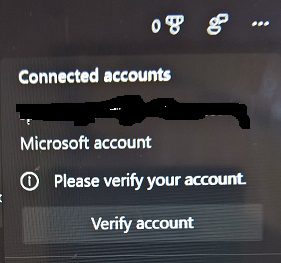
    Looking at Your info in Settings/Accounts shows everything to be normal. I thought this problem was solved previously! I don't know whether it has any baring on the Mail app issue above.

    Was this answer helpful?

    1 person found this answer helpful.
    0 comments No comments
  5. Anonymous
    2021-09-10T08:03:14+00:00

    Hi,

    Thank you for writing to Microsoft Community Forums.

    I understand that you are facing issue regarding Mail app

    I would suggest you to follow the steps mentioned below and check if the issue persists:

    Please follow the steps given in the link below:

    Resolve sync issues in Mail and Calendar apps in Windows 10 (microsoft.com) 

    Reset mail app

    1. Select Start > Settings > Apps > Apps & features.
    2. Select Mail app from the list
    3. Select the Advanced options link under the name of the app. On the page that opens, select Repair if it's available. If it isn't available or doesn't fix the problem, select Reset.

    Let us know how it goes.

    Vineet Kumar

    Microsoft Community – Moderator

    Was this answer helpful?

    1 person found this answer helpful.
    0 comments No comments