Share via

Consistent GSOD while updating

Anonymous
2023-03-06T01:54:05+00:00

Build 25300, Insiders dev channel.

I haven't been keeping up with updates recently, but yesterday I decided that I should probably update to the latest build. However, I consistently haven't been able to update through Windows Updater.
I keep getting a Green Screen of Death while updating, this time it was at 97% before crashing. Error SYSTEM_SERVICE_EXCEPTION, FLTMGR.sys, is what the screen tells me.

I've done sfc /scannow, chkdsk, and the DISM CheckHealth/ScanHealth commands (which don't find any problems)

Since I haven't been keeping up with updates recently, I was on a pretty old insiders dev build, but while trying to install the latest yesterday, I downloaded an ISO of 25300 and... it worked! but 25309 still consistently fails (through Windows Update) and there's no ISO for it.

According to Windows Update, all of my drivers are up to date, and none of them in Device Manager have a yellow warning sign.

I really don't want to reinstall Windows, but that's starting to seem like the only option. Hopefully a solution can be found before that, as I don't want to go through setting everything up again (especially my dev environment)

Here's logs, setupmem.dmp and a System Information export: https://1drv.ms/u/s!Atgr4Erlbr68meoQ9-p3k80F-X9jJQ?e=MBDpqx

The Minidumps folder was empty, by the way. Also, MEMORY.DMP was last updated January 29th...

If any more information is needed, please let me know. This issue is bothering me a lot, and I'm worried that I won't be able to update using Windows Update without reinstalling Windows, and using ISOs to update is really inconvenient.

System info:

Acer Model Nitro AN515-54, x64-based

Processor: Intel(R) Core(TM) i5-9300H CPU @ 2.40GHz, 2400 Mhz, 4 Core(s), 8 Logical Processor(s)

BIOS Version/Date: Insyde Corp. V1.33, 2020-11-17

Windows Insider program | Windows Insider preview | Repair and recovery

Locked Question. This question was migrated from the Microsoft Support Community. You can vote on whether it's helpful, but you can't add comments or replies or follow the question.

0 comments No comments

Answer accepted by question author

BryceSor 5,305 Reputation points Volunteer Moderator
2023-03-06T02:09:46+00:00

Hi AllyTally,

that error normally points to drivers, check the event viewer for the full error code.

I would check I have the latest bios installed.

Use Intel driver program to get the latest Intel except video.

Get the latest Nvidia drivers.

FYI the device manager will only search your computer for drivers and Windows Update won't find the latest drivers but will find the ones that MS approve.

I will check your D/L file later as I am at work.

Was this answer helpful?

2 people found this answer helpful.
0 comments No comments

Answer accepted by question author

CrazyKats 15,780 Reputation points Volunteer Moderator
2023-03-06T02:29:35+00:00

Do you have any external drive plugged in?

If you do disconnect it and try again.

Was this answer helpful?

1 person found this answer helpful.
0 comments No comments

3 additional answers

Sort by: Most helpful
  1. Anonymous
    2023-03-06T05:44:28+00:00

    UPDATE: Seems like either updating my drivers, or trying again with my HDD unplugged (though I did try that earlier today) worked, as I've now successfully installed 25309. Thank you everyone for your help.

    Was this answer helpful?

    0 comments No comments
  2. Anonymous
    2023-03-06T03:22:18+00:00

    I have updated my Intel and NVIDIA drivers, and my BIOS is up to date.

    Was this answer helpful?

    0 comments No comments
  3. Anonymous
    2023-03-06T02:22:42+00:00

    Hi AllyTally,

    that error normally points to drivers, check the event viewer for the full error code.

    All I'm finding is the following:

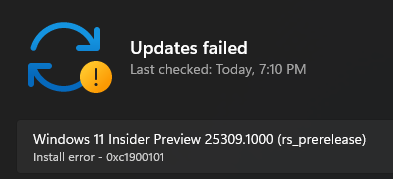
    Installation Failure: Windows failed to install the following update with error 0xC1900101: Windows 11 Insider Preview 25309.1000 (rs_prerelease).

    0xC1900101 is the error code that Windows Update already gave me (I forgot to mention it in text, but it's in the screenshot)

    Am I missing something in the Event Viewer? It's really dense so I might be.

    Was this answer helpful?

    0 comments No comments