Microsoft Security | Microsoft Entra | Microsoft Entra ID
A cloud-based identity and access management service for securing user authentication and resource access

This browser is no longer supported.
Upgrade to Microsoft Edge to take advantage of the latest features, security updates, and technical support.
' cx='32' cy='32' r='32' /%3E%3Ctext x='50%25' y='55%25' dominant-baseline='middle' text-anchor='middle' fill='%23FFF' %3EJK%3C/text%3E%3C/svg%3E)
Hi together,
We're using Azure AD Connect and I want to enforce new password policies from our local AD.
So I have set up granular policies and assigned them to a few users.
I already activated PasswordHashSync, PasswordWriteBack and ForcePasswordChangeOnLogOn trough Powershell and Azure AD Connect.
I checked "User must change password at next logon" at AD and was waiting for confirmation from our testing group.
Meanwhile I was thinking about the question when will Azure AD prompt the user for password change, if he is still logged in? Which timeout are applied to the users session, if he don't sign out from his actual session? Can I modify this value?
Further I have read through some articles regarding the password sync and all of them displayed a value at the following part:
Get-AzureADUser -ObjectID username@keyman .com | Select PasswordPolicies, PasswordProfile | fl
PasswordPolicies : DisablePasswordExpiration
PasswordProfile : class PasswordProfile {
Password:
ForceChangePasswordNextLogin: True
EnforceChangePasswordPolicy: False
}
If I check my users the PasswordProfile is empty but the user is forced to enter a new password. So should I worry about this?

And the last point is, that even PasswordWriteBack is activated at the AzureAD Connect tool, I get a "False" if I check all Features by powershell. 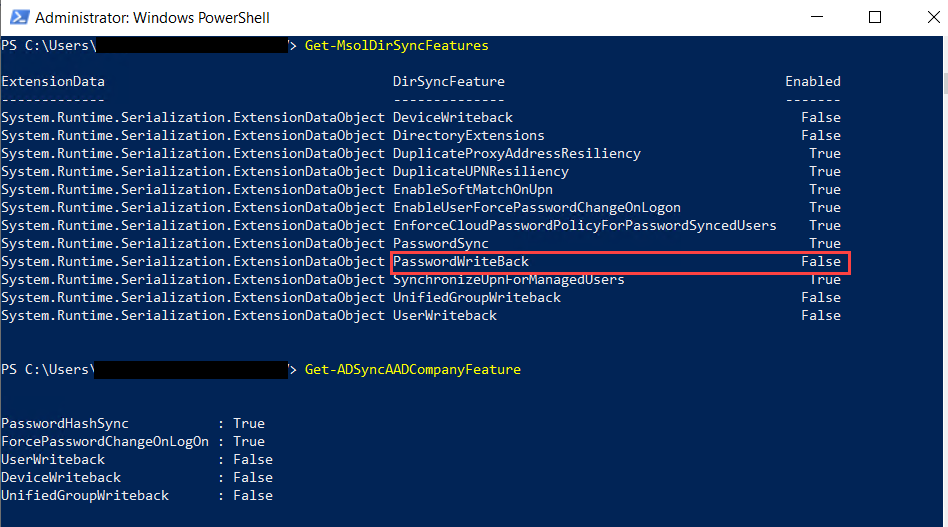
Happy for any ideas.
Regards,
Jonny
' cx='32' cy='32' r='32' /%3E%3Ctext x='50%25' y='55%25' dominant-baseline='middle' text-anchor='middle' fill='%23FFF' %3EMM%3C/text%3E%3C/svg%3E)
Hello @Jonny Klaas
Thank you very much for reaching out to us I will go with your second concern first can you please verify if the password writeback connectivity in the Azure portal is showing up and running if Yes then please try to toggle the password writeback service on and off and re run the PowerShell to see if its reflecting or not also if you see connectivity failure in the below screen shot then follow this article for troubleshooting issues related to password writeback.
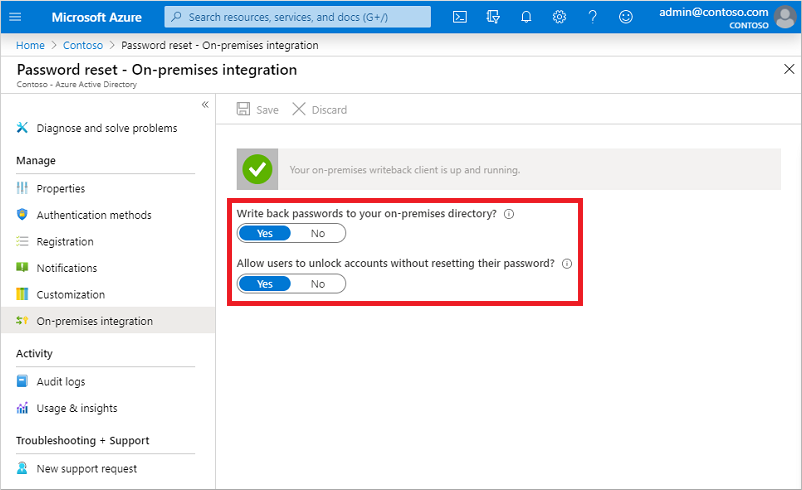
And coming to you first concern user won't get the notification to change the password if they are logged in in order to revoke the session you can use the below Graph API query to revoke the session for a user.
Revoke-AzureADUserAllRefreshToken
-ObjectId <String>
[<CommonParameters>]
Also Get-AzureADUser -ObjectID username@keyman .com | Select PasswordPolicies, PasswordProfile | fl will display the password policy of the Azure AD not the local AD that is the reason it is showing none for you.
In case you have any questions on the same, you can surely let us know and we will be happy to help you further. If this post provides you the answer you were looking for, do accept it as an answer in the interest of community members with similar queries. If this does not answer, please ask further in the comments and we will happy to address your concerns.
Thank you.
Hey mirba,
Thank you so much for your detailed reply and instructions. I really appreciate it! :)
I already toogled the PasswordWriteback feature at AzureAD and updated my AzureConnect Client.
But the Status remains at False. AD Permissions for password reset at AD are fine.
Password are synced from AAD back to AD. So I guess I shouldn't worry that much?
Have a nice weekend!
Jonny