Developer technologies | Universal Windows Platform (UWP)
A Microsoft platform for building and publishing apps for Windows devices.
This browser is no longer supported.
Upgrade to Microsoft Edge to take advantage of the latest features, security updates, and technical support.
' cx='32' cy='32' r='32' /%3E%3Ctext x='50%25' y='55%25' dominant-baseline='middle' text-anchor='middle' fill='%23FFF' %3EA%3C/text%3E%3C/svg%3E)
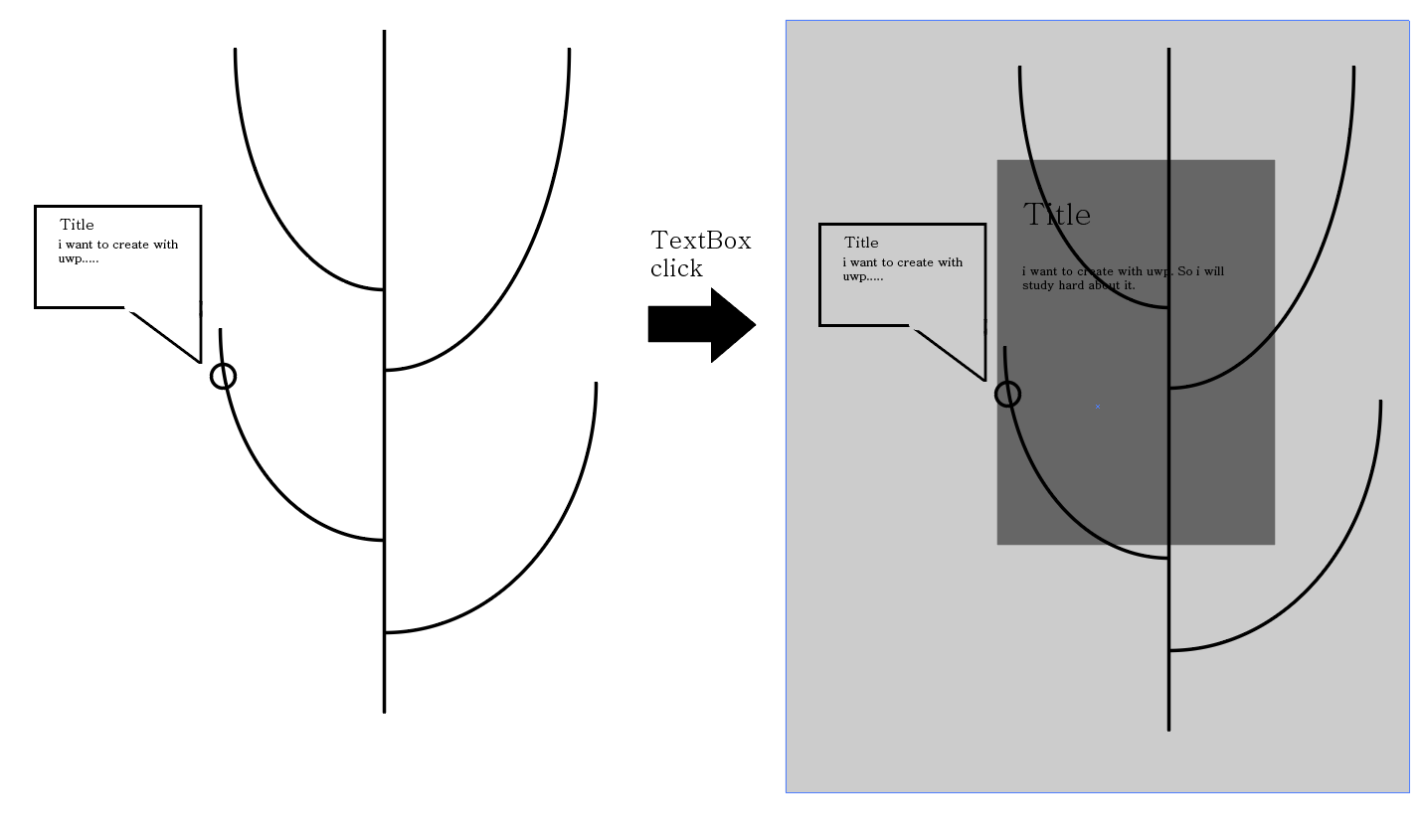
When I searched Google for custom controls, I could only find a way to extend the existing controls.
However, I want to know how to make a control from scratch like the attached picture.
Specifically, I want to make the shape of the tree over there so that I can move the circle like Progress bar and register the writing.
Can i create a new control by adding detailed functions like this?
' cx='32' cy='32' r='32' /%3E%3Ctext x='50%25' y='55%25' dominant-baseline='middle' text-anchor='middle' fill='%23FFF' %3EAM%3C/text%3E%3C/svg%3E)
Hi,
Welcome to Microsoft Q&A!
A custom control is based on an existing control combination. You design new styles and write logic codes for it.
A custom (templated) control allows an app to use the Template property to replace the control’s internal element tree. If you don’t need your control to have that re-templating feature, it is easier to use UserControl.
I suggest using UserControl to achieve it, there is a simple sample to use UserControl.
MyUserControl1.xaml:
<UserControl
  ….>
   <UserControl.Resources>
        <Style TargetType="TextBox" x:Key="Textboxstyle">
            <Setter Property="FontStyle" Value="Italic"/>
            <Setter Property="Width" Value="100"/>
            <Setter Property="Height" Value="40"/>
            <Setter Property="VerticalAlignment" Value="Center"/>
            <Setter Property="HorizontalAlignment" Value="Center"/>
        </Style>
    </UserControl.Resources>
    <Grid>
        <!--place your control-->
        <TextBox Style="{StaticResource Textboxstyle}" Text="Hi"/>
    </Grid>
</UserControl>
MainPage.xaml:
<Page  …>
    <Grid><local:MyUserControl1/></Grid>
</Page>
More info can be found here.
If the response is helpful, please click "Accept Answer" and upvote it.
Note: Please follow the steps in our documentation to enable e-mail notifications if you want to receive the related email notification for this thread.
First of all, thank you for your answer.
I'm glad to know how to use user control this time.
And, I read the related documents you provided.
It was a good content, but it wasn't the way I wanted it.
By changing the question, I am thinking of using the webview class with uwp to bring up the free web from the design part.
I would like to know if there is any other way for the front end like above.
@민석 전 I don’t understand “using the webview class with uwp to bring up the free web from the design part” very well. What is your expected behavior? Could you please explain it in detail?