Community Center | Not monitored
Tag not monitored by Microsoft.

This browser is no longer supported.
Upgrade to Microsoft Edge to take advantage of the latest features, security updates, and technical support.
' cx='32' cy='32' r='32' /%3E%3Ctext x='50%25' y='55%25' dominant-baseline='middle' text-anchor='middle' fill='%23FFF' %3EPO%3C/text%3E%3C/svg%3E)
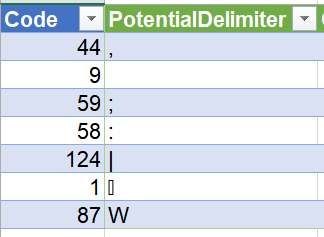
All the documentation says about InferContentType is "If the inferred content type is text/csv, and the format is delimited, additionally returns field Csv.PotentialDelimiter containing a table for analysis of potential delimiters." It gives no explanation of all the codes in the table, and the last two are strange.
Csv.PotentialDelimiters returns a table with the following (pictured) Potential Delimiter characters. I have added a column Code to the left to show the ASC code of each. The first five, up to the pipe character, are all well understood. But why are chr(1) and chr(87) there? What files have fields separated or delimited by chr(1) or "W"?
Is there a bug in the characters displayed, perhaps only the little end of Unicode characters is being returned? For example, in Japanese the comma is U+3001, so there's the 01.
Tag not monitored by Microsoft.
Answer accepted by question author
' cx='32' cy='32' r='32' /%3E%3Ctext x='50%25' y='55%25' dominant-baseline='middle' text-anchor='middle' fill='%23FFF' %3EEM%3C/text%3E%3C/svg%3E)
This function is used internally by PQ. "W" represents "split by whitespace", which corresponds to passing an empty text value "" to Csv.Document. I have no idea why 0x0001 is part of the default delimiter list, but there must be some historical reason for it.
Thank you very much Ehren.
I tested and found that SOH / CHAR(1) is indeed recognised as a separator.
Google tells me it is used in Hadoop for a field separator .
For Whitespace , I tried space and that is recognised as W, but nonbreaking space (160) is not.
So in code I can replace "W" by " "
I appreciate the reply,
Patrick