HyperV // A lot of Checkpoints/Snapshots - Unable to merge

Dean McDowell 1 Reputation point
2021-01-21T10:17:55.497+00:00

Hi guys,

Hoping someone can shed some light or point me in the right direction.

I have HyperV running on Windows Server 2016 Standard with 7 VMs running (3 windows & 4 Linux). All VMs are running perfectly.

We use Acronis Cloud to run daily backups which is working on 6 VMs and failing on 1. So what we are going to do is export the VM and move it for testing, this is where we noticed a problem.

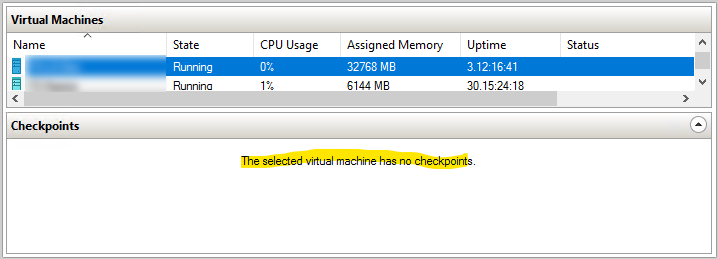
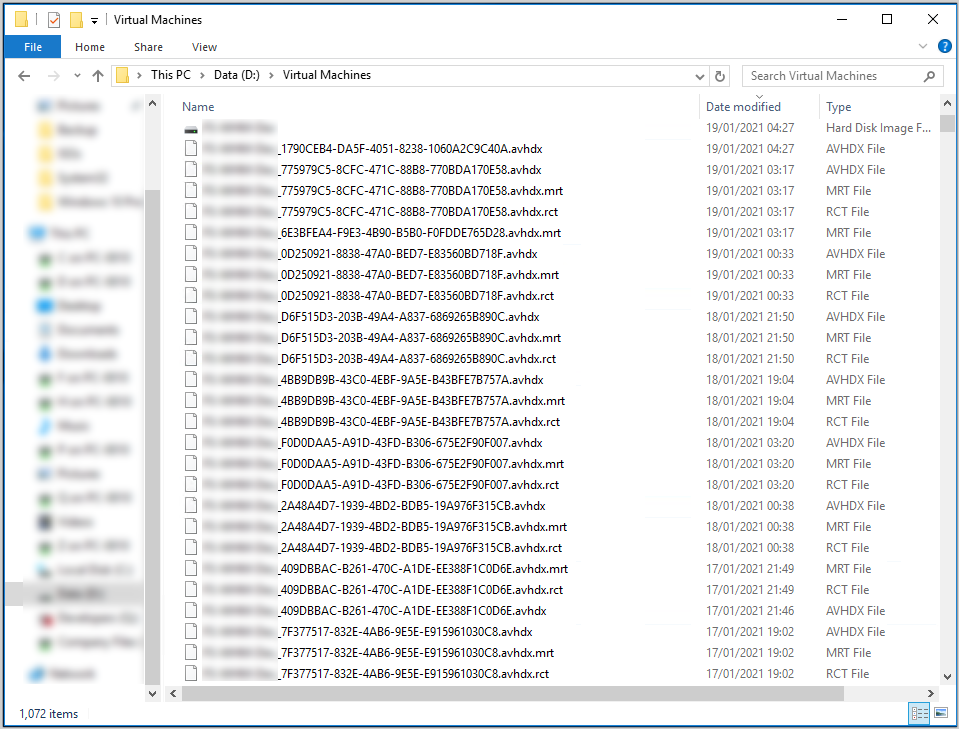
When attempting to export the VM in question it fails stating that it failed to merge. What I found odd was that there are no snapshots listed within HyperV Manager. When browsing the VM and snapshot location I can then see hundreds of snapshots have been taken. I would like to get these VMs merged to allow me to export the VM for testing.

HyperV Manager
59097-hyperv-snapshots.png

File Explorer
59142-hyperv-snapshots-2.png

Has anyone ever experienced this or know the best process for merging these files manually?

I have spoken to Acronis support and they are stating that this would not be something caused by the Acronis backup process.

Any thoughts would be greatly appreciated.

Thanks in advance.

Dean.

Windows for business | Windows Client for IT Pros | Storage high availability | Virtualization and Hyper-V
{count} votes

4 answers

Sort by: Most helpful
  1. Xiaowei He 9,936 Reputation points
    2021-01-22T07:17:30.86+00:00

    Hi,

    If you didn't create the checkpoints manually, I assume the avhdx files are recovery checkpionts created via backup tools, while not merged automatically after backup.

    Please check the following article about recovery checkpiont and how to merge it manually:

    https://learn.microsoft.com/en-us/troubleshoot/windows-server/virtualization/cannot-delete-recovery-checkpoint-vm

    https://social.technet.microsoft.com/wiki/contents/articles/6257.manually-merge-avhd-to-vhd-in-hyper-v.aspx

    Thanks for your time!
    Best Regards,
    Anne

    -----------------------------

    If the Answer is helpful, please click "Accept Answer" and upvote it.

    Note: Please follow the steps in our documentation to enable e-mail notifications if you want to receive the related email notification for this thread.


  2. Mikkel Lund Knudsen 116 Reputation points
    2021-09-23T07:45:31.96+00:00

    Hello,

    I've found this script very usefull : https://github.com/TheGabeMan/Hyper-V-MergeAVHDX

    Shout out to TheGabeMan - saved me a ton of time, proper scripting dude ;-)


  3. Ilias Mpourantas 0 Reputation points
    2024-01-02T14:03:16.2266667+00:00

    Hello everybody.

    I am facing the same problem on my infrastructure. I have a cluster consisting of 5 nodes and some virtual machines. In a certain vm it has shown me the above image with many avhdx files without showing me in the hyper-v manager that there is a checkpoint

    0 comments No comments

  4. Sanjay Vishwakarma 0 Reputation points
    2025-12-03T04:13:59.4+00:00

    We are also seeing a similar issue across Windows 2016 and Windows 2019 during the backup. This is very intermiittent however. No antivirus are runing.

    Any pointer to figure out the RCA will be a great help.

    0 comments No comments

Your answer

Answers can be marked as 'Accepted' by the question author and 'Recommended' by moderators, which helps users know the answer solved the author's problem.