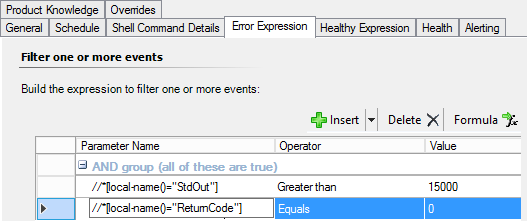
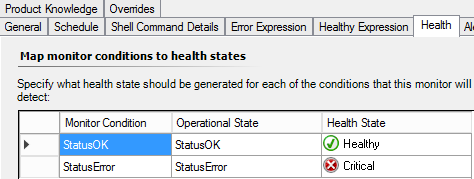
Chances are you are facing a very common issue when creating workflows in the console : the fields are typed as "Strings", not "Integers". Therefore greater/lower comparision are not working as expected.
Read here : https://argonsys.com/microsoft-cloud/library/using-integers-and-other-non-string-data-types-in-rules-and-monitors/
Unix Linux Two state monitoring
Hi All,
I have created two monitor for scripts through Unix/Linux two state monitor. The output value set for the alert is 15000 and for the second is 11. If it goes above this it will generate an alert, but for the threshold defined 15000 it is throwing alert even if the output is 50 and similar is going with the second monitor. It is generating alert for the value less than 11 also. Below is the screen shot

]3

Please help me on this.
Regards,
Ravi Bhushan
System Center Operations Manager
3 answers
Sort by: Most helpful
-
CyrAz 5,181 Reputation points
2021-01-22T15:20:58.11+00:00 -
CyrAz 5,181 Reputation points
2021-01-25T19:51:42.583+00:00 I had a quick look at the XML and it seems to be OK, however I also just noticed in the screenshot in your first post that StdOut contains at least two lines : a number and then a "last login" date.
So that's not an integer, and if you have a look at the Operations Manager event log in your SCOM Management Servers you'll probably find errors about the workflow failing to convert data to integer type or something like that.From there you have two options :
- Modify the .sh scripts so they will output an integer ONLY.
- Modify the SCOM workflow to include a powershell parsing of stdout. In that case I would recommend using the Unix authoring library :
https://social.technet.microsoft.com/wiki/contents/articles/18084.scom-2012-unixlinux-monitoring-with-scripts.aspx#Handling_complex_shell_command_script_output_with_PowerShell_scripts
-
CyrAz 5,181 Reputation points
2021-01-26T16:00:30.217+00:00 Also please try running it using the scom agent account, not yours; and even better try running it as a network job using ssh as this will reflect more closely the agent actual behavior :
ssh scomuser@localhost '/bin/sh -c "/opt/MastekAutomation/KongErrorCount.sh"'