Microsoft Security | Microsoft Entra | Other
Additional Microsoft Entra services and features related to identity, access, and network security

This browser is no longer supported.
Upgrade to Microsoft Edge to take advantage of the latest features, security updates, and technical support.

I have posted the same on an Intune forum and they recommended me to post it over here to know if the Sharepoint for iOS app has any dependencies or limitations.
please check out the above post where I have clearly explained what policy I created and what app is causing the problem at sign-in after the first-factor authentication is successful. anyways, I am also mentioning it here as well.
The below policy has impact on Sharepoint for iOS only and the rest of the apps were working perfectly fine.
Block Policy:

Allow Policy:
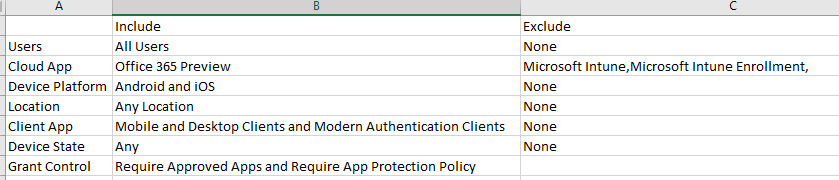
Later, I thought of tweaking the above policy to the following way and it worked like charm but not sure why? I set up the device platform to "Any" instead of selecting a platform and selected the platform in the exclude
Here is the tweaked policy
Block All Cloud Apps:

Allow Office 365 Preview
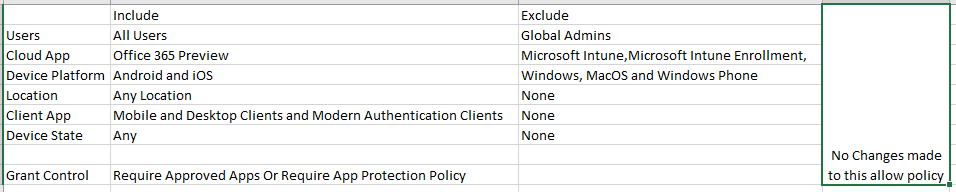
So, what I would like to know is, why the device platform "Include/Exclude" behaves this way? is it by design? other policies also should I use the same way?

The behavior you're experiencing might be influenced by the specific conditions and configurations you've set in your policy. While I don't have direct access to your Intune environment or the policy in question