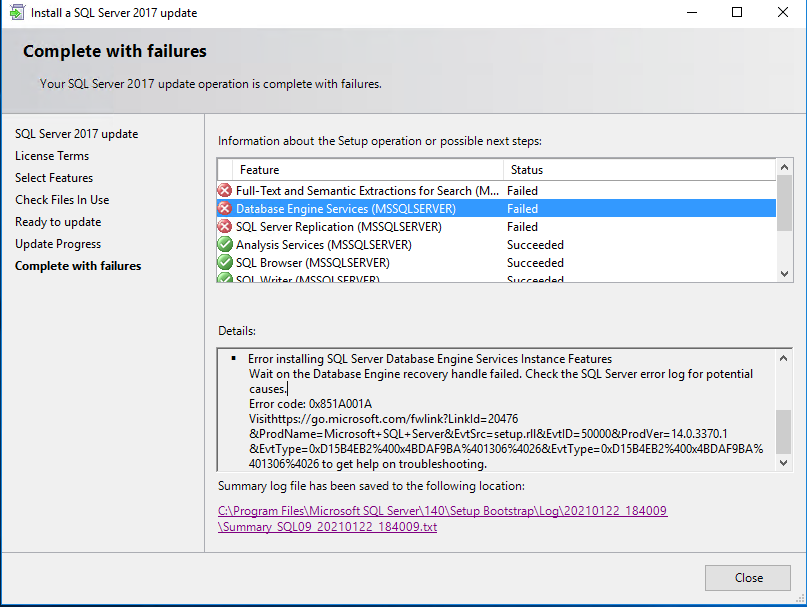
"Wait on the Database Engine recovery handle failed" when updating SQL Server 2017 to KB4583457 (CU22)

Matt Smith 1 Reputation point
2021-01-22T21:13:58.233+00:00

Hi,

We're having a problem installing the above update, both through Windows Update and running the standalone installer. Both methods corrupt our SQL installations, requiring us to re-install SQL Server. Upon re-installing SQL Server 2017, we can then update this install with the same update without issue. We have encountered this on 3 servers so far.

The update hangs at ~40% at the following step, and fails. The following reason is displayed in the Details:

Error installing SQL Server Database Engine Services Instance Features
Wait on the Database Engine recovery handle failed. Check the SQL Server error log for potential causes.
Error code: 0x851A001A

Can anybody shine a light on why this is happening. As far as i'm aware, there is nothing special about our installs other than them being installed to a seperate bitlockered volume (unlocked during the whole setup). This has never posed an issue before.

59660-sql-update-issue2.png
59617-sql-update-issue.png

59676-summary-sql09-20210122-184009.txt

SQL Server | Other
0 comments No comments
{count} votes

5 answers

Sort by: Most helpful
  1. Erland Sommarskog 129.6K Reputation points MVP Volunteer Moderator
    2021-01-22T22:26:05.083+00:00

    This error message means that SQL Server did not respond when Setup tried to run upgrade scripts. You need to look in the SQL Server errorlog to find out why. Typically, SQL Server started, but then stopped due to some fatal error.

    With a default install of SQL Server, you find the error log in C:\Program Files\Microsoft SQL Server\MSSQL14.MSSQLSERVER\MSSQL\LOG\Errorlog.

    1 person found this answer helpful.
    0 comments No comments

  2. Erland Sommarskog 129.6K Reputation points MVP Volunteer Moderator
    2021-01-23T13:37:28.777+00:00

    This script, msdb110_upgrade.sql is a known troublemaker. I have seen more than one case where this script can cause the upgrade to fail.

    As I understand it, you have been able to recover the situation by uninstalling and reinstalling, and you don't have this situation on a server right now. I know it is possible to work around this situation by fiddling with startup trace flags, but I have only seen it, and never tried it myself, so I abstain from giving advice that could give matters worse.

    I do have an idea what have caused this. If you are to run this CU on more instances, run sp_configure 'user options'. Preferably both config_value and run_value should be 0. If it is non-zero, take the value(s) and run SELECT value & 2, this comes back as 2 - this is bad news. You need to run sp_configure to change the value so that the next-to-least significant bit is not set. When this bit is set, all processes connect to the instance will have IMPLICIT_TRANSACTIONS enabled by default.

    The purpose code that is quoted as the troublemaker in the errorlog is to check whether implicit transactions is on and in such case save that in an extended property before turning off implicit transactions. The problem, though, is that the SELECT statement to retrieve the value of the extended property will start an implicit transaction. And the transaction is then still active it runs sp_dbcmptlevel - which does not agree to being executed in a transaction.

    I need to add the disclaimer that I am not 100% sure that the output in the errorlog is accurate - it could be another batch in the script that fails for a different reason. I know at least two more reasons why this script can fail, although the pattern in this case does not really match any of those.

    1 person found this answer helpful.
    0 comments No comments

  3. Matt Smith 1 Reputation point
    2021-01-23T11:22:00.32+00:00

    I have found the ERRORLOG from when the services failed to start. It looks like it's erroring at the stage where it upgrades the masterdb. See below the final portion of the upgrade script. The server in question is now working, however we have some other servers where the same update is pending on an automatic update.

    2021-01-22 20:08:12.14 spid8s      Database 'master' is upgrading script 'upgrade_ucp_cmdw_discovery.sql' from level 234884216 to level 234884394.
    2021-01-22 20:08:12.38 spid8s      Database 'master' is upgrading script 'msdb110_upgrade.sql' from level 234884216 to level 234884394.
    2021-01-22 20:08:12.38 spid8s      ----------------------------------
    2021-01-22 20:08:12.38 spid8s      Starting execution of PRE_MSDB.SQL
    2021-01-22 20:08:12.38 spid8s      ----------------------------------
    2021-01-22 20:08:12.95 spid8s      Error: 3930, Severity: 16, State: 1.
    2021-01-22 20:08:12.95 spid8s      The current transaction cannot be committed and cannot support operations that write to the log file. Roll back the transaction.
    2021-01-22 20:08:12.95 spid8s      The failed batch of t-sql statements :
    
    
    -- If the user sets implicit_transactions on, some specprocs and DBCC commands will fail
    -- Need to save the state and disable implicit_transactions
    DECLARE @implicit_transactions_flag INT
    DECLARE @is_implicit_transactions_set BIT
    
    SELECT @is_implicit_transactions_set = CONVERT(BIT, value)
    FROM fn_listextendedproperty(N'IMPLICIT_TRANSACTIONS', default, default, default, default, default, default);
    
    IF (@is_implicit_transactions_set IS NOT NULL)
    BEGIN
        EXEC sp_dropextendedproperty N'IMPLICIT_TRANSACTIONS'
    END
    
    SET @implicit_transactions_flag = 2
    SET @is_implicit_transactions_set = @@options & @implicit_transactions_flag
    
    EXEC sp_addextendedproperty 
    @name = N'IMPLICIT_TRANSACTIONS', @value = @is_implicit_transactions_set
    
    SET IMPLICIT_TRANSACTIONS OFF
    
    --set compatibily level to 100
    EXEC sp_dbcmptlevel @dbname = 'msdb',  @new_cmptlevel = '100'
    
    
    2021-01-22 20:08:12.95 spid8s      Error: 912, Severity: 21, State: 2.
    2021-01-22 20:08:12.95 spid8s      Script level upgrade for database 'master' failed because upgrade step 'msdb110_upgrade.sql' encountered error 3930, state 1, severity 16. This is a serious error condition which might interfere with regular operation and the database will be taken offline. If the error happened during upgrade of the 'master' database, it will prevent the entire SQL Server instance from starting. Examine the previous errorlog entries for errors, take the appropriate corrective actions and re-start the database so that the script upgrade steps run to completion.
    2021-01-22 20:08:12.95 spid8s      Error: 3417, Severity: 21, State: 3.
    2021-01-22 20:08:12.95 spid8s      Cannot recover the master database. SQL Server is unable to run. Restore master from a full backup, repair it, or rebuild it. For more information about how to rebuild the master database, see SQL Server Books Online.
    2021-01-22 20:08:12.95 spid8s      SQL Server shutdown has been initiated
    2021-01-22 20:08:12.95 spid8s      SQL Trace was stopped due to server shutdown. Trace ID = '1'. This is an informational message only; no user action is required.
    2021-01-22 20:08:12.98 spid15s     The SQL Server Network Interface library successfully deregistered the Service Principal Name (SPN) [ MSSQLSvc/SQL09.TOCKWITH2.LOCAL ] for the SQL Server service.
    2021-01-22 20:08:12.98 spid15s     The SQL Server Network Interface library successfully deregistered the Service Principal Name (SPN) [ MSSQLSvc/SQL09.TOCKWITH2.LOCAL:1433 ] for the SQL Server service.
    
    0 comments No comments

  4. Matt Smith 1 Reputation point
    2021-01-23T16:02:09.683+00:00

    Both config_value and run_value on the servers that have been re-installed are 0, however I don't know what they were before. We have two servers left to update and these both have 0's for both values.

    Thank you for taking time to look into this.

    0 comments No comments

  5. Erland Sommarskog 129.6K Reputation points MVP Volunteer Moderator
    2021-01-24T10:28:13.38+00:00

    So maybe these upgrades will run smoothly, then.

    I can't say that I know for sure that this is the issue. In fact when I tested this passage on its own with implicit transactions on, I got a different error message from what is in the errorlog above.

    On the other hand, if the script would get past this batch, there is PRINT statement of which there is no trace in the error log.

    What is a little worrying is that if you indeed had this option set on these three instance, and no longer have, this can affect the applications running on that server. Just as turning on this flag is likely to cause chaos for applications that are not prepared for it.

    0 comments No comments

Your answer

Answers can be marked as 'Accepted' by the question author and 'Recommended' by moderators, which helps users know the answer solved the author's problem.