SQL Server Reporting Services
A SQL Server technology that supports the creation, management, and delivery of both traditional, paper-oriented reports and interactive, web-based reports.
This browser is no longer supported.
Upgrade to Microsoft Edge to take advantage of the latest features, security updates, and technical support.
' cx='32' cy='32' r='32' /%3E%3Ctext x='50%25' y='55%25' dominant-baseline='middle' text-anchor='middle' fill='%23FFF' %3EH%3C/text%3E%3C/svg%3E)
I am using SSRS 2019. I have a report and a parameter has been created. But when I preview, I must select an item from each parameter to make it run. Can I preview the report without selecting any parameter values? Or can I choose to leave one of the parameters blank?
Any help is greatly appreciated.

That depends on how you defined the parameter.
See Report Parameters (Report Builder and Report Designer)
=> Allow null value
=> Default values

Hi @HarperCheney ,
I'm not sure whether you want to display a null value or a blank value, you can check the required options in the parameter properties.
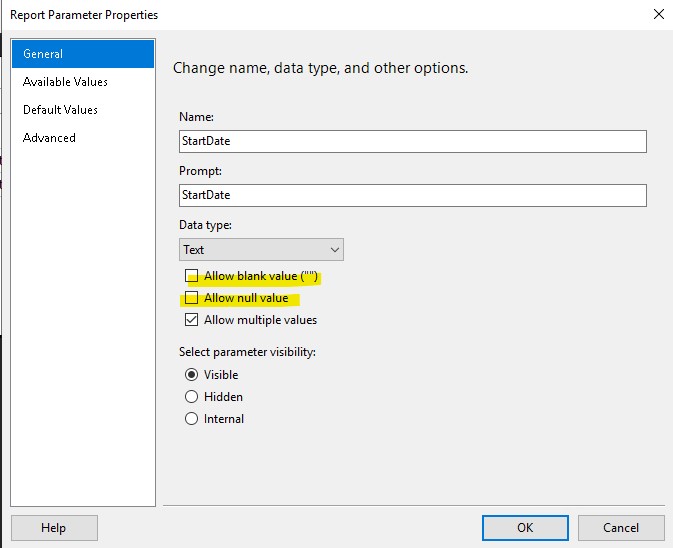
According to your description, you want to preview the report after previewing it without selecting parameters. I think it is sufficient to set the default value in the properties. The value can be specified or obtained by query. As follows:

Best Regards,
Joy
If the answer is helpful, please click "Accept Answer" and upvote it.
Note: Please follow the steps in our documentation to enable e-mail notifications if you want to receive the related email notification for this thread.