Developer technologies | Transact-SQL
A Microsoft extension to the ANSI SQL language that includes procedural programming, local variables, and various support functions.
This browser is no longer supported.
Upgrade to Microsoft Edge to take advantage of the latest features, security updates, and technical support.
' cx='32' cy='32' r='32' /%3E%3Ctext x='50%25' y='55%25' dominant-baseline='middle' text-anchor='middle' fill='%23FFF' %3EMB%3C/text%3E%3C/svg%3E)
Hi,
we're tryng to read data from sql server table for insert into csv using sqlcmd in Linux OS. Unfortunately when we try to read the float values from table like
-0.373783
then in files we get
-.373783
but we would like to get on file -0.373783 as on the database table. We don't understand why sqlcmd remove leading zeros, I mean to the left of the decimal point, the same select query on SSMS return the right number rapresentation. We tried to use the following statement
SELECT cast(floatField AS Numeric(9,6))
but we keep getting the number without the zeros before the decimal point.. we are going crazy!
Thanks in advance for your suggestion

SSMS return the right number rapresentation.
You pointed it, it's just the representation of the frontend = SSMS, ".373783" without leading zero is still a valid numeric value.
' cx='32' cy='32' r='32' /%3E%3Ctext x='50%25' y='55%25' dominant-baseline='middle' text-anchor='middle' fill='%23FFF' %3EEM%3C/text%3E%3C/svg%3E)
Do you have any update?
Echo
' cx='32' cy='32' r='32' /%3E%3Ctext x='50%25' y='55%25' dominant-baseline='middle' text-anchor='middle' fill='%23FFF' %3EYK%3C/text%3E%3C/svg%3E)
SQL
DECLARE @var DECIMAL(10,6) = -0.373783;

SELECT @var AS [Before]
    , CAST(@var AS VARCHAR(12)) AS [After]
    , FORMAT(@var,'###0.######') AS [Formatted];
' cx='32' cy='32' r='32' /%3E%3Ctext x='50%25' y='55%25' dominant-baseline='middle' text-anchor='middle' fill='%23FFF' %3EG%3C/text%3E%3C/svg%3E)
Create a test table and insert data ...
CREATE TABLE tbl (FloatField DECIMAL(10,6));
INSERT INTO tbl VALUES (-0.373783);
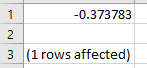
Use the following command and it works:
sqlcmd -S localhost -d TestDB -E -Q "SELECT FloatField FROM tbl" -o "MyData.csv" -h-1 -s"," -w 700
Hi @Micheal Bolton ,
Welcome to the Microsoft TSQL Q&A Forum!
GuoxiongYuan-7218 has provided you with the correct solution, please check if it works.
Regards
Echo
Note: Please follow the steps in our documentation to enable e-mail notifications if you want to receive the related email notification for this thread.