Microsoft Teams | Microsoft Teams for business | Other
Additional features, settings, or issues not covered by specific Microsoft Teams categories

This browser is no longer supported.
Upgrade to Microsoft Edge to take advantage of the latest features, security updates, and technical support.
' cx='32' cy='32' r='32' /%3E%3Ctext x='50%25' y='55%25' dominant-baseline='middle' text-anchor='middle' fill='%23FFF' %3EFT%3C/text%3E%3C/svg%3E)
We have added a SharePoint Online document library to a Microsoft TEAM. When viewing a Office file directly in SPO, we can open and create new Office documents successfully.
However...
When we attempt to try to open the same Office document via the TEAMS/SharePoint integrated document library, we receive an "Unknown Error".
When we attempt to create a +New Office document in the TEAMS/SharePoint integrated document library, nothing happens.
Why is this happening and how do I correct?
' cx='32' cy='32' r='32' /%3E%3Ctext x='50%25' y='55%25' dominant-baseline='middle' text-anchor='middle' fill='%23FFF' %3EJM%3C/text%3E%3C/svg%3E)
Hi @Fulton, Tim ,
Did you create a new SharePoint document library before creating Teams?
I did a test in my environment and it looks normal in Teams client.
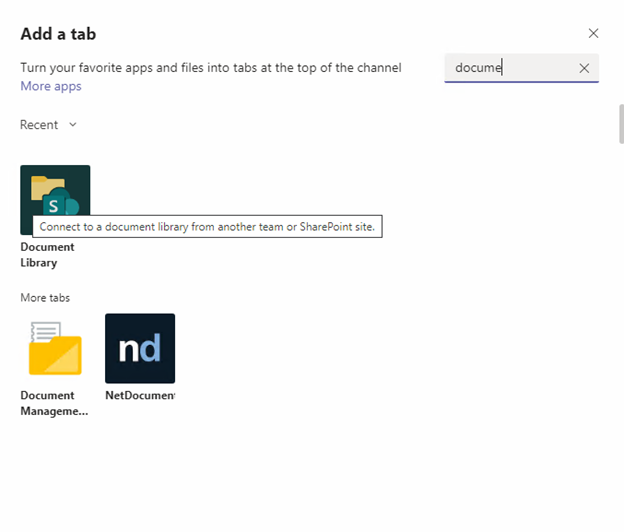
1.Add document library in Teams site clicking “Add a tab”, then select “Document Library”
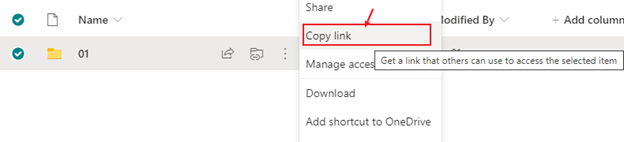
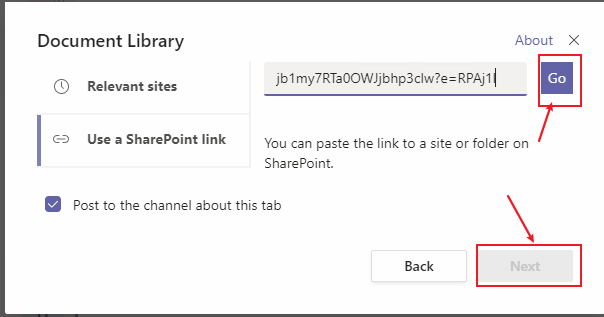
2.Copy the document library link and paste it to “Use a sharepoint link”.
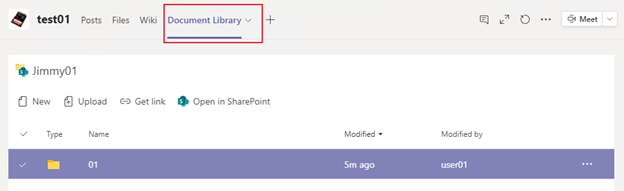
3.We can create a new excel file and open the file normally in it.
If I misunderstand your requirements, please figure it out. Thanks for your understanding!
If the response is helpful, please click "Accept Answer" and upvote it.
Note: Please follow the steps in our documentation to enable e-mail notifications if you want to receive the related email notification for this thread.
No, this particular document library is a long standing library that was created in SP2013 prior to Teams.
The document link that we have access to looks like this: https://......./Forms/AllItems.aspx
We can see and navigate the document library structure but just can not open files.
Hi @Fulton, Tim ,
You need to Migrate SharePoint 2013 documents to the Microsoft Teams Default Document Library firstly. For more details, you can refer to:
https://resources.techcommunity.microsoft.com/cloud-migration-microsoft-teams/
Hi @Fulton, Tim ,
Any update?
While your method works, it requires the conversion of our older SharePoint libraries, which we're not going to undertake as this time. What I have discovered is SharePoint offers three integrations with TEAMS.