
Hello,
As you said the rule was successfully parsed from the store, it should be working fine now.
If it doesn't works, you can try blocking it via hosts file as an alternative.
Hope this helps!
This browser is no longer supported.
Upgrade to Microsoft Edge to take advantage of the latest features, security updates, and technical support.
' cx='32' cy='32' r='32' /%3E%3Ctext x='50%25' y='55%25' dominant-baseline='middle' text-anchor='middle' fill='%23FFF' %3ECB%3C/text%3E%3C/svg%3E)
Hello,
I'm trying to block access from an IP address. I ran the following elevated PowerShell script:
PS C:\> New-NetFirewallRule -RemoteAddress 192.35.168.128 `
>>                     -DisplayName "Block Bad IP" `
>>                     -Direction inbound `
>>                     -Profile Any `
>>                     -Action Block


Name                  : {4b7d1af9-99b6-4e9c-9ae9-c811b31400ae}
DisplayName           : Block Bad IP
Description           :
DisplayGroup          :
Group                 :
Enabled               : True
Profile               : Any
Platform              : {}
Direction             : Inbound
Action                : Block
EdgeTraversalPolicy   : Block
LooseSourceMapping    : False
LocalOnlyMapping      : False
Owner                 :
PrimaryStatus         : OK
Status                : The rule was parsed successfully from the store. (65536)
EnforcementStatus     : NotApplicable
PolicyStoreSource     : PersistentStore
PolicyStoreSourceType : Local
When I look at the rule with wf.msc I do not see a green check-mark.
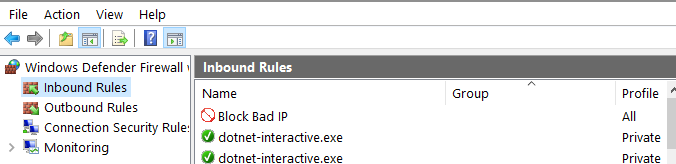
The rule is not working. What am I missing?
Charles

Hello,
As you said the rule was successfully parsed from the store, it should be working fine now.
If it doesn't works, you can try blocking it via hosts file as an alternative.
Hope this helps!
' cx='32' cy='32' r='32' /%3E%3Ctext x='50%25' y='55%25' dominant-baseline='middle' text-anchor='middle' fill='%23FFF' %3EA%3C/text%3E%3C/svg%3E)
Hi ,
I did not see anything wrong, what's the exact problem?
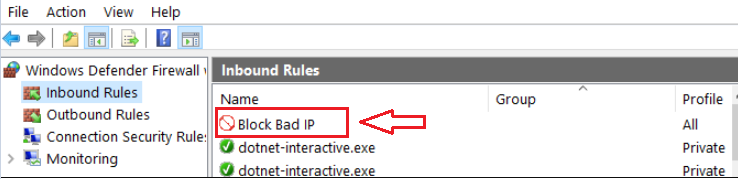
If you configure a block firewall rule successfully, then you will see a small red icon in form of a stop panel at the left of the entry. This is correct.
Best Regards,
Candy
--------------------------------------------------------------
If the Answer is helpful, please click "Accept Answer" and upvote it.
Note: Please follow the steps in our documentation to enable e-mail notifications if you want to receive the related email notification for this thread.
' cx='32' cy='32' r='32' /%3E%3Ctext x='50%25' y='55%25' dominant-baseline='middle' text-anchor='middle' fill='%23FFF' %3EC%3C/text%3E%3C/svg%3E)
Agreed.
"Green check mark" is for "allow rules", "stop sign" is for "deny rules".