Microsoft 365 and Office | SharePoint Server | For business
A family of Microsoft on-premises document management and storage systems.

This browser is no longer supported.
Upgrade to Microsoft Edge to take advantage of the latest features, security updates, and technical support.
' cx='32' cy='32' r='32' /%3E%3Ctext x='50%25' y='55%25' dominant-baseline='middle' text-anchor='middle' fill='%23FFF' %3EXY%3C/text%3E%3C/svg%3E)
Files in SharePoint 2016 are not searchable and I have crawled the content source

@Xiangtian Yang There are some reasons which may cause this issue, so, let's verify the followings firstly:
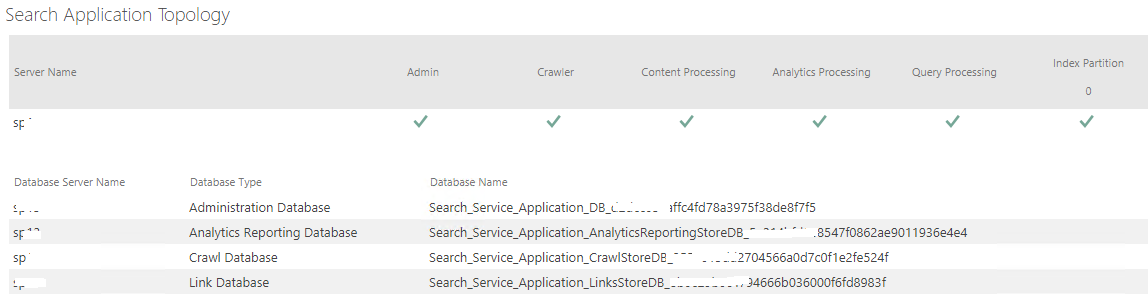
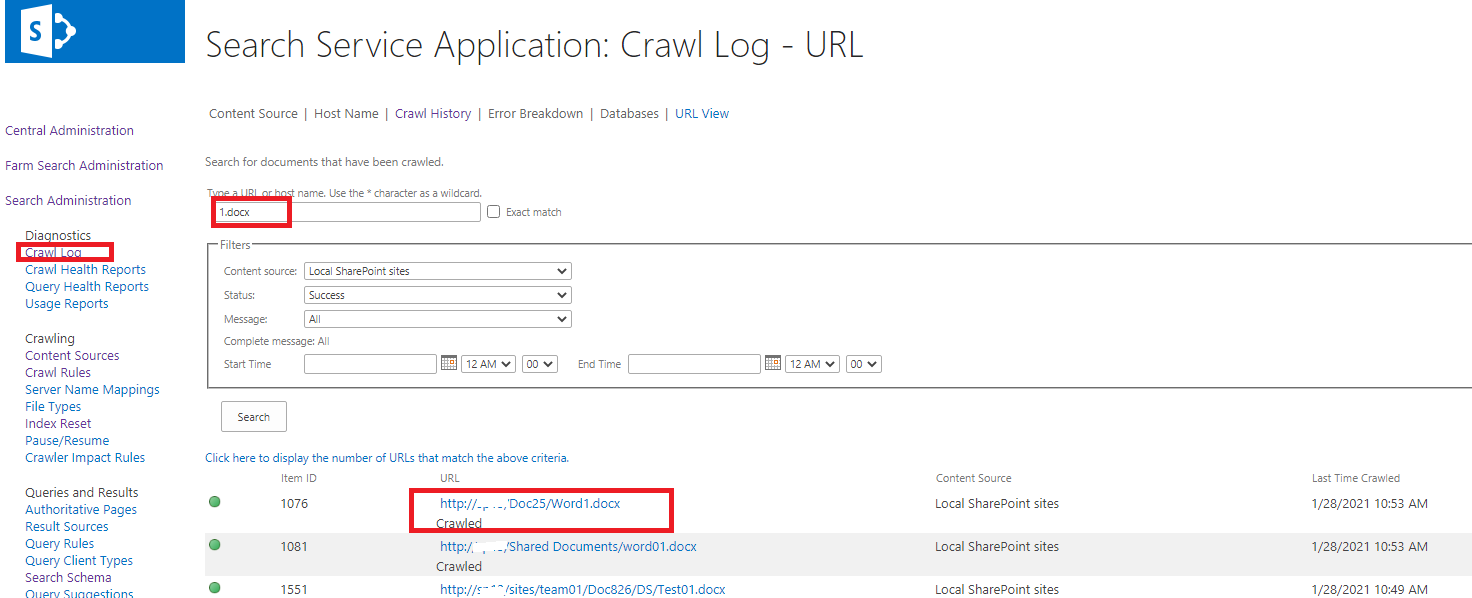
Please have a check and let's know the result.
-----------------
Updated on 2/5--------------
@Xiangtian Yang Based on the ULS log file, there is something wrong with the query processing.
Firstly, please make sure there is enough free disk space for your Search server which hosts the Query component. You can check SharePoint Server 2016 hardware requirement as the article.
Secondly, double-check the search topology, make sure all are running like the below, especially for "Query processing".

Go to Application Management->Manage services on server, make sure all search services are started:

Also, please try to restart "Search Host Controller Service" and "Search Query and Site Settings Service". After that, test again.
If the issue still exists, please use the following PowerShell commands to restart search service application:
net stop osearch15
net start osearch15
=============
If an Answer is helpful, please click "Accept Answer" and upvote it.
Note: Please follow the steps in our documentation to enable e-mail notifications if you want to receive the related email notification for this thread.
Thank you very much for your reply
I have checked through your way, and I can confirm that the file has been crawled. The crawler log can be searched normally
But I could not find it in the main page, and the following error occurred
The search encountered a problem and could not return results.If the problem persists, contact your administrator.
The correlation ID: b4a9a59f-eca9-f0b4-0c16-99af2d1a4036
Please filter ULS files based on the correlation ID to find more information about this error. The default path of ULS files is "C:\program file\Common Files\Microsoft Shared\Web Server Extensions\16\LOGS".
There is a blog about how to check the ULS log for your reference:
use-uls-log-viewer-with-sharepoint-server-2016
@Xiangtian Yang I am checking to see how things are going there on this issue.
If you have any concerns about this issue, please feel free to reply. :)
64444-ws-mshare-20210205-1511.log
Attached is the log of specific error report, please help to analyze it, thank you
I updated my original answer, please check the updated section. If you have any concerns, please feel free to let us know.
 ]1
]1
I did not find these services, and I also used PowerShell to indicate that I could not find this service
Please switch to All in View option, check if these services are listed and started.
