


Using Performance Monitor counter IDs instead of the counter names - 2

Mikhail Firsov 1,881 Reputation points
2021-01-28T09:30:45.383+00:00

Hello,

As you already may know each Performance Monitor counter has the corresponding ID which you can find in the registry:

HKEY_LOCAL_MACHINE\SOFTWARE\Microsoft\Windows NT\CurrentVersion\Perflib\009\Counter

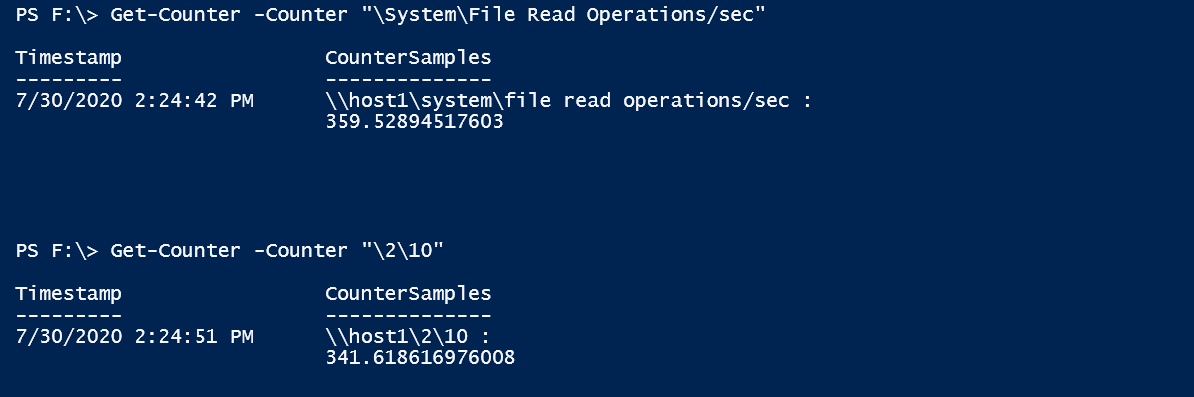
So theoretically we can get the counter value by typing

Get-Counter -Counter "\2\10" instead of

Get-Counter -Counter "\System\File Read Operations/sec" - and it does work:
61443-1.png

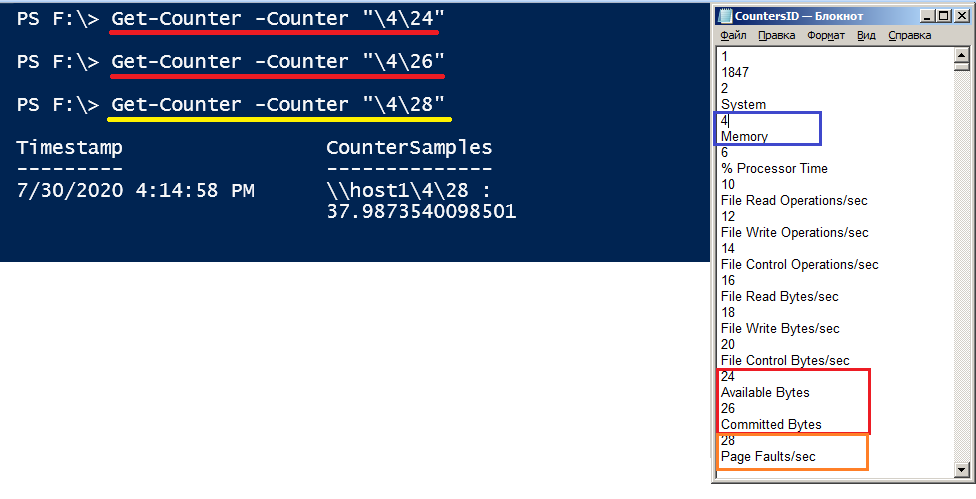
But I don't understand why other counters may not be read by such method:

Get-Counter -Counter "\System\File Read Operations/sec"
61374-2.png

What's wrong with the second query?

Here's one more example:
61383-3.png

Thank you in advance,
Michael

Windows for business | Windows Server | User experience | PowerShell
Windows for business | Windows Server | User experience | Other
0 comments No comments
{count} votes

Answer accepted by question author
  1. Anonymous
    2021-02-01T06:27:58.537+00:00

    Hi,

    According to the help documentation, the -counter parameter uses counter names, not IDs. It doesn't seem to support IDs well. The following link gives a way to get local counter names from IDs
    https://www.powershellmagazine.com/2013/07/19/querying-performance-counters-from-powershell/

    Best Regards,
    Ian Xue

    ============================================

    If the Answer is helpful, please click "Accept Answer" and upvote it.
    Note: Please follow the steps in our documentation to enable e-mail notifications if you want to receive the related email notification for this thread.

    0 comments No comments

1 additional answer

Sort by: Most helpful
  1. Mikhail Firsov 1,881 Reputation points
    2021-02-08T09:11:34.26+00:00

    Hi IanXue-MSFT,

    Sorry for the delay. Thank you for yor help!

    It's really weird that some of the IDs do really work in the Get-Counter. In computers some feature usually either works or does not work, but not 50/50...

    Regards,
    Michael

    0 comments No comments

Your answer

Answers can be marked as 'Accepted' by the question author and 'Recommended' by moderators, which helps users know the answer solved the author's problem.