
Hi,
Check if the DNS resolution is working from DC in new domain to resolve the name of old domain.
Try also launch network capture to get more details about the authentication issue.
Please don't forget to mark helpful reply as answer
This browser is no longer supported.
Upgrade to Microsoft Edge to take advantage of the latest features, security updates, and technical support.

I am trying to create trust for a future domain migration. ![61868-pic1.png][1]
• Forest and domain functional level in both domains is Server 2016
• I have created a two-way forest trust between Domain OLD and Domain NEW
• I have validated the trust from both domains and received the message "The trust has been validated. It is now in place and active"
• verified that the DNS conditional forwarders are in place pointing to the domain controllers in the opposite domain
• Verified in the IPv4 configuration on the DC of domain old & new that the DNS servers from the opposite domain have been added.
• From each DC, verified I can ping the short name and FQDN of machines in the opposite domain.
My problem is this: I am trying to add a domain administrator account to the Administrators group in the opposite domains.
From Domain OLD, I can open the Administrators group via ADUC and when adding a member and browsing the location, I can see both Domain Old and Domain NEW. I can browse Domain NEW and add the member successfully ![61897-pic1.png][2]
From Domain NEW when I try the same thing I can only see Domain NEW. ![61918-pic2.png][3]
From Domain OLD I can open ADUC and "Change Domain" and change to Domain NEW successfully.
However, when I am on the Domain NEW DC in ADUC and try to change to Domain OLD, It fails telling me the username or password is incorrect.
I have also looked at the DNS logs and not finding any relevant errors. Any help you can provide would be much appreciated.
' cx='32' cy='32' r='32' /%3E%3Ctext x='50%25' y='55%25' dominant-baseline='middle' text-anchor='middle' fill='%23FFF' %3EA%3C/text%3E%3C/svg%3E)
Hello @Charlie Caldwell ,
How are things going on your end? Please keep me posted on this issue.
If you have any further questions or concerns about this question, please let us know.
I appreciate your time and efforts.
Best Regards,
Daisy Zhou
Hello @Charlie Caldwell ,
I am just writing to see if this question has any update. If anything is unclear, please feel free to let us know.
Thanks for your time and have a nice day!
Best Regards,
Daisy Zhou
' cx='32' cy='32' r='32' /%3E%3Ctext x='50%25' y='55%25' dominant-baseline='middle' text-anchor='middle' fill='%23FFF' %3ETB%3C/text%3E%3C/svg%3E)
Hi,
Check if the DNS resolution is working from DC in new domain to resolve the name of old domain.
Try also launch network capture to get more details about the authentication issue.
Please don't forget to mark helpful reply as answer
Hi,
You can also re-validate the trust and check.
Please don't forget to mark helpful reply as answer
Hello @Charlie Caldwell ,
Thank you for posting here.
Based on the description, I did a test in my lab.
1-Set up Conditional forwarders.
2-Create two-way forest trust (a.local and b.local).
3-Validate two-way forest trust successfully.
4-I can change domain in ADUC of a.local domain successfully.
5-I can change domain in ADUC of b.local domain successfully.
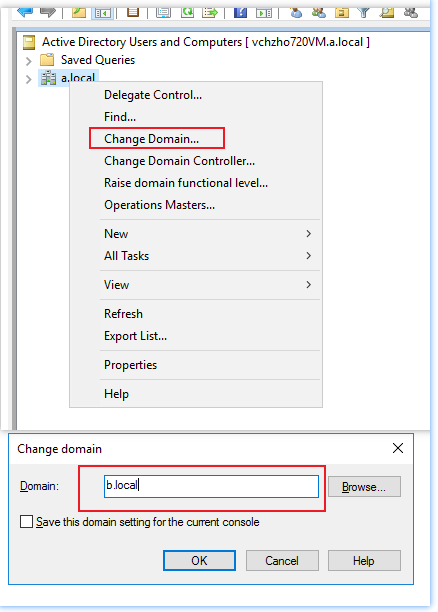
It seems there is issue between the two-way trust.
I suggest, we can delete the Conditional Forwarders and two-way trust, then recreate Conditional Forwarders and two-way trust.
setup of trust relationship between 2 domains
https://social.technet.microsoft.com/Forums/windowsserver/en-US/9e501d72-5457-421a-b81b-3a1f83ac7b0e/setup-of-trust-relationship-between-2-domains?forum=winservergen
Active Directory – How to create forest trust
https://tutoexpress.com/index.php/active-directory-how-to-create-forest-trust/
Hope the information above is helpful, if anything is unclear, please feel free to let us know.
Please note: Information posted in the given link is hosted by a third party. Microsoft does not guarantee the accuracy and effectiveness of information.
Best Regards,
Daisy Zhou