Microsoft Security | Microsoft Entra | Microsoft Entra External ID
Managing external identities to enable secure access for partners, customers, and other non-employees

This browser is no longer supported.
Upgrade to Microsoft Edge to take advantage of the latest features, security updates, and technical support.
' cx='32' cy='32' r='32' /%3E%3Ctext x='50%25' y='55%25' dominant-baseline='middle' text-anchor='middle' fill='%23FFF' %3ELA%3C/text%3E%3C/svg%3E)
Hi, when I go to Azure AD B2C tenant edition I have these callback url:
Then I want to add these two new domains:
and I have these error:
No se pudieron actualizar las claves de la aplicación SPB2C. Detalle del error: One or more properties contains invalid values.. [aHSfR2cNqcqWcQBXo2aa36]
Can you help me? Is there something wrong with these new domains? Is there something that I can do to fix it?
Thanks.

Hi @Lautaro Alvarez · Thank you for sharing the manifest. I reviewed the manifest and found the property "publisherDomain" is set to null
Could you please try adding any of your verified domain as publisher domain using below option:
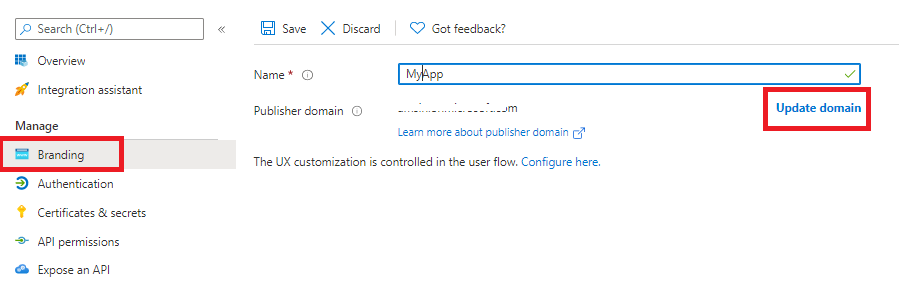
Once the publisher is added, try to add reply url (redirect uri) again.
Read More: How to: Configure an application's publisher domain
-----------------------------------------------------------------------------------------------------------
Please "Accept the answer" if the information helped you. This will help us and others in the community as well.
It works! Thank you very much!
Hi @Lautaro Alvarez · Thank you for reaching out.
I don't see anything wrong in the URLs that you are trying to add. Could you please try adding the Callback URLs by updating the application manifest as mentioned below:
"replyUrlsWithType": [
		{
			"url": "https://ds.qa.MYDOMAIN/authCallback",
			"type": "Web"
		},
		{
			"url": "https://qa.MYDOMAIN/authCallback",
			"type": "Web"
		},
		{
			"url": "https://dsd.qa.MYDOMAIN/authCallback",
			"type": "Web"
		},
		{
			"url": "http://localhost:4200/authCallback",
			"type": "Web"
		}
	]
-----------------------------------------------------------------------------------------------------------
Please "Accept the answer" if the information helped you. This will help us and others in the community as well.
Hi @AmanpreetSingh-MSFT , thanks for replying.
I tried it but when I save it show me this error:

This is the plain text:
No se pudieron actualizar las claves de la aplicación SPB2C. Detalle del error: One or more properties contains invalid values.. [BDM2HNgXMXCAUA+pFjmVv9]
Can I obtain any logs or something that can help you?
I can send you the manifest if it helps.
Hi @Lautaro Alvarez · Thank you for the update. The problem can be with any other property/attribute of the application. Could you please try updating any existing reply url (rather than adding new ones) and save? I the error might be occurring due to any other property as well. Please let me know if you still get the error. Also, send your manifest via email to AzCommunity[at]Microsoft[dot]Com with subject ATTN:Amanpreet.
I tried to edit a domain but I have the same error. I send you the app manifest by email.