Microsoft 365 and Office | Development | Other
Building custom solutions that extend, automate, and integrate Microsoft 365 apps.

This browser is no longer supported.
Upgrade to Microsoft Edge to take advantage of the latest features, security updates, and technical support.
' cx='32' cy='32' r='32' /%3E%3Ctext x='50%25' y='55%25' dominant-baseline='middle' text-anchor='middle' fill='%23FFF' %3EDM%3C/text%3E%3C/svg%3E)
HI
I have a pivot table that connects to a SQL server DB.
If was to save the Pivot table with the underlying data the file would be 23,000KB
If I save the pivot without the underlying data (so you need to refresh it after opening- then the file would be 4,500KB
But if I just pasted as value what showing on the pivot as text into a workbook- the file would only be 11KB
What extra data is causing the pivot, without underlying data, to be so big?- It's causing a problem with an application I want to circulate- how can I get the pivot, without underlying data closer to the size of just the info being displayed as if there was no pivot table at all?
Hopefully, someone has a nugget for me..
Thanks
David

Hi @david meehan ,
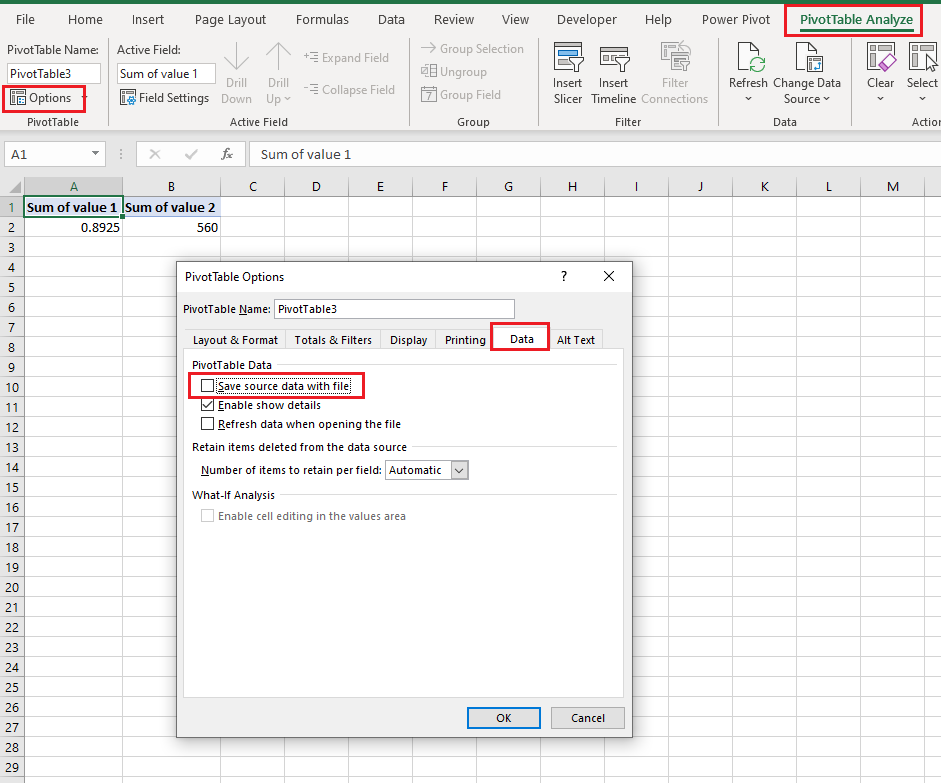
Try to select the PivotTable- go to PivotTable Analyze tab- Options- Data tab- uncheck save source data with file:
If the response is helpful, please click "Accept Answer" and upvote it.
Note: Please follow the steps in our documentation to enable e-mail notifications if you want to receive the related email notification for this thread.
@Emi Zhang-MSFT
Unfortunately not- that's what I was referring to when I said "I saved the pivot without the underlying data".
So even with the tick box empty- and file saved- the pivot is causing the file to be >4,000KB