Exchange | Exchange Server | Management
The administration and maintenance of Microsoft Exchange Server to ensure secure, reliable, and efficient email and collaboration services across an organization.
This browser is no longer supported.
Upgrade to Microsoft Edge to take advantage of the latest features, security updates, and technical support.
' cx='32' cy='32' r='32' /%3E%3Ctext x='50%25' y='55%25' dominant-baseline='middle' text-anchor='middle' fill='%23FFF' %3EC%3C/text%3E%3C/svg%3E)
Hello all,
we have a mailbox with 2,5GB size.
How can we shrink TotalDeletedItemSize and Attachment Size?
InPlaceHold is disabled and keep DeletedItem is set to 1 day!
RunspaceId : 217be7a-ca8-4f5f-b5d5bf5
MoveHistory :
AssociatedItemCount : 30
DeletedItemCount : 45693
ItemCount : 2925
TotalDeletedItemSize : 31.05 GB (33,338,522,279 bytes)
TotalItemSize : 2.061 GB (2,212,643,749 bytes)
MessageTableTotalSize : 285.4 MB (299,270,144 bytes)
MessageTableAvailableSize : 22.28 MB (23,363,584 bytes)
AttachmentTableTotalSize : 32.97 GB (35,403,792,384 bytes)
AttachmentTableAvailableSize : 12.84 MB (13,467,648 bytes)
OtherTablesTotalSize : 17.38 MB (18,219,008 bytes)
OtherTablesAvailableSize : 1.813 MB (1,900,544 bytes)
The administration and maintenance of Microsoft Exchange Server to ensure secure, reliable, and efficient email and collaboration services across an organization.
Answer accepted by question author
' cx='32' cy='32' r='32' /%3E%3Ctext x='50%25' y='55%25' dominant-baseline='middle' text-anchor='middle' fill='%23FFF' %3EA%3C/text%3E%3C/svg%3E)
Hi @Chris ,
The TotalDeletedItemSize refers to the size of items in the Recoverable Items Folder, so you can purge these items following the article provided by michev:
As for the AttachmentTableTotleSize, according to my research, it could be the space of attachment table reserved for the user. I want to first confirm if you have enabled journaling(in database or journaling rules).
I think you can manage your mailbox size using the Retention policy to delete these items automatically. Retention tags and retention policies in Exchange Server
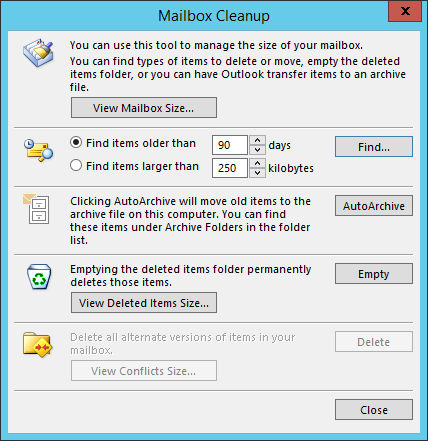
Or in outlook client, use the Mailbox Cleanup tool.
I found a related issue: Mailbox database MUCH larger than the content inside of it that may be helpful.
Bests,
Lou
If the response is helpful, please click "Accept Answer" and upvote it.
Note: Please follow the steps in our documentation to enable e-mail notifications if you want to receive the related email notification for this thread.
