
8,329 questions
This browser is no longer supported.
Upgrade to Microsoft Edge to take advantage of the latest features, security updates, and technical support.

I want to get lastlgon from a list in the txt file
My query on powershell gets the result for an account within the file, but with more users an error is generated.
$file = Get-Content -Path "C:\Temp\UsersLastLogon.txt"
Get-ADUser -Identity $file -Properties LastLogonDate | Select-Object SamAccountName, LastLogonDate

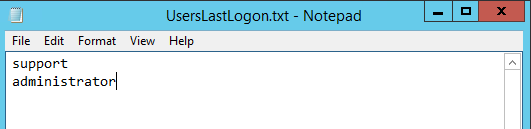

Maybe this helps:
$file = Get-Content -Path "C:\Temp\UsersLastLogon.txt"
foreach ($user in $file)
    {
    Get-ADUser -Identity $user -Properties LastLogonDate | Select-Object SamAccountName, LastLogonDate
    }
(If the reply was helpful please don't forget to upvote and/or accept as answer, thank you)
Regards
Andreas Baumgarten
Your consultation worked!
Thank you!
' cx='32' cy='32' r='32' /%3E%3Ctext x='50%25' y='55%25' dominant-baseline='middle' text-anchor='middle' fill='%23FFF' %3EM%3C/text%3E%3C/svg%3E)
hi Andreas, how can you export it to csv file.
' cx='32' cy='32' r='32' /%3E%3Ctext x='50%25' y='55%25' dominant-baseline='middle' text-anchor='middle' fill='%23FFF' %3EMF%3C/text%3E%3C/svg%3E)
You can export it like this e.g.
$file = Get-Content -Path "C:\Temp\UsersLastLogon.txt"
foreach ($user in $file)
{
    Get-ADUser -Identity $user -Properties LastLogonDate |
    Select-Object SamAccountName, LastLogonDate |
    Out-File -FilePath "C:\Temp\lastlogon.csv" -Append
}