Microsoft bluetooth stack multiple instances

Anonymous
2013-07-22T12:28:03+00:00

Hello Everyone,

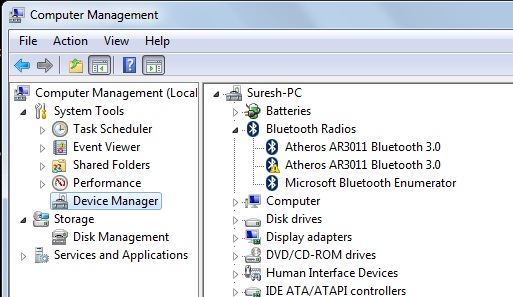
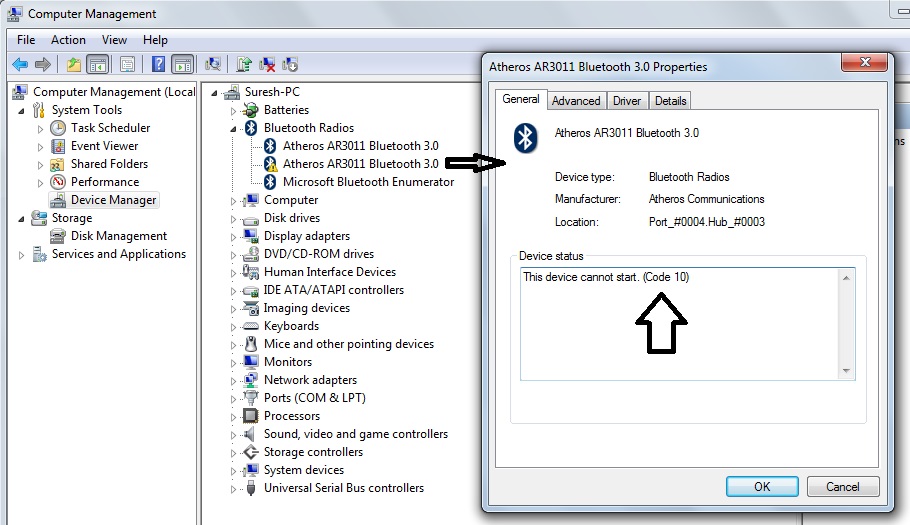
I am having a problem in using two Bluetooth adapters on Microsoft Bluetooth Stack. Either of the adapter works fine until other adapter is not connected. When other adapter is connected it does not starts shown in Device Manager. Reason, displayed is Device cannot start(error code 10).

I think it is due to resource conflict link Audio service which may be resolved if multiple instances of Microsoft Bluetooth Stack could be run or by some configuration setting. I am struggling for long but still I have not found any working method.

Bluetooth Adapter: Atheros 3011.

Error with second device:
Error message:
Windows for home | Previous Windows versions | Devices and drivers

Locked Question. This question was migrated from the Microsoft Support Community. You can vote on whether it's helpful, but you can't add comments or replies or follow the question.

0 comments No comments
{count} votes
Answer accepted by question author
  1. Anonymous
    2013-07-23T04:32:32+00:00

    Hi Suresh,

    Only one active Bluetooth radio is supported at a time in Microsoft Bluetooth Stack. It should be possible to make connection to a few destinations at the same time using one radio. No stack on Windows supports more than one radio.

    For further assistance on this issue, I would suggest you to post your query in TechNet Forums.

    http://social.technet.microsoft.com/Forums/windows/en-US/home?category=w7itpro&filter=alltypes&sort=lastpostdesc

    Hope it helps.

    0 comments No comments

3 additional answers

Sort by: Most helpful
  1. Anonymous
    2013-07-23T10:43:10+00:00

    Dear Anil,

    Thanks for your suggestion.  I will try it.

    Thanks

    -Suresh

    0 comments No comments
  2. Anonymous
    2013-07-24T09:07:46+00:00

    Get back to us for any issues related to Windows. We will be happy to help you.

    Regards,

    Anil

    0 comments No comments
  3. Anonymous
    2013-10-11T22:49:13+00:00

    Hello Everyone,

    I am having a problem in using two Bluetooth adapters on Microsoft Bluetooth Stack. Either of the adapter works fine until other adapter is not connected. When other adapter is connected it does not starts shown in Device Manager. Reason, displayed is Device cannot start(error code 10).

    I think it is due to resource conflict link Audio service which may be resolved if multiple instances of Microsoft Bluetooth Stack could be run or by some configuration setting. I am struggling for long but still I have not found any working method.

    Bluetooth Adapter: Atheros 3011.

    Error with second device:

    Error message:

    Follow these steps:

    1. Click

    Collapse this image Expand this image

    , type regedit in the Start Search box, and then press ENTER. 2. Locate and then right-click the following registry subkey:

    HKEY_LOCAL_MACHINE\SOFTWARE\Microsoft\Windows\CurrentVersion\explorer\ControlPanel\NameSpace{28803F59-3A75-4058-995F-4EE5503B023C} 3. Click Delete.Note If you are prompted to confirm the key deletion, click Yes. 4. On the File menu, click Exit. 5. Also Try run this fix it.

    Hope this will fix the issue :)

    0 comments No comments
