Microsoft 365 and Office | SharePoint Server | For business
A family of Microsoft on-premises document management and storage systems.

This browser is no longer supported.
Upgrade to Microsoft Edge to take advantage of the latest features, security updates, and technical support.
' cx='32' cy='32' r='32' /%3E%3Ctext x='50%25' y='55%25' dominant-baseline='middle' text-anchor='middle' fill='%23FFF' %3EQL%3C/text%3E%3C/svg%3E)
Upload a file, provided required data, clicked on Check-in. result in error, file uploaded but missing property and checked out. not visible to others 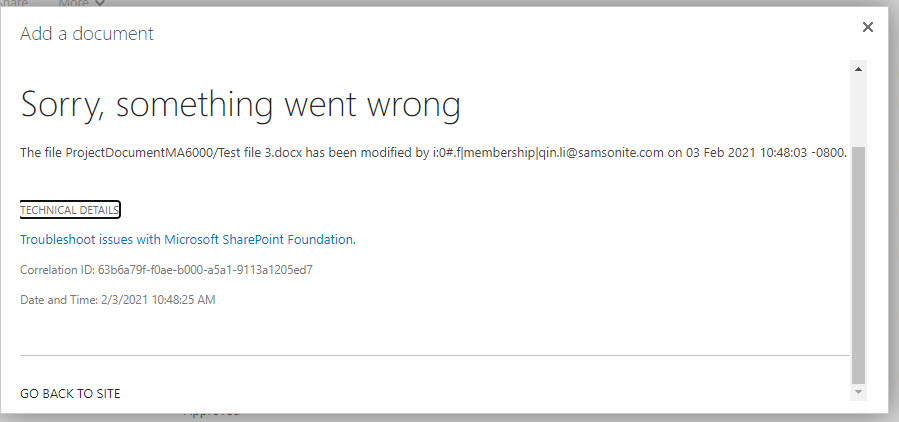
A family of Microsoft on-premises document management and storage systems.

Hi, @Qin Li ,
I am checking how thing are going here. Have you tried the suggestions in the reply? Any progress towards this issue?
Hi, @Qin Li ,
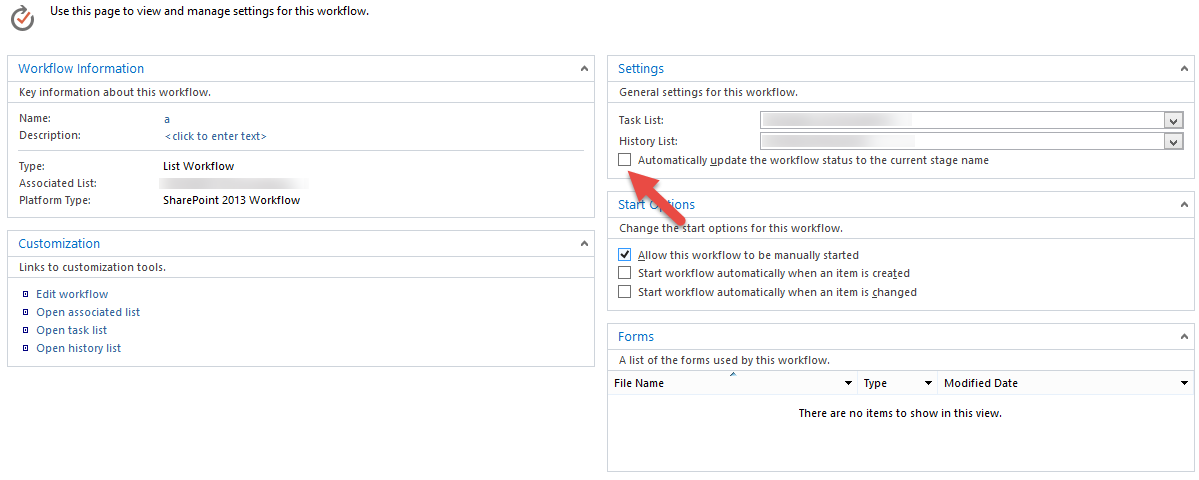
Is there workflow attached to the list with issue? If so, please uncheck the option automatically update the Workflow State. And with the correlation ID, you can check the ULS log for more information about this error. And please let me know your environment, what version of SharePoint are you using.
If an Answer is helpful, please click "Accept Answer" and upvote it.
Note: Please follow the steps in our documentation to enable e-mail notifications if you want to receive the related email notification for this thread.