Excel chart - change data labels reference

Tang, Ziqi 21 Reputation points
2021-02-04T06:14:11.073+00:00

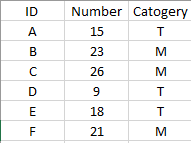
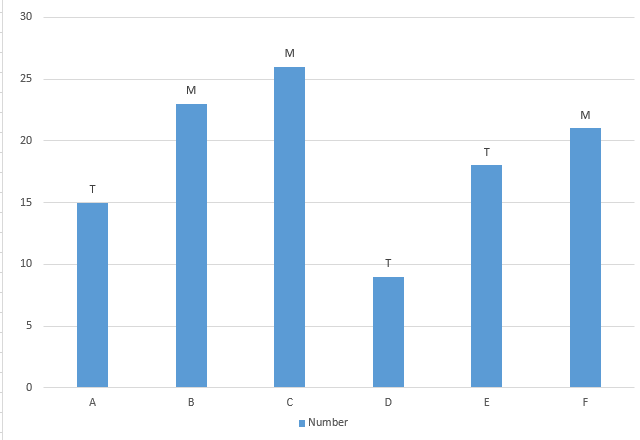
I have a bar chart from the table, but I want the labels to display information in "Category", not the number. Is there any way that I can achieve it in a easy way? Thanks.

63827-1.png

63798-2.png

Microsoft 365 and Office | PowerPoint | For business | Windows
Microsoft 365 and Office | Excel | For business | Windows
0 comments No comments
{count} votes

Answer accepted by question author
  1. Lz._ 38,106 Reputation points Volunteer Moderator
    2021-02-04T16:00:17.497+00:00

    @Tang, Ziqi

    I don't have Excel 2016 but don't think that doesn't matter. Looking at your image more carefully, "TMMTTM" appears at the top of only 1 histo. bar while Numbers appear at the top of the other bars. This means something went wrong when you did it OR the process is slightly different with Excel 2016

    Please try again, making sure that at #3 all numbers are selected BEFORE you Check option "Value From Cells". You can also download my demo from this link to check this displays as expected on your side


1 additional answer

Sort by: Most helpful
  1. Lz._ 38,106 Reputation points Volunteer Moderator
    2021-02-04T09:38:43.263+00:00

    Hi @Tang, Ziqi

    PIC

    (Done with Excel 365 for Windows) With the above range:
    1/ Select A1:B7 > Inser your Histo. chart
    2/ Right-click i.e. on the 1st histo. bar (A) > Add Data Labels (numbers are displayed a the top of the bars)
    3/ Click one of the numbers that just displayed (the Format Data Labels pane opens on the right) > Check option "Value From Cells" > Select range C2:C7 > OK > Uncheck option "Value"


Your answer

Answers can be marked as 'Accepted' by the question author and 'Recommended' by moderators, which helps users know the answer solved the author's problem.