
Have you tried it from the command line? i.e. net use T: \servername\share /PERSISTENT:YES
This browser is no longer supported.
Upgrade to Microsoft Edge to take advantage of the latest features, security updates, and technical support.
' cx='32' cy='32' r='32' /%3E%3Ctext x='50%25' y='55%25' dominant-baseline='middle' text-anchor='middle' fill='%23FFF' %3ESF%3C/text%3E%3C/svg%3E)
I am having an issue with one user who is not able to map a network drive on a Windows 10 computer (fully updated).
After entering in the drive letter and folder/server path, we are instantly asked for credentials. After we submit credentials, it shows "attempting to connect", then 15 seconds later goes back to the credential screen. No error is given. Credentials are working as I was able to map the drive on another machine using that users credentials.
The machine is able to ping the server where the files are located. It appears that the map function is not functioning properly.
' cx='32' cy='32' r='32' /%3E%3Ctext x='50%25' y='55%25' dominant-baseline='middle' text-anchor='middle' fill='%23FFF' %3ELR%3C/text%3E%3C/svg%3E)
Have you tried it from the command line? i.e. net use T: \servername\share /PERSISTENT:YES
I have not. I will try that today. Thanks!
I tried to map it manually and it said the network path was not found. I am able to ping the path.
Browsing to it via file explorer does not work either. This is the only user out of 100 that cannot access it.
' cx='32' cy='32' r='32' /%3E%3Ctext x='50%25' y='55%25' dominant-baseline='middle' text-anchor='middle' fill='%23FFF' %3EA%3C/text%3E%3C/svg%3E)
Hi,
Thanks for posting in Q&A platform.
May I know if you can access to the shared folder via Windows Explorer directly?
As LesReeder's suggestion, please try to map network drive via command line to see if the issue still existed.
Or I would suggest add Windows credential manually to see if the issue can be resolved.
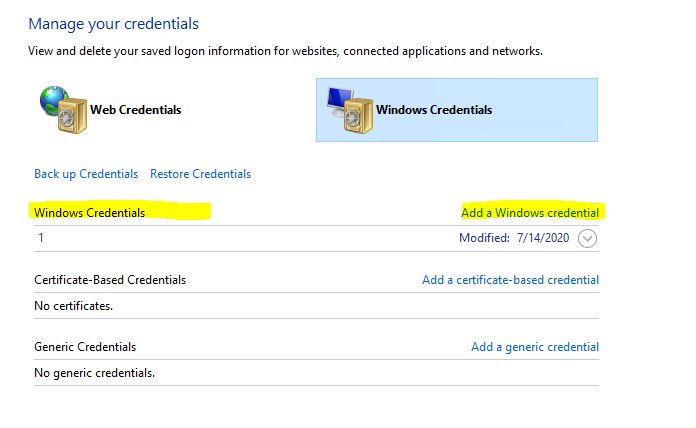
Best Regards,
Sunny
----------
If the Answer is helpful, please click "Accept Answer" and upvote it.
Note: Please follow the steps in our documentation to enable e-mail notifications if you want to receive the related email notification for this thread.
I have attempted to map it via the command line however it said the path was not found. I can still ping it successfully. Accessing via file explorer failes as well.
I have added the credentials for this server manually in the control panel as you provided, however no change unfortunely.
Hi,
Thank you very much for your feedback.
May I know how did you access to the shared folder via file explorer? By \IP\shared folder or \hostname\shared folder?
And is there any error message when access the shared folder directly?
Meanwhile, please check the the event log from both SMB client and server for further troubleshooting.
e.g. Windows 10 access windows 2019 shared file, then Windows 10 is SMB client and windows 2019 is SMB server.

Best Regards,
Sunny
----------
If the Answer is helpful, please click "Accept Answer" and upvote it.
Note: Please follow the steps in our documentation to enable e-mail notifications if you want to receive the related email notification for this thread.
' cx='32' cy='32' r='32' /%3E%3Ctext x='50%25' y='55%25' dominant-baseline='middle' text-anchor='middle' fill='%23FFF' %3ESK%3C/text%3E%3C/svg%3E)
Sounds like a network configuration issue. I would 1st check the network adapter network config and verify it is ok. Then I would look at the firewall on the machine and on your router.