Developer technologies | VB
An object-oriented programming language developed by Microsoft that can be used in .NET.
This browser is no longer supported.
Upgrade to Microsoft Edge to take advantage of the latest features, security updates, and technical support.
' cx='32' cy='32' r='32' /%3E%3Ctext x='50%25' y='55%25' dominant-baseline='middle' text-anchor='middle' fill='%23FFF' %3EH%3C/text%3E%3C/svg%3E)
Hallo,
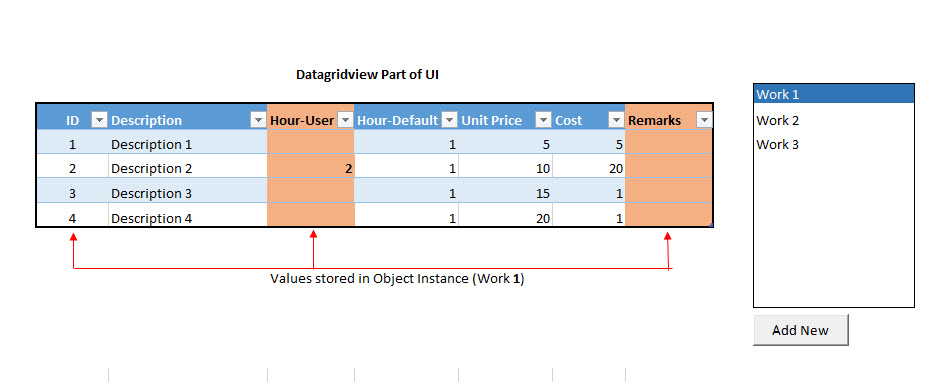
I am trying figure out for more than a month but with my current knowledge it seems impossible. Currently i have a datagridview as shown in screenshot. it is a kind of template with predefined objects bound to datagridview and it is part of the UI it is always there and i have a class called Work and it is instances are bound to another datagridview where i can add more instances or remove them. Every work instance can have different set of man hour values , if user enters the new value, cost will be calculated with user value. here i want to save only the inputs from the datagrid view with my object instances. How can i do that? Any help will be much appreciated.
Public Class Form1

    Public TemplateList As New List(Of Template)
    Public BS_TemplateList As New BindingSource
    Public WorkList As New List(Of Work)
    Public BS_WorkList As New BindingSource

    Private Sub Form1_Load(sender As Object, e As EventArgs) Handles MyBase.Load

        TemplateList.Add(New Template With {.ID = 1, .Description = "Discription 1", .HourDefault = 1, .UnitPrice = 5})
        TemplateList.Add(New Template With {.ID = 2, .Description = "Discription 2", .HourDefault = 1, .UnitPrice = 10})
        TemplateList.Add(New Template With {.ID = 3, .Description = "Discription 3", .HourDefault = 1, .UnitPrice = 15})
        TemplateList.Add(New Template With {.ID = 4, .Description = "Discription 4", .HourDefault = 1, .UnitPrice = 20})

        BS_TemplateList.DataSource = TemplateList
        DataGridView1.DataSource = BS_TemplateList

        BS_WorkList.DataSource = WorkList
        DataGridView2.DataSource = BS_TemplateList

    End Sub


    Private Sub Button3_Click(sender As Object, e As EventArgs) Handles Button3.Click
        BS_WorkList.Add(New Work With {.WorkID = 1, .Item = "Work1"})
    End Sub

End class

Public Class Template
    Public Property ID As Integer
    Public Property Description As String
    Public Property Hour As Integer?
    Public Property HourDefault As Integer
    Public Property UnitPrice As Integer
    Public ReadOnly Property Cost As Integer
        Get
            If Hour > 0 Then
                Return Hour * UnitPrice
            Else
                Return HourDefault * UnitPrice
            End If
        End Get
    End Property
    Public Property Remarks As String

End Class

Public Class Work
    Public Property WorkID As Integer
    Public Property Item As String
    Public Property TemplateID As Integer
    Public Property Hour As Integer
    Public Property Remarks As String
End Class
Thanks
' cx='32' cy='32' r='32' /%3E%3Ctext x='50%25' y='55%25' dominant-baseline='middle' text-anchor='middle' fill='%23FFF' %3EXZ%3C/text%3E%3C/svg%3E)
Hi @Hobbyist_programmer ,
According to your description, I have a question to confirm with you.
Do you want to save the changes in 'datagridview1' to 'TemplateList' ?
Thanks XingyuZhao
No, TemplateList is part of UI and its fixed but i want to save the values in Work Object from column "Hour_User" and "Remarks" ( only when user Hour_User is somthing)

Looks to me that you need 3 buttons to for each row and to the right of the Remarks for Add, Update and Delete.
http://csharp.net-informations.com/datagridview/csharp-datagridview-tutorial.htm
You may or you may not find VB.NET examples by using Bing or Google, but I think you can figure out the jest of the C# examples.
You should be able to determine what column index you're on in a row to know what button was clicked. You should be able to know the rowindex you are on. And since Worklist is bound to the datagrid, you can take the rowindex that is a direct link to the Work object item in WorkList and update the property of Work object an item in WorkList.
Worklist(rowindex).Hour = columndata

Hi,
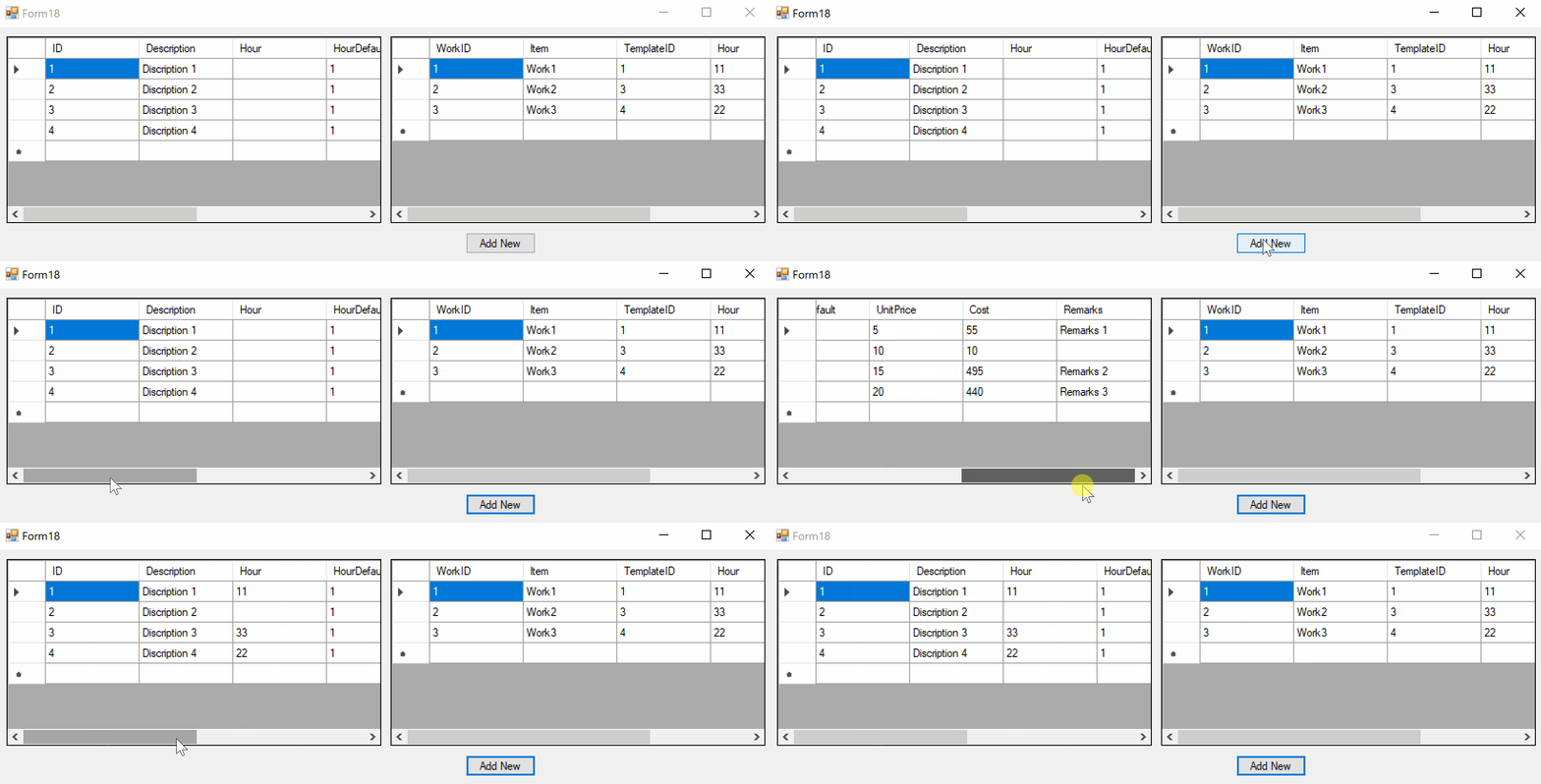
I think you want this one. Try following demo (copy code in empty Form and start):
Public Class Form18

  Public TemplateList As New List(Of Template)
  Public BS_TemplateList As New BindingSource
  Public WorkList As New List(Of Work)
  Public BS_WorkList As New BindingSource

  Private DataGridView1 As New DataGridView With {.Left = 10, .Top = 10, .Width = 400, .Height = 200}
  Private DataGridView2 As New DataGridView With {.Left = 420, .Top = 10, .Width = 400, .Height = 200}
  Private WithEvents Button3 As New Button With {.Text = "Add New", .Left = 500, .Top = 220}

  Private Sub Form1_Load(sender As Object, e As EventArgs) Handles MyBase.Load

    TemplateList.Add(New Template With {.ID = 1, .Description = "Discription 1", .HourDefault = 1, .UnitPrice = 5})
    TemplateList.Add(New Template With {.ID = 2, .Description = "Discription 2", .HourDefault = 1, .UnitPrice = 10})
    TemplateList.Add(New Template With {.ID = 3, .Description = "Discription 3", .HourDefault = 1, .UnitPrice = 15})
    TemplateList.Add(New Template With {.ID = 4, .Description = "Discription 4", .HourDefault = 1, .UnitPrice = 20})

    WorkList.Add(New Work With {.WorkID = 1, .Item = "Work1", .TemplateID = 1, .Hour = 11, .Remarks = "Remarks 1"})
    WorkList.Add(New Work With {.WorkID = 2, .Item = "Work2", .TemplateID = 3, .Hour = 33, .Remarks = "Remarks 2"})
    WorkList.Add(New Work With {.WorkID = 3, .Item = "Work3", .TemplateID = 4, .Hour = 22, .Remarks = "Remarks 3"})

    Me.Controls.AddRange(New Control() {DataGridView1, DataGridView2, Button3})

    BS_TemplateList.DataSource = TemplateList
    DataGridView1.DataSource = BS_TemplateList

    BS_WorkList.DataSource = WorkList
    DataGridView2.DataSource = BS_WorkList

  End Sub

  Private Sub Button3_Click(sender As Object, e As EventArgs) Handles Button3.Click
    For Each work In WorkList
      With TemplateList.Where(Function(w)
                                Return w.ID = work.TemplateID
                              End Function).First
        .Hour = work.Hour
        .Remarks = work.Remarks
      End With
    Next
  End Sub

  Public Class Template
    Public Property ID As Integer
    Public Property Description As String
    Public Property Hour As Integer?
    Public Property HourDefault As Integer
    Public Property UnitPrice As Integer
    Public ReadOnly Property Cost As Integer
      Get
        If Hour > 0 Then
          Return Hour.Value * UnitPrice
        Else
          Return HourDefault * UnitPrice
        End If
      End Get
    End Property
    Public Property Remarks As String

  End Class

  Public Class Work
    Public Property WorkID As Integer
    Public Property Item As String
    Public Property TemplateID As Integer
    Public Property Hour As Integer
    Public Property Remarks As String
  End Class

End Class
Result:
Thanks Peter,
But i think i did not make it clear. lets say . I have a pre defined tasks like Description 1, Description 2.....4. with standard hours and unit price with options for user input hours and remarks.
Now i can add many bidders or bidders can bid for the tasks in the template. So each bidder can type their own hours in the hours-input column and write their reason in the remarks column. so their input hours and remarks should be stored with Work1( say bid1) or Work2( say bid2). So if i cycle through the work list (bid list) i should able to see the inputs they made (if any). so each work (work1, Work2..) should or can have the different input hours. Hope it is clear.
Thanks
Hi,
if I unterstand correctly you write data from selected left row to selected right row. Try following demo:
Public Class Form1

  Public TemplateList As New List(Of Template)
  Public BS_TemplateList As New BindingSource
  Public WorkList As New List(Of Work)
  Public BS_WorkList As New BindingSource

  Private DataGridView1 As New DataGridView With {.Left = 10, .Top = 10, .Width = 750, .Height = 200}
  Private DataGridView2 As New DataGridView With {.Left = 770, .Top = 10, .Width = 600, .Height = 200}
  Private WithEvents Button3 As New Button With {.Text = "Add New", .Left = 800, .Top = 220}

  Private Sub Form1_Load(sender As Object, e As EventArgs) Handles MyBase.Load

    TemplateList.Add(New Template With {.ID = 1, .Description = "Discription 1", .HourDefault = 1, .UnitPrice = 5})
    TemplateList.Add(New Template With {.ID = 2, .Description = "Discription 2", .HourDefault = 1, .UnitPrice = 10})
    TemplateList.Add(New Template With {.ID = 3, .Description = "Discription 3", .HourDefault = 1, .UnitPrice = 15})
    TemplateList.Add(New Template With {.ID = 4, .Description = "Discription 4", .HourDefault = 1, .UnitPrice = 20})

    WorkList.Add(New Work With {.WorkID = 1, .Item = "Work1"})
    WorkList.Add(New Work With {.WorkID = 2, .Item = "Work2"})
    WorkList.Add(New Work With {.WorkID = 3, .Item = "Work3"})

    Me.Controls.AddRange(New Control() {DataGridView1, DataGridView2, Button3})

    BS_TemplateList.DataSource = TemplateList
    DataGridView1.DataSource = BS_TemplateList

    BS_WorkList.DataSource = WorkList
    DataGridView2.DataSource = BS_WorkList

  End Sub

  Private Sub Button3_Click(sender As Object, e As EventArgs) Handles Button3.Click
    Dim tl = TryCast(Me.BS_TemplateList.Current, Template)
    Dim wl = TryCast(Me.BS_WorkList.Current, Work)
    If tl Is Nothing OrElse wl Is Nothing Then Exit Sub
    wl.TemplateID = tl.ID
    wl.Hour = If(tl.Hour.HasValue, tl.Hour.Value, 0)
    wl.Remarks = tl.Remarks
    Me.BS_WorkList.ResetBindings(False)
  End Sub

  Public Class Template
    Public Property ID As Integer
    Public Property Description As String
    Public Property Hour As Integer?
    Public Property HourDefault As Integer
    Public Property UnitPrice As Integer
    Public ReadOnly Property Cost As Integer
      Get
        If Hour > 0 Then
          Return Hour.Value * UnitPrice
        Else
          Return HourDefault * UnitPrice
        End If
      End Get
    End Property
    Public Property Remarks As String

  End Class

  Public Class Work
    Public Property WorkID As Integer
    Public Property Item As String
    Public Property TemplateID As Integer
    Public Property Hour As Integer
    Public Property Remarks As String
  End Class

End Class
Result:

Hallo Peter thanks again. Still it is not that i was trying to achieve.
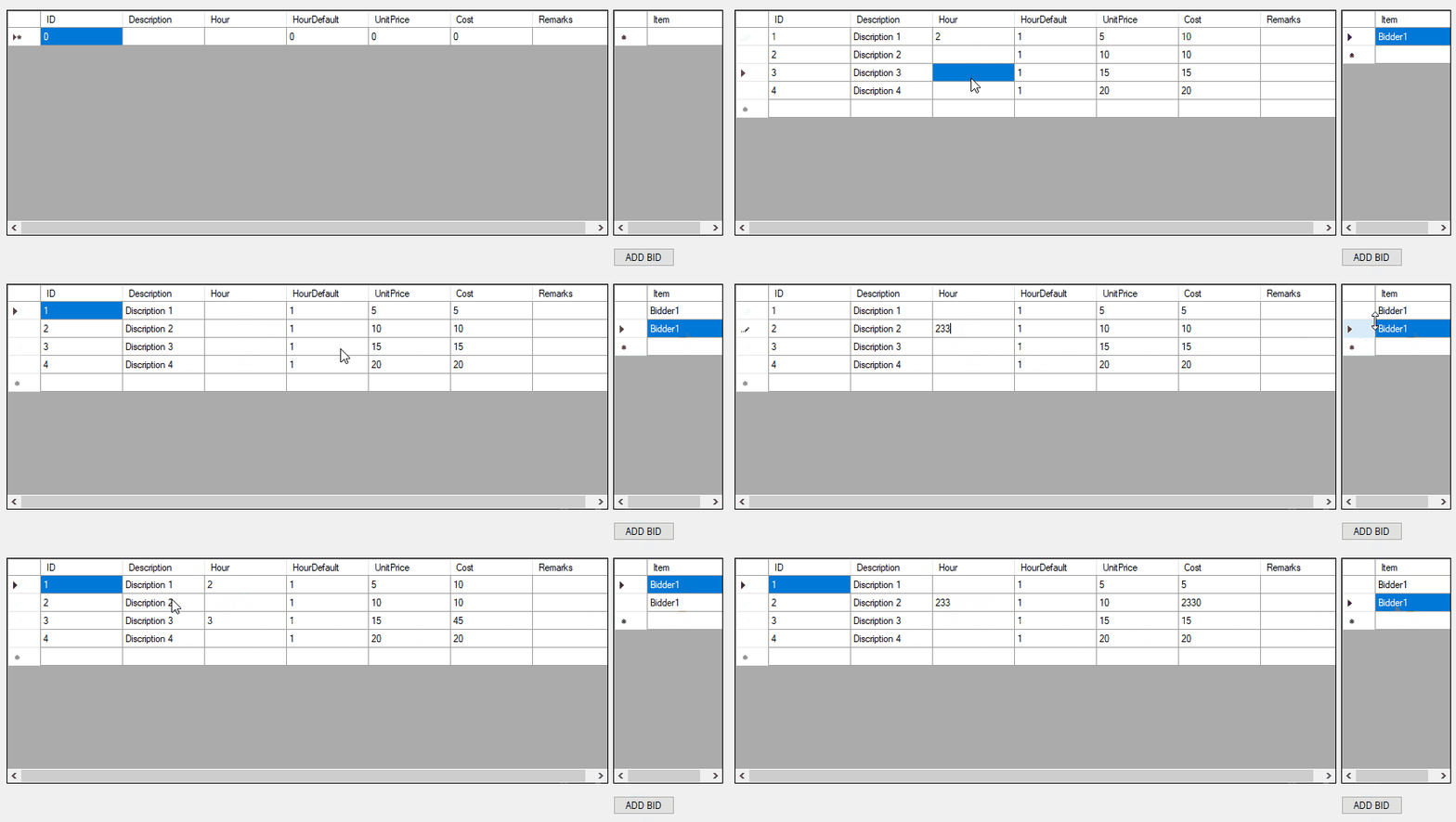
I want to achieve the result as exactly as below. But the problem is i dont want the "Work" object to be the part of Bid since it repeats and stores the unnecessary values so i want to separate "Work" and make it as part of the UI and just store the user input values with Object "Bid" is it possible or any alternative method?. If it is still not clear please let me know.
Public Class Form1
    Public BS_TemplateList As New BindingSource
    Public WorkList As New List(Of Bid)
    Public BS_WorkList As New BindingSource

    Private Sub Form1_Load(sender As Object, e As EventArgs) Handles MyBase.Load
        BS_WorkList.DataSource = WorkList
        DataGridView4.DataSource = BS_WorkList
        BS_TemplateList.DataSource = BS_WorkList
        BS_TemplateList.DataMember = "Work"
        DataGridView3.DataSource = BS_TemplateList
        DataGridView4.Columns("WorkID").Visible = False
    End Sub

    Private Sub Button1_Click(sender As Object, e As EventArgs) Handles Button1.Click
        BS_WorkList.Add(New Bid With {.WorkID = 1, .Item = "Bidder1"})
    End Sub

    Public Function GetTemplates() As Works
        Dim T As New Works
        With T
            .Add(New Work With {.ID = 1, .Description = "Discription 1", .HourDefault = 1, .UnitPrice = 5})
            .Add(New Work With {.ID = 2, .Description = "Discription 2", .HourDefault = 1, .UnitPrice = 10})
            .Add(New Work With {.ID = 3, .Description = "Discription 3", .HourDefault = 1, .UnitPrice = 15})
            .Add(New Work With {.ID = 4, .Description = "Discription 4", .HourDefault = 1, .UnitPrice = 20})
        End With
        Return T
    End Function
End Class

Public Class Bid
    Public Sub New()
        Work = New Works()
        Work = Form1.GetTemplates()
    End Sub
    Public Property WorkID As Integer
    Public Property Item As String
    Public Property Work() As Works
End Class

Public Class Tasks
    Inherits System.ComponentModel.BindingList(Of Bid)
End Class

Public Class Work
    Public Property ID As Integer
    Public Property Description As String
    Public Property Hour As Integer?
    Public Property HourDefault As Integer
    Public Property UnitPrice As Integer
    Public ReadOnly Property Cost As Integer
        Get
            If Hour > 0 Then
                Return Hour.Value * UnitPrice
            Else
                Return HourDefault * UnitPrice
            End If
        End Get
    End Property
    Public Property Remarks As String
End Class
Public Class Works
    Inherits System.ComponentModel.BindingList(Of Work)
End Class
Hi,
if I unterstand you look out for 1:n relation. One Bidder can hold a list of Work. Button "ADD BID" attach to Bid all Work items with not null Hour and after attaching clear Hour cells in Work.
Try this demo:
Public Class Form1

  Public TemplateList As New List(Of Template)
  Public BS_TemplateList As New BindingSource

  Public WorkList As New List(Of Bid)
  Public WithEvents BS_WorkList As New BindingSource

  Private DataGridView1 As New DataGridView With {.Left = 10, .Top = 10, .Width = 750, .Height = 200}
  Private DataGridView2 As New DataGridView With {.Left = 770, .Top = 10, .Width = 600, .Height = 200}
  Private WithEvents Button1 As New Button With {.Text = "Add New", .Left = 800, .Top = 220}

  Private Sub Form1_Load(sender As Object, e As EventArgs) Handles MyBase.Load

    TemplateList.Add(New Template With {.ID = 1, .Description = "Discription 1", .HourDefault = 1, .UnitPrice = 5})
    TemplateList.Add(New Template With {.ID = 2, .Description = "Discription 2", .HourDefault = 1, .UnitPrice = 10})
    TemplateList.Add(New Template With {.ID = 3, .Description = "Discription 3", .HourDefault = 1, .UnitPrice = 15})
    TemplateList.Add(New Template With {.ID = 4, .Description = "Discription 4", .HourDefault = 1, .UnitPrice = 20})

    Me.Controls.AddRange(New Control() {DataGridView1, DataGridView2, Button1})

    BS_TemplateList.DataSource = TemplateList
    DataGridView1.DataSource = BS_TemplateList

    BS_WorkList.DataSource = WorkList
    DataGridView2.DataSource = BS_WorkList

  End Sub

  Private Sub Button1_Click(sender As Object, e As EventArgs) Handles Button1.Click
    Dim w As New Bid
    w.Item = $"Bidder{w.WorkID}"
    w.Works.AddRange(From item In Me.TemplateList Where item.Hour.HasValue Select item.Copy)
    If w.Works.Count > 0 Then
      Me.BS_WorkList.Add(w)
      For Each item In w.Works
        With Me.TemplateList.Where(Function(p) p.ID = item.ID).First
          .Hour = Nothing
          .Remarks = String.Empty
        End With
      Next
      Me.BS_TemplateList.ResetBindings(False)
    End If
  End Sub

  Private Sub BS_WorkList_CurrentChanged(sender As Object, e As EventArgs) Handles BS_WorkList.CurrentChanged
    Dim w = TryCast(CType(sender, BindingSource).Current, Bid)
    For Each item In Me.TemplateList
      item.Hour = Nothing
      item.Remarks = String.Empty
    Next
    For Each item In w.Works
      With Me.TemplateList.Where(Function(p) p.ID = item.ID).First
        .Hour = item.Hour
        .Remarks = item.Remarks
      End With
    Next
    Me.BS_TemplateList.ResetBindings(False)
  End Sub

  Public Class Template
    Public Property ID As Integer
    Public Property Description As String
    Public Property Hour As Integer?
    Public Property HourDefault As Integer
    Public Property UnitPrice As Integer
    Public ReadOnly Property Cost As Integer
      Get
        If Hour > 0 Then
          Return Hour.Value * UnitPrice
        Else
          Return HourDefault * UnitPrice
        End If
      End Get
    End Property
    Public Property Remarks As String

    Public Function Copy() As Template
      Return New Template With {.ID = Me.ID, .Hour = Me.Hour, .Remarks = Me.Remarks}
    End Function

  End Class

  Public Class Bid
    Private Shared index As Integer
    Public Sub New()
      index += 1
      Me.WorkID = index
    End Sub
    Public Property WorkID As Integer
    Public Property Item As String
    Public Property Works As New List(Of Template)
  End Class

End Class
Result:
