Some of the keys don't work correctly on Windows 8.1 laptop

Anonymous
2014-02-27T02:26:37+00:00

I noticed today that some of the keys on my Dell laptop keyboard aren't working as expected. However when I use an external keyboard or the virtual keyboard, they are displayed correctly in a notepad document.

The ones that don't work are:

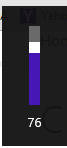
[{ key - when I press the key, a slider opens up on the top left corner and the number on the slider decreases as I continue to press the key repeatedly (Not sure what the key is changing!)

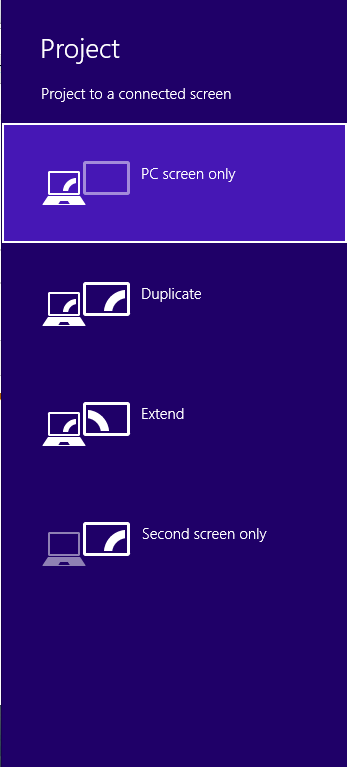
/? key - when I press the key, "Project to a connected screen" pops up in the sidebar

<, key - nothing is displayed

Any help or recommendations would be appreciated.

Thank you
Windows for home | Previous Windows versions | Performance and system failures

Locked Question. This question was migrated from the Microsoft Support Community. You can vote on whether it's helpful, but you can't add comments or replies or follow the question.

0 comments No comments

12 answers

Sort by: Most helpful
  1. Anonymous
    2014-02-28T02:29:00+00:00

    Hi

    Thanks for replying.

    I upgraded to 8.1 a month ago. Yesterday was the first time I noticed that the slash-question key not working.

    I installed the chip set drivers from the link that you provided. That didn't seem to help. The issue still remains!

    Was this answer helpful?

    0 comments No comments
  2. Anonymous
    2014-02-27T15:49:13+00:00

    laptop is a Inspiron 15z

    That is a model, not a product number.  You might see your SKU number in msinfo32.exe or (via a cmd window) with:

    wmic.exe  csproduct  list  /format:list

    However, in case yours is  1570,  see if page 26  of its Setup Guide helps explain things.  Apparently it has a BIOS setting where other machines might have an "F-Lock" key.

    ftp://ftp.dell.com/Manuals/Common/inspiron-1570_Setup%20Guide_en-us.pdf

    <quote>

    Multimedia Key First– This is the default setting. Pressing any multimedia control key performs the

    associated multimedia action. For function key, press <Fn> + the required function key

    </quote>

    I was hoping to find a complete description of your keyboard but did not find one.

    Was this answer helpful?

    0 comments No comments
  3. Anonymous
    2014-02-27T15:33:24+00:00

    Hi,

    Are you facing this issue after upgrading to Windows 8.1?

    Install the chipset drives, this might fix the issue.

    Inspiron 15Z 5523

    http://www.dell.com/support/drivers/us/en/19/Product/inspiron-15z-5523

    Was this answer helpful?

    0 comments No comments
  4. Anonymous
    2014-02-27T05:45:48+00:00

    Hi Robert

    Thanks for your reply. My laptop is a Inspiron 15z

    Was this answer helpful?

    0 comments No comments
  5. Anonymous
    2014-02-27T03:20:24+00:00

    some of the keys on my Dell laptop keyboard aren't working as expected

    Which product number specifically?  (E.g. so someone could find and interpret your User Guide for you.)

    Sounds like you have alternate functions for those keys which have been tied to W8 keyboard shortcuts specifically.  For example, on my Surface RT some of the function keys do that but normally I need to press a Fn key in order to get an alternate function from any of those keys.  I haven't tried to find out if the Fn key could be used in association with other keys.  Perhaps you have a Fn key (or similar modifier) which is sticking?

    HTH

    Robert Aldwinckle


    Was this answer helpful?

    0 comments No comments