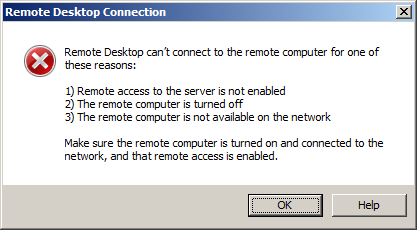
Error message while using Remote Desktop Connection.

Anonymous
2013-12-20T13:12:09+00:00

Hello,

I'm trying to open a Remote desktop connection from my laptop to my desktop computer. This over a local network. But I get this error :

Of course, (1) Remote access is enable, (2) my computer is on and (3) able from the network (I can upload files from one computer to another).

I verified my firewall. Everything seems to be properly configured. I also tried to put it off, without any change.

What else can I do ? Thanks for your help.

GS.

Windows for home | Previous Windows versions | Internet and connectivity

Locked Question. This question was migrated from the Microsoft Support Community. You can vote on whether it's helpful, but you can't add comments or replies or follow the question.

0 comments No comments
{count} votes

5 answers

Sort by: Most helpful
  1. Anonymous
    2013-12-21T04:53:19+00:00

    Hi Georges,

    1. Have you tried turning off Firewall on both the computers?
    2. Have you started facing this issue recently?

    Also, if you have any other third-party security program installed on the PCs then, temporarily disable them and check the issue.

    **Important:**Antivirus software can help protect your computer against viruses and other security threats. In most cases, you shouldn't disable your antivirus software. If you have to temporarily disable it to install other software, you should re-enable it as soon as you're done. If you're connected to the Internet or a network while your antivirus software is disabled, your computer is vulnerable to attacks.

    Refer to this article:

    Why can’t I connect using Remote Desktop Connection?http://windows.microsoft.com/en-gb/windows7/why-can-t-i-connect-using-remote-desktop-connection

    If that does not help, I would suggest you to post your query in the TechNet forum.

    http://social.technet.microsoft.com/Forums/en-us/w7itpronetworking/threads

    Hope this helps.

    0 comments No comments
  2. Anonymous
    2013-12-21T11:41:54+00:00

    Dear Rajith,

    Thank you for your help.

    1. Yes, I have tried to stop my firewall as well as my antivirus. No effect.
    2. Yes. The problem is recent. It occured more or less after I installed Dropbox. Of course, I tried to uninstall Dropbox. Here again : no result.

    I'm wondering if it could be a services problem. But I don't know the services that use Desktop remote.

    Thank you again.

    GS.

    0 comments No comments
  3. Anonymous
    2013-12-30T12:43:01+00:00

    Hi,

    Sorry for the late reply.

    Please check if these services are started on the PC.

    a. Click on Startbutton and type services.mscand press Enter.

    b. From the Services window, locate these services.

    Remote Desktop Service

    Remote Desktop Configuration.

    Remote Desktop Services UserMode Port Redirector.

    c. Right-click on these services and click on Properties and check if these services are started.

    2 people found this answer helpful.
    0 comments No comments
  4. Anonymous
    2013-12-30T13:16:03+00:00

    Dear Rajith,

    Thank you again for your help. Meanwhile, I've posted my question over social.technet.microsoft.com as suggested. You can read the thread here :

    http://social.technet.microsoft.com/Forums/windows/en-US/19034bb9-1a37-46a0-b57f-04d3de1cce63

    As you will see, I have done some test with services.

    My problem is still going on... Your help would be appreciate if possible.

    GS.

    0 comments No comments
  5. Anonymous
    2013-12-30T13:19:32+00:00

    I'm now considering the possibility to repair or re-install RDP. But I don't know if it's possible or not.

    ...

    GS.

    0 comments No comments