Microsoft 365 and Office | SharePoint | For business | Windows
A group of Microsoft Products and technologies used for sharing and managing content, knowledge, and applications.

This browser is no longer supported.
Upgrade to Microsoft Edge to take advantage of the latest features, security updates, and technical support.
' cx='32' cy='32' r='32' /%3E%3Ctext x='50%25' y='55%25' dominant-baseline='middle' text-anchor='middle' fill='%23FFF' %3EJJ%3C/text%3E%3C/svg%3E)
I added the modern script editor web part to a modern page @ https://github.com/pnp/sp-dev-fx-webparts/tree/master/samples/react-script-editor .. now the web part is working well for internal users while it is raising this error for external user:-
Something went wrong
If the problem persists, contact the site administrator and give them the information in Technical Details.
Technical Details

[SPLoaderError.loadComponentError]:
Failed to load component "3a328f0a-99c4-4b28-95ab-fe0847f657a3" (ScriptEditorWebPart). Original error: Failed to load path dependency "PropertyControlStrings" from component "3a328f0a-99c4-4b28-95ab-fe0847f657a3" (ScriptEditorWebPart). Original error: Error loading https://component-id.invalid/3a328f0a-99c4-4b28-95ab-fe0847f657a3_1.0.0/PropertyControlStrings
 Unable to load script https://***co.sharepoint.com/sites/AppCatalog/ClientSideAssets/1425175f-3ed8-44d2-8fc4-dd1497191294/react-script-editor-propertycontrolstrings_en-us_92b9e969e3f7ed4b17e1c27dfc789861.js

INNERERROR:
Failed to load path dependency "PropertyControlStrings" from component "3a328f0a-99c4-4b28-95ab-fe0847f657a3" (ScriptEditorWebPart). Original error: Error loading https://component-id.invalid/3a328f0a-99c4-4b28-95ab-fe0847f657a3_1.0.0/PropertyControlStrings
 Unable to load script https://***co.sharepoint.com/sites/AppCatalog/ClientSideAssets/1425175f-3ed8-44d2-8fc4-dd1497191294/react-script-editor-propertycontrolstrings_en-us_92b9e969e3f7ed4b17e1c27dfc789861.js
CALLSTACK:
Error
   at t._generateErrorStackForIE (https://modern.akamai.odsp.cdn.office.net/files/sp-client/sp-pages-assembly_en-gb_f0e2149359bcca08ea915a43bbe89991.js:1:870382)
   at t (https://modern.akamai.odsp.cdn.office.net/files/sp-client/sp-pages-assembly_en-gb_f0e2149359bcca08ea915a43bbe89991.js:1:869900)
   at t (https://modern.akamai.odsp.cdn.office.net/files/sp-client/sp-pages-assembly_en-gb_f0e2149359bcca08ea915a43bbe89991.js:1:1013797)
   at e.buildErrorWithVerboseLog (https://modern.akamai.odsp.cdn.office.net/files/sp-client/sp-pages-assembly_en-gb_f0e2149359bcca08ea915a43bbe89991.js:1:1036973)
   at e.buildLoadComponentError (https://modern.akamai.odsp.cdn.office.net/files/sp-client/sp-pages-assembly_en-gb_f0e2149359bcca08ea915a43bbe89991.js:1:1033012)
   at Anonymous function (https://modern.akamai.odsp.cdn.office.net/files/sp-client/chunk.systemjs-component-loader_en-us_06fb90fbb103ba8a0bb1.js:1:66104)
   at Anonymous function (https://modern.akamai.odsp.cdn.office.net/files/sp-client/sp-pages-assembly_en-gb_f0e2149359bcca08ea915a43bbe89991.js:1:13839)
   at C (https://modern.akamai.odsp.cdn.office.net/files/sp-client/sp-pages-assembly_en-gb_f0e2149359bcca08ea915a43bbe89991.js:1:13815)
   at R (https://modern.akamai.odsp.cdn.office.net/files/sp-client/sp-pages-assembly_en-gb_f0e2149359bcca08ea915a43bbe89991.js:1:13701)
   at T (https://modern.akamai.odsp.cdn.office.net/files/sp-client/sp-pages-assembly_en-gb_f0e2149359bcca08ea915a43bbe89991.js:1:13279)
is there a way to fix this? Thanks

Hi @john john ,
Is there any update ? Did the solution resolve the error for external user ?
If the solution is working, I suggest you could accept as answer so that it could also help others in the forum who have the similiar question in the future.
Thanks
Best Regards
' cx='32' cy='32' r='32' /%3E%3Ctext x='50%25' y='55%25' dominant-baseline='middle' text-anchor='middle' fill='%23FFF' %3EAE%3C/text%3E%3C/svg%3E)
I have the same issue, but for only a single internal user, and it seems only in the Chrome browser at this time, as they do not get the error when using Edge.
Hi @john john ,
ClientSideAssets is a special library which by default allow all internal user access deployed Js files in browser even there is no permission settings in the UI.
While for external user, the library won't provide any permission even for js file in browser, it's necessary to set at least read permission for all external user.
To grant permissions to all users including all external users at once, we can do this using SharePoint Online Management Shell by following below:
Connect-SPOService
Set-SPOTenant -ShowAllUsersClaim $true
Then grant permission to the group named "All Users (membership)":
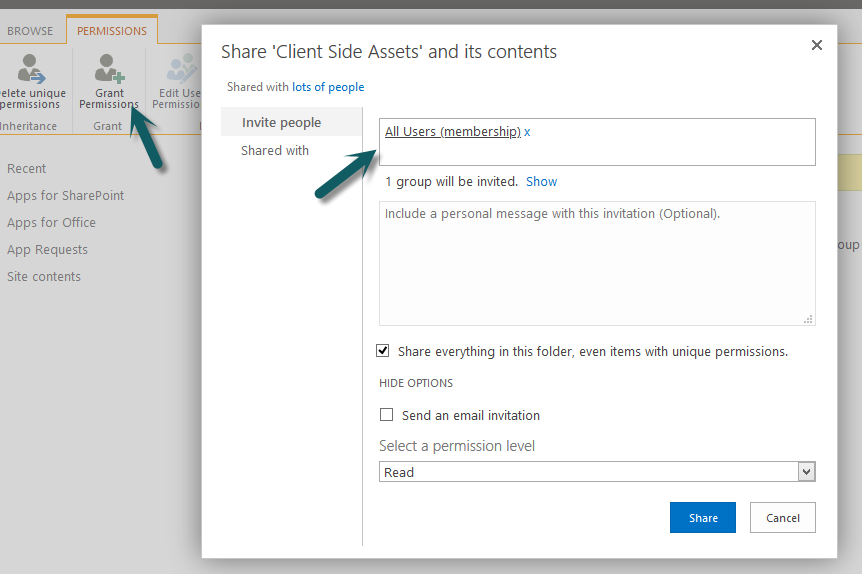
Referene:
Permissions Required For External Users To Use Modern UI (SPFx) Components
Grant permissions to all external users on Client Side Assets library in App Catalog site
Thanks
Best Regards
If an Answer is helpful, please click "Accept Answer" and upvote it.
Note: Please follow the steps in our documentation to enable e-mail notifications if you want to receive the related email notification for this thread.
@Jerryzy-MSFT thanks for the reply .. i access the permission settings for the https://*co.sharepoint.com/sites/AppCatalog/ClientSideAssets lib **and it has unique permissions with no users inside it,, so how the internal users are using those assets then?
Similiar with Public CDN, it's the default ClientSide Assets if no CDN enabled.
It's available for all internal users but for external users, it needs to grant permission like above.
@Jerryzy-MSFT ok fine, so i need to open the app catalog for external sharing as a first step,, as by default the external sharing on app catalog will be disabled? is this correct/valid?
Thanks
@john john ,Yes, this is correct.
By default, the App Catalog site's external sharing is disabled. Please enable it in Admin Center:
