Microsoft Security | Intune | Configuration Manager | Updates
Managing and deploying updates via Configuration Manager

This browser is no longer supported.
Upgrade to Microsoft Edge to take advantage of the latest features, security updates, and technical support.
' cx='32' cy='32' r='32' /%3E%3Ctext x='50%25' y='55%25' dominant-baseline='middle' text-anchor='middle' fill='%23FFF' %3EKP%3C/text%3E%3C/svg%3E)
Hi All,
I am finding the below error when i run GP update
"Windows failed to apply the MDM policy settings. MDM policy policy might have its own log"
As per MS, they recommend to ignore (https://learn.microsoft.com/en-us/troubleshoot/mem/intune/windows-failed-to-apply-mdm-policy#:~:text=This%20issue%20occurs%20if%20the,you%20receive%20the%20warning%20message.) which is fine
But seems "CHECK FOR UPDATES" under updates & security is enabled and user can check for update online. Before it was greyed out but now it is enabled
Is this related to MDM or something causing it. Please advice
' cx='32' cy='32' r='32' /%3E%3Ctext x='50%25' y='55%25' dominant-baseline='middle' text-anchor='middle' fill='%23FFF' %3ECM%3C/text%3E%3C/svg%3E)
@karthik palani , For the GP update warning message, we can safely ignore it. From your description, it seems the "Check for updates" is enabled after we deploy windows 10 update rings profile or Windows 10 Feature update in Intune. if there's any misunderstanding, feel free to let us know.
To disable the function, we can set "Option to check for Windows updates" as disable in the windows update ring policy in Intune.
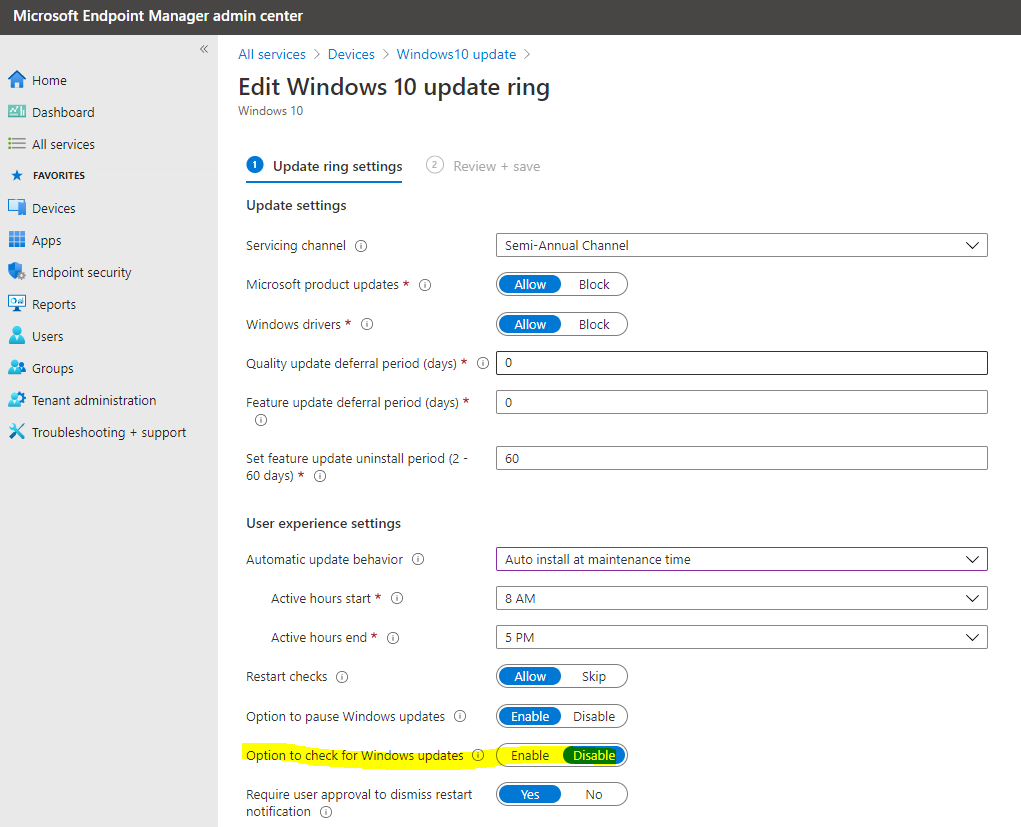
Hope it can help.
If the response is helpful, please click "Accept Answer" and upvote it.
Note: Please follow the steps in our documentation to enable e-mail notifications if you want to receive the related email notification for this thread.
Thanks for the information
I verified the above steps, the machines which are affected are not part of Intune auto enrollment or Update policies.
I even verified SCCM which is not causing this issue. Is there any log i can check on why this "Check for Updates" is enabled
Please suggest
@karthik palani , From your description, it seem you don't use Intune to configure the Windows update for Business. Based on my research, GPO can also control the behavior by "Turn off access to all Windows Update features". We can check if it is set.
https://community.spiceworks.com/topic/2203652-disable-check-online-for-updates-from-microsoft-update-and-nothing-else
Note: Non-microsoft link, just for the reference.
However, if it is also not controlled by GPO. Based on my experience, that means, the setting is on by default, the organization didn't control it. If we want to control it, we can set policy in GPO or Intune Windows 10 update rings policy to do it.
Hope it can help.
@karthik palani , How's everything going? I am writing to see if there's anything else we can help. If yes, feel free to let us know.