I ran sfc /scannow and got a number of issues that could not be repaired.
I copied the issues at the end of this post. About the first (Unified telemetry client) I read that it was a false positive.
Here in Microsoft community I then read that I should try running the DISM.
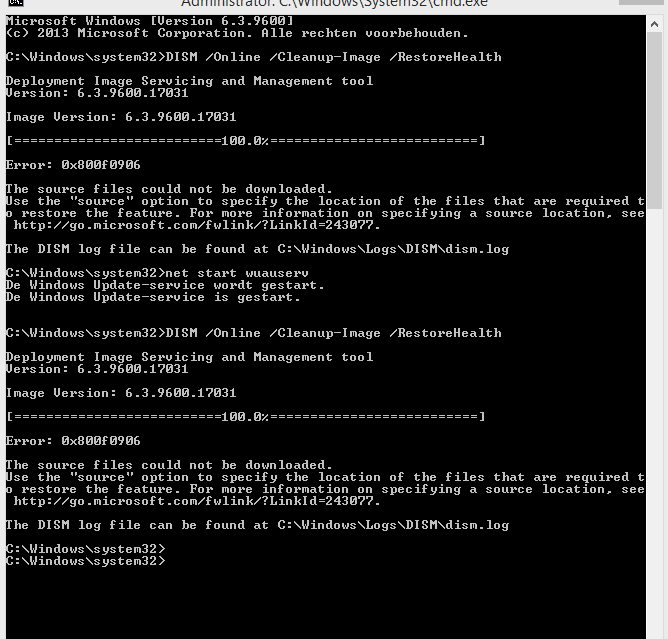
This gave an error.
I also tried starting windows update service first but still got error message.
This is a screenimage;
;
I have the CBS and DISM logs but do not know how to add them here.
For the CBS log I copied all the issues that could not be repaired:
2015-08-17 20:26:57, Info
CSI 000004d1 Hashes for file member \SystemRoot\WinSxS\Temp\InFlight\0e238d4c1ad9d001387e0000ec21a023\amd64_microsoft-windows-u..ed-telemetry-client_31bf3856ad364e35_6.3.9600.17842_none_90da81a4dac50d54\utc.app.json do not match actual
file [l:24{12}]"utc.app.json" :
Found: {l:32 b:hyDk3BXuVEmGLmMMYKyiT59XkHrpGhm9a4DXTb14jjU=} Expected: {l:32 b:6510UErwHGoFg3sRd3gzh3HSbTceuHem3Rnk0NraKS8=}
2015-08-17 20:26:57, Info
CSI 000004d2 [SR] Cannotrepair member file [l:24{12}]"utc.app.json" of Microsoft-Windows-Unified-Telemetry-Client, Version = 6.3.9600.17842, pA = PROCESSOR_ARCHITECTURE_AMD64 (9), Culture neutral, VersionScope
= 1 nonSxS, PublicKeyToken = {l:8 b:31bf3856ad364e35}, Type neutral, TypeName neutral, PublicKey neutral in the store, hash mismatch
2015-08-17 20:26:57, Info
CSI 000004d3 Hashes for file member \SystemRoot\WinSxS\Temp\InFlight\0e238d4c1ad9d001387e0000ec21a023\amd64_microsoft-windows-u..ed-telemetry-client_31bf3856ad364e35_6.3.9600.17842_none_90da81a4dac50d54\telemetry.ASM-WindowsDefault.json
do not match actual file [l:66{33}]"telemetry.ASM-WindowsDefault.json" :
Found: {l:32 b:uJb1xc+7UfB0sWDxWhgMheOSADljkxkTslfhp7nidZg=} Expected: {l:32 b:EeQJzlVPvq9GNIcA2FEwrOjEeuDam1G+ol3x61gKasQ=}
2015-08-17 20:26:57, Info
CSI 000004d4 [SR] Cannotrepair member file [l:66{33}]"telemetry.ASM-WindowsDefault.json"
of Microsoft-Windows-Unified-Telemetry-Client, Version = 6.3.9600.17842, pA = PROCESSOR_ARCHITECTURE_AMD64 (9), Culture neutral, VersionScope = 1 nonSxS, PublicKeyToken = {l:8 b:31bf3856ad364e35}, Type neutral, TypeName neutral, PublicKey neutral in the store,
hash mismatch
2015-08-17 20:26:59, Info
CSI 000004d5 [DIRSD OWNER WARNING] Directory [ml:520{260},l:94{47}]"??\C:\Windows\diagnostics\system\UsbCore\nl-NL" is not owned but specifies SDDL in component Microsoft-Windows-UsbCoreDiagnostic.Resources, pA = PROCESSOR_ARCHITECTURE_AMD64
(9), Culture = [l:10{5}]"nl-NL", VersionScope = 1 nonSxS, PublicKeyToken = {l:8 b:31bf3856ad364e35}, Type neutral, TypeName neutral, PublicKey neutral
2015-08-17 20:27:00, Info
CSI 000004d6 Hashes for file member \SystemRoot\WinSxS\Temp\InFlight\381d5e4e1ad9d001637e0000ec21a023\amd64_microsoft-windows-u..ed-telemetry-client_31bf3856ad364e35_6.3.9600.17842_none_90da81a4dac50d54\utc.app.json do not match actual
file [l:24{12}]"utc.app.json" :
Found: {l:32 b:hyDk3BXuVEmGLmMMYKyiT59XkHrpGhm9a4DXTb14jjU=} Expected: {l:32 b:6510UErwHGoFg3sRd3gzh3HSbTceuHem3Rnk0NraKS8=}
2015-08-17 20:27:00, Info
CSI 000004d7 [SR] Cannotrepair member file [l:24{12}]"utc.app.json"
of Microsoft-Windows-Unified-Telemetry-Client, Version = 6.3.9600.17842, pA = PROCESSOR_ARCHITECTURE_AMD64 (9), Culture neutral, VersionScope = 1 nonSxS, PublicKeyToken = {l:8 b:31bf3856ad364e35}, Type neutral, TypeName neutral, PublicKey neutral in the store,
hash mismatch
2015-08-17 20:27:00, Info
CSI 000004d8 [SR] This component was referenced by [l:154{77}]"Package_1_for_KB3068708~31bf3856ad364e35~amd64~~6.3.1.0.3068708-1_neutral_GDR"
2015-08-17 20:27:00, Info
CSI 000004d9 Hashes for file member \SystemRoot\WinSxS\Temp\InFlight\381d5e4e1ad9d001637e0000ec21a023\amd64_microsoft-windows-u..ed-telemetry-client_31bf3856ad364e35_6.3.9600.17842_none_90da81a4dac50d54\telemetry.ASM-WindowsDefault.json
do not match actual file [l:66{33}]"telemetry.ASM-WindowsDefault.json" :
Found: {l:32 b:uJb1xc+7UfB0sWDxWhgMheOSADljkxkTslfhp7nidZg=} Expected: {l:32 b:EeQJzlVPvq9GNIcA2FEwrOjEeuDam1G+ol3x61gKasQ=}
2015-08-17 20:27:00, Info
CSI 000004da [SR] Cannotrepair member file [l:66{33}]"telemetry.ASM-WindowsDefault.json"
of Microsoft-Windows-Unified-Telemetry-Client, Version = 6.3.9600.17842, pA = PROCESSOR_ARCHITECTURE_AMD64 (9), Culture neutral, VersionScope = 1 nonSxS, PublicKeyToken = {l:8 b:31bf3856ad364e35}, Type neutral, TypeName neutral, PublicKey neutral in the store,
hash mismatch
2015-08-17 20:27:00, Info
CSI 000004db [SR] This component was referenced by [l:154{77}]"Package_1_for_KB3068708~31bf3856ad364e35~amd64~~6.3.1.0.3068708-1_neutral_GDR"
_AMD64 (9), Culture neutral, VersionScope = 1 nonSxS, PublicKeyToken = {l:8 b:31bf3856ad364e35}, Type neutral, TypeName neutral, PublicKey neutral
2015-08-17 20:34:25, Info
CSI 00000943 Hashes for file member \SystemRoot\WinSxS\Temp\InFlight\eb3bfc571bd9d001a7ca0000ec21a023\amd64_microsoft-windows-u..ed-telemetry-client_31bf3856ad364e35_6.3.9600.17842_none_90da81a4dac50d54\utc.app.json do not match actual
file [l:24{12}]"utc.app.json" :
Found: {l:32 b:hyDk3BXuVEmGLmMMYKyiT59XkHrpGhm9a4DXTb14jjU=} Expected: {l:32 b:6510UErwHGoFg3sRd3gzh3HSbTceuHem3Rnk0NraKS8=}
2015-08-17 20:34:25, Info
CSI 00000944 [SR] Cannotrepair member file [l:24{12}]"utc.app.json"
of Microsoft-Windows-Unified-Telemetry-Client, Version = 6.3.9600.17842, pA = PROCESSOR_ARCHITECTURE_AMD64 (9), Culture neutral, VersionScope = 1 nonSxS, PublicKeyToken = {l:8 b:31bf3856ad364e35}, Type neutral, TypeName neutral, PublicKey neutral in the store,
hash mismatch
2015-08-17 20:34:25, Info
CSI 00000945 Hashes for file member \SystemRoot\WinSxS\Temp\InFlight\eb3bfc571bd9d001a7ca0000ec21a023\amd64_microsoft-windows-u..ed-telemetry-client_31bf3856ad364e35_6.3.9600.17842_none_90da81a4dac50d54\telemetry.ASM-WindowsDefault.json
do not match actual file [l:66{33}]"telemetry.ASM-WindowsDefault.json" :
Found: {l:32 b:uJb1xc+7UfB0sWDxWhgMheOSADljkxkTslfhp7nidZg=} Expected: {l:32 b:EeQJzlVPvq9GNIcA2FEwrOjEeuDam1G+ol3x61gKasQ=}
2015-08-17 20:34:25, Info
CSI 00000946 [SR] Cannotrepair member file [l:66{33}]"telemetry.ASM-WindowsDefault.json"
of Microsoft-Windows-Unified-Telemetry-Client, Version = 6.3.9600.17842, pA = PROCESSOR_ARCHITECTURE_AMD64 (9), Culture neutral, VersionScope = 1 nonSxS, PublicKeyToken = {l:8 b:31bf3856ad364e35}, Type neutral, TypeName neutral, PublicKey neutral in the store,
hash mismatch
2015-08-17 20:34:26, Info
CSI 00000947 Hashes for file member \SystemRoot\WinSxS\amd64_prncacla.inf_31bf3856ad364e35_6.3.9600.17415_none_95dd5540d57f8c01\Amd64\CNBJ2530.DPB do not match actual file [l:36{18}]"Amd64\CNBJ2530.DPB" :
Found: {l:32 b:v1Esz8BVi8FeeaBNfwKwB//e7r3kwk6AGPLRTf5jsbc=} Expected: {l:32 b:n520k714Uu3utHa5JGQ6HQYbZphKhlMWq5pEmfnCDuw=}
- Re: Microsoft-Windows-Unified-Telemetry-Client corrupt files: "utc.app.json" & "telem
Hi Stijn :)
These files are falsely reported as corrupt by SFC. Microsoft is aware of this situation and they said that this issue will be fixed in a later update. These files aren't corrupt and they won't affect anything on your system. You can leave it be without
any consequences. For more information, see the Microsoft Article below.
https://support.microsoft.com/en-us/kb/3022345
This update contains the following files that are occasionally updated by the Diagnostic Tracking Service: telemetry.ASM-WindowsDefault.json utc.app.json The two files are marked as static files in the update. When an advanced user runs the System File Checker Tool (sfc.exe), the files are unintentionally flagged as corrupted. There is no impact or actual corruption on a device running this update, and a later service update will resolve this issue.
2015-08-17 20:34:26, Info
CSI 00000948 [SR] Cannotrepair member file [l:36{18}]"Amd64\CNBJ2530.DPB"
of prncacla.inf, Version = 6.3.9600.17415, pA = PROCESSOR_ARCHITECTURE_AMD64 (9), Culture neutral, VersionScope = 1 nonSxS, PublicKeyToken = {l:8 b:31bf3856ad364e35}, Type = [l:24{12}]"driverUpdate", TypeName neutral, PublicKey neutral in the store, hash mismatch
2015-08-17 20:34:26, Info
CSI 00000949 Hashes for file member \SystemRoot\WinSxS\amd64_prncacla.inf_31bf3856ad364e35_6.3.9600.17415_none_95dd5540d57f8c01\Amd64\CNBJ2530.DPB do not match actual file [l:36{18}]"Amd64\CNBJ2530.DPB" :
Found: {l:32 b:v1Esz8BVi8FeeaBNfwKwB//e7r3kwk6AGPLRTf5jsbc=} Expected: {l:32 b:n520k714Uu3utHa5JGQ6HQYbZphKhlMWq5pEmfnCDuw=}
2015-08-17 20:34:26, Info
CSI 0000094a [SR] Cannotrepair member file [l:36{18}]"Amd64\CNBJ2530.DPB"
of prncacla.inf, Version = 6.3.9600.17415, pA = PROCESSOR_ARCHITECTURE_AMD64 (9), Culture neutral, VersionScope = 1 nonSxS, PublicKeyToken = {l:8 b:31bf3856ad364e35}, Type = [l:24{12}]"driverUpdate", TypeName neutral, PublicKey neutral in the store, hash mismatch
2015-08-17 20:34:26, Info
CSI 0000094b [SR] This component was referenced by [l:166{83}]"Package_2709_for_KB3000850~31bf3856ad364e35~amd64~~6.3.1.8.3000850-6825_neutral_GDR"
2015-08-17 20:34:26, Info
CSI 0000094c Hashes for file member \SystemRoot\WinSxS\Temp\InFlight\89037d581bd9d001b0ca0000ec21a023\amd64_microsoft-windows-u..ed-telemetry-client_31bf3856ad364e35_6.3.9600.17842_none_90da81a4dac50d54\utc.app.json do not match actual
file [l:24{12}]"utc.app.json" :
Found: {l:32 b:hyDk3BXuVEmGLmMMYKyiT59XkHrpGhm9a4DXTb14jjU=} Expected: {l:32 b:6510UErwHGoFg3sRd3gzh3HSbTceuHem3Rnk0NraKS8=}
2015-08-17 20:34:26, Info
CSI 0000094d [SR] Cannotrepair
member file [l:24{12}]"utc.app.json" of Microsoft-Windows-Unified-Telemetry-Client, Version = 6.3.9600.17842, pA = PROCESSOR_ARCHITECTURE_AMD64 (9), Culture neutral, VersionScope = 1 nonSxS, PublicKeyToken = {l:8 b:31bf3856ad364e35}, Type neutral, TypeName
neutral, PublicKey neutral in the store, hash mismatch
2015-08-17 20:34:26, Info
CSI 0000094e [SR] This component was referenced by [l:154{77}]"Package_1_for_KB3068708~31bf3856ad364e35~amd64~~6.3.1.0.3068708-1_neutral_GDR"
2015-08-17 20:34:26, Info
CSI 0000094f Hashes for file member \SystemRoot\WinSxS\Temp\InFlight\89037d581bd9d001b0ca0000ec21a023\amd64_microsoft-windows-u..ed-telemetry-client_31bf3856ad364e35_6.3.9600.17842_none_90da81a4dac50d54\telemetry.ASM-WindowsDefault.json
do not match actual file [l:66{33}]"telemetry.ASM-WindowsDefault.json" :
Found: {l:32 b:uJb1xc+7UfB0sWDxWhgMheOSADljkxkTslfhp7nidZg=} Expected: {l:32 b:EeQJzlVPvq9GNIcA2FEwrOjEeuDam1G+ol3x61gKasQ=}
2015-08-17 20:34:26, Info
CSI 00000950 [SR] Cannotrepair member file [l:66{33}]"telemetry.ASM-WindowsDefault.json"
of Microsoft-Windows-Unified-Telemetry-Client, Version = 6.3.9600.17842, pA = PROCESSOR_ARCHITECTURE_AMD64 (9), Culture neutral, VersionScope = 1 nonSxS, PublicKeyToken = {l:8 b:31bf3856ad364e35}, Type neutral, TypeName neutral, PublicKey neutral in the store,
hash mismatch
2015-08-17 20:34:26, Info
CSI 00000951 [SR] This component was referenced by [l:154{77}]"Package_1_for_KB3068708~31bf3856ad364e35~amd64~~6.3.1.0.3068708-1_neutral_GDR"
' cx='32' cy='32' r='32' /%3E%3Ctext x='50%25' y='55%25' dominant-baseline='middle' text-anchor='middle' fill='%23FFF' %3EA%3C/text%3E%3C/svg%3E)

 Note
Note