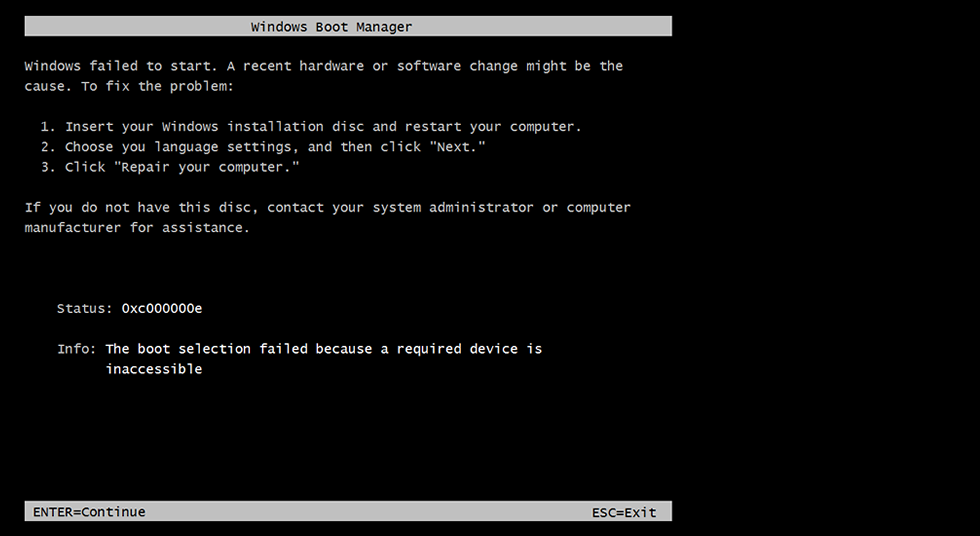
How to fix Windows 7 0xc000000e boot error?

Anonymous
2015-11-17T02:39:19+00:00

I've built my computer about three months ago using a GTX970 graphics card, two 1TB hard disk drives, one 256GB solid state drive, and a CD/DVD disc drive. For about two and a half of those months, everything has worked fine. However, about two weeks ago, the error 0xc000000e started appearing whenever I try to boot. While the computer is in the error state, no USB devices function (including the keyboard), so all I could do was turn the computer on and off.

Here's a picture of the error: https://neosmart.net/wiki/wp-content/upl...

I eventually remedied the error by unplugging the CD/DVD drive, which worked for some unknown reason, but now every time I boot the computer I have to either unplug or plug in the drive, which is very annoying as I have to partially disassemble the case every time to do this. If I don't do this, the 0xc000000e error happens.

I need a way to fix this error permanently. I don't have a Windows 7 install disc and don't want to install windows 10, and I've tried fixing the problem by using a registry cleaner, but it failed. I've also tried to rebuild the BCD, but upon running the "ren C:\boot\bcd bcd.old" command the system says it cannot find the file specified. Figuring my drive letter was incorrect, I used DISKPART to try and determine the correct drive. But upon detailing the active partition, the system returns that the partition has no drive letter. Here's a picture of it:I'm dumbfounded, please help!

Windows for home | Previous Windows versions | Windows update

Locked Question. This question was migrated from the Microsoft Support Community. You can vote on whether it's helpful, but you can't add comments or replies or follow the question.

0 comments No comments
{count} votes

2 answers

Sort by: Most helpful
  1. Anonymous
    2015-11-18T00:01:58+00:00

    Hi,

    Thank you for posting in Microsoft community.

    1.    Since when are you facing this issue?

    2.    Any recent changes made to the computer?

    Method 1:

    Check if you are able to boot in safe mode or not:

    http://windows.microsoft.com/en-US/windows7/Start-your-computer-in-safe-mode

    If yes, I suggest you to put the computer in clean boot state and check.

    To help troubleshoot error messages and other issues, you can start Windows Vista by using a minimal set of drivers and startup programs. This kind of startup is known as a "clean boot." A clean boot helps eliminate software conflicts.

    Refer the link below for more details: https://support.microsoft.com/en-us/kb/929135/en-us/

    Note:

    After you have finished troubleshooting, follow these steps in the above article to reset the computer to start as usual.

    If not, try performing a startup repair and check:

    http://windows.microsoft.com/en-US/windows7/What-are-the-system-recovery-options-in-Windows-7

    Method 2:

    If not, I suggest you to Rebuild the BCD store manually by using the Bcdedit.exe tool.

    Refer step 3 to do the same in the below article:

    **http://support.microsoft.com/kb/2004518**

    For your reference:

    http://social.technet.microsoft.com/Forums/en/itprovistadeployment/thread/4de675a4-14ae-4469-b881-5df58d846bff

    Hope this helps.

    Please reply to us with the status of the issue.

    Thanks.

    3 people found this answer helpful.
    0 comments No comments
  2. Anonymous
    2015-11-18T03:53:47+00:00

    It just started happening about two weeks ago, for no reason.

    I cannot boot in safe mode, nor can I clean boot, at least not correctly. WHENEVER the computer is turned on, via restart or just by the power button, it boots into the 0xc000000e error state. HOWEVER, after unplugging or plugging in the CD  drive and turning it off and on again, the computer will then boot however I choose it.

    A note: I unplugged all SATA drives that were not essential for booting (CD drive, 1TB HDD, 1TB HDD), and the error persisted, although it has now changed to the following:

    Now every time my computer would normally go into the 0xc000000e error state, it goes into this error state instead. What gives?

    8 people found this answer helpful.
    0 comments No comments