Share via

Removing program name from add/delete programs in Control Panel Windows 8.1

Anonymous
2016-03-02T20:42:09+00:00

Please help in removing a program name in the control panel list of programs.  Uninstall doesn't work and returns an error saying the program doesn't exist.  I have searched my pc and can not find an instance of this program.  I did have it installed at one time, but removed it, along with all the residuals I could find, but it is still listed in the Control Panel.  The program is epub reader, and my system is windows 8.1

Windows for home | Previous Windows versions | Files, folders, and storage

Locked Question. This question was migrated from the Microsoft Support Community. You can vote on whether it's helpful, but you can't add comments or replies or follow the question.

0 comments No comments

5 answers

Sort by: Most helpful
  1. Anonymous
    2016-03-08T11:25:10+00:00

    Hi,

    Thank you for the update on the issue.

    If program is showing in control panel but actually it is not there then try to run the Autorun tool mentioned in my first post. **Microsoft AutoRuns utility is used to remove all the obsolete traces in registry for the uninstalled programs.**To download the tool you may refer the article mentioned below.

    Autoruns for Windows v13.51

    Do keep us updated.

    Regards,

    Was this answer helpful?

    2 people found this answer helpful.
    0 comments No comments
  2. Anonymous
    2016-03-07T18:39:28+00:00

    I have previously tried the fix program, but again, its for programs that exist that can't be installed.  My problem, as previously stated, is the name of the program is listed on the control panel programs list, but is actually not there, and when an attempt to delete it is initiated, it returns the message not found.  I don't believe the program is there.  I think that its just a matter of getting the name of the program, which is listed in the control panel programs removed.  There apparently is a glitch in the windows 8.1 that fails to remove the name of the program even though the program has been deleted. 

    Thanks for your suggestion, but not a solution to my problem.

    Was this answer helpful?

    1 person found this answer helpful.
    0 comments No comments
  3. Anonymous
    2016-03-07T11:42:44+00:00

    Hi,

    Thank you for the update on the issue.

    If you could not uninstall the application you may try to run the fixit provided below and see if it helps you to remove the program from your computer.

    Fix problems that programs cannot be installed or uninstalled

    Do keep us updated.

    Regards,

    Was this answer helpful?

    1 person found this answer helpful.
    0 comments No comments
  4. Anonymous
    2016-03-03T13:17:51+00:00

    Hello,

    Thank you for posting your concern on the forum.

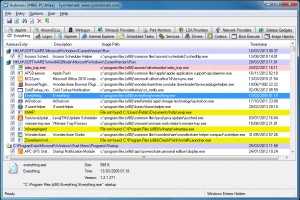
    As per the issue description you are unable to remove a program from add/delete programs list in control panel. There might be a chance that some of its traces get remain in the registry. So, try to remove those traces of programs using Autorun and see if it helps.

    Let’s Download and run Microsoft AutoRuns utility to remove all the obsolete traces in registry for the uninstalled programs. Autoruns has the most comprehensive knowledge of auto-starting locations of any startup monitor, shows you what programs are configured to run during system bootup or login, and shows you the entries in the order Windows processes them. These programs include ones in your startup folder, Run, RunOnce, and other Registry keys. \

    Delete all the Yellow or red entries and restart the computer and check if that helps.

    Stop a program from running automatically when Windows starts.

    http://windows.microsoft.com/en-us/windows/stop-program-running-automatically-windows-starts#1TC=windows-7

    Refer the picture below:
    Important This section, method, or task contains steps that tell you how to modify the registry. However, serious problems might occur if you modify the registry incorrectly. Therefore, make sure that you follow these steps carefully. For added protection, back up the registry before you modify it. Then, you can restore the registry if a problem occurs. For more information about how to back up and restore the registry, click the following article number to view the article in the Microsoft Knowledge Base.

    ***How to back up and restore the registry in Windows***

    Hope this would help. If issue still persists post back with current status of your computer and result of the proposed suggestion, we will be happy to assist you.

    Regards,

    Was this answer helpful?

    1 person found this answer helpful.
    0 comments No comments
  5. Anonymous
    2016-03-03T16:03:47+00:00

    1.  The suggested repair app appears to be for windows 7 and windows Vista.  I have windows 8.1. 

    2.  The suggested app is for programs that run automatically when windows starts up.  This is not my problem.

    My problem is that opening programs and features under Control Panel, I have a program called epub reader for windows version 5.3 that will not uninstall.  When I click on uninstall I receive a pop up error which reads, File "C:\Program Files (x86)\ePub Reader for Windows\unins000.dat" does not exist. Cannot uninstall.  Since this app does not exist, I want to remove the listing for this app so it no longer appears in the programs and features listing.

    Was this answer helpful?

    0 comments No comments
