Developer technologies | .NET | Xamarin
A Microsoft framework for building cross-platform mobile apps using .NET and C# with native performance and user interfaces.
This browser is no longer supported.
Upgrade to Microsoft Edge to take advantage of the latest features, security updates, and technical support.
' cx='32' cy='32' r='32' /%3E%3Ctext x='50%25' y='55%25' dominant-baseline='middle' text-anchor='middle' fill='%23FFF' %3EY%3C/text%3E%3C/svg%3E)
Hi
I replaced this file with this code:
using SkiaSharp;
using SkiaSharp.Views.Forms;
using System.IO;
using System.Reflection;
namespace SkiaSharpFormsDemos.Curves
{
    public partial class BezierCurvePage : InteractivePage
    {
        SKBitmap resourceBitmap;
        public BezierCurvePage()
        {
            string resourceID = "SkiaSharpFormsDemos.Media.Banana.jpg";
            Assembly assembly = GetType().GetTypeInfo().Assembly;
            using (Stream stream = assembly.GetManifestResourceStream(resourceID))
            {
                resourceBitmap = SKBitmap.Decode(stream);
            }
            touchPoints = new TouchPoint[2];
            touchPoints[0] = new TouchPoint(50, 50);
            touchPoints[1] = new TouchPoint(350, 350);
            InitializeComponent();
            baseCanvasView = canvasView;
        }

        void OnCanvasViewPaintSurface(object sender, SKPaintSurfaceEventArgs args)
        {
            SKSurface surface = args.Surface;
            SKCanvas canvas = surface.Canvas;
            canvas.Clear();
            SKRect rect = new SKRect(touchPoints[0].Center.X, touchPoints[0].Center.Y, touchPoints[1].Center.X, touchPoints[1].Center.Y);
            // canvas.DrawBitmap(resourceBitmap, rect);   // works
            canvas.DrawBitmap(resourceBitmap, rect, BitmapStretch.Uniform); // does not work
            foreach (TouchPoint touchPoint in touchPoints)
            {
                touchPoint.Paint(canvas);
            }
        }
    }
}
When using BitmapStretch.Uniform bitmap angles are drawn away from touch points. (line 31).

How to make bitmap in the correct positions for touch points?
Thanks
Hello,
Welcome to Microsoft Q&A!
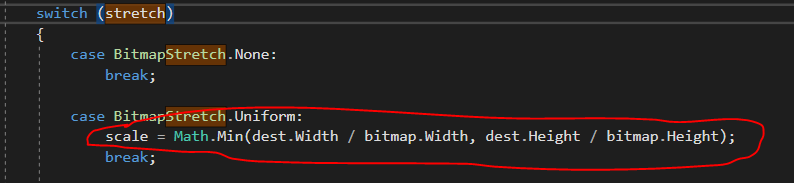
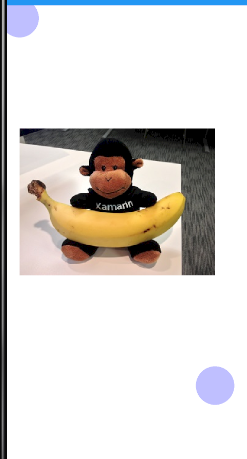
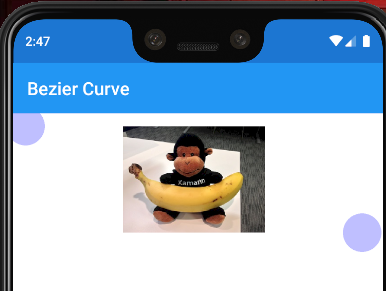
The behavior is normal , the ratio of that image keeps the same if we select Uniform .
The scale is decided by the min ratio value of the with and height .
If the height ratio is greater than width ratio
If the width ratio is greater than height ratio
If the response is helpful, please click "Accept Answer" and upvote it.
Note: Please follow the steps in our documentation to enable e-mail notifications if you want to receive the related email notification for this thread.
How to correct touch points position by using scale and offset?
You can change BitmapStretch.Uniform to BitmapStretch.Fill , but in this way you can't keep the original ratio.
Any idea to solve this issue?