Hello everyone,
I have installed Windows 8.1 on my Computer & Visual studio 2013 Update 5. I created a project in Windows Universal store app & create
a certificate for Windows app. There is no option for creating certificate for Windows Phone app. I want to install it on W10M device which is running on latest build. I have also register my device with Windows Phone 8.1 device registration tool. I have
selected developer mode on my W10M. I created .appxbundle, .appxsym & .appx files with Visual studio 2013.5. After selecting developer mode in my W10M, I paired device with local network. When i am going to install app on device i got following issue,.
Can anyone provide solution to this with details.
Screenshot attached.
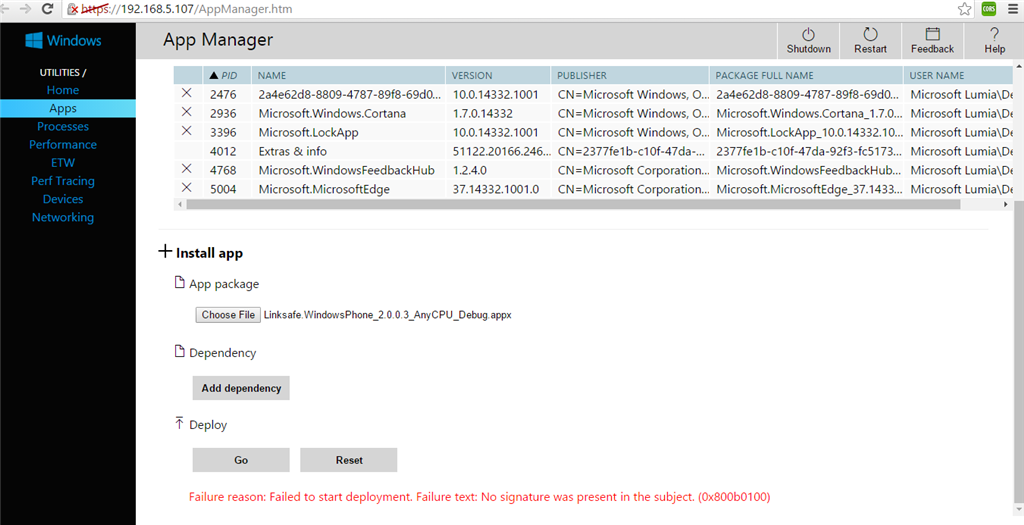
Failure reason: Failed to start deployment. Failure text: No signature was present in the subject. (0x800b0100)
Please provide solution to this as soon as possiible.
' cx='32' cy='32' r='32' /%3E%3Ctext x='50%25' y='55%25' dominant-baseline='middle' text-anchor='middle' fill='%23FFF' %3EA%3C/text%3E%3C/svg%3E)
