When the system is performing slowly and you look at the Processes tab in Task Manager (Ctrl-Alt-Del), with the "Show processes from all users" checked click the CPU column header to sort highest to lowest.
Take a screen shot (or two...) and post them in your next reply.
How to include a screen shot in your topic
We expect to see something like this:
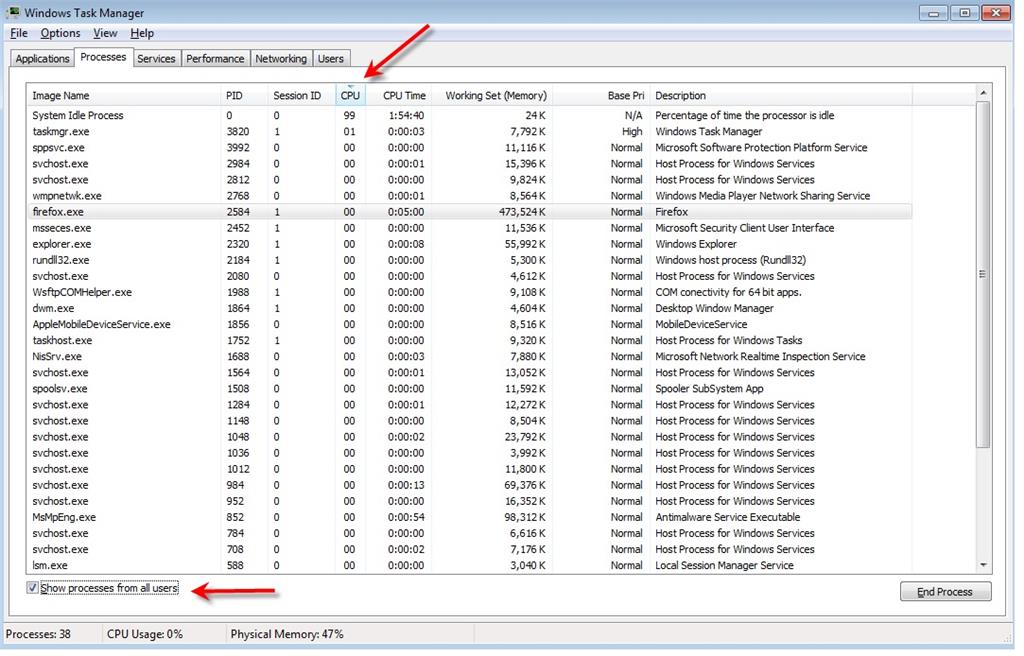
The System Idle Process is the amount of "free time" your CPU has so the more of that the better. If you see some other Process that even momentarily consume large amounts of CPU capture it in your screen shot or tell us what it is.
If the hardware reserved "shot up to 4.6g" does that mean you are certain that's not the way it was or the way it has always been - do you know in the past it used to be some other lower amount?
If you unchecked the box in msconfig does that mean it was checked when you looked? That would indicate tampering since that is not the default configuration.
Did you perform a system recovery or a system restore (not the same thing).
Do this so we can know more about your system:
Click the Start button/orb in the lower-left corner of your screen. Or, press the Windows logo key on your keyboard.
In the box enter:
msinfo32
Select/click msinfo32.exe and the System Information dialog box will open.
Click on System Summary, click Edit, Select All (Ctrl-A), Copy (Ctrl-C) and then paste (Ctrl-V) the information back here in your next reply.
For video driver information, expand the Components, click Display, click Edit, Select All (Ctrl-A), Copy (Ctrl-C) and then paste (Ctrl-V) the information back here.
There will be some personal information (like System Name and User Name), and whatever appears to be private information to you, just delete it from the pasted information.
' cx='32' cy='32' r='32' /%3E%3Ctext x='50%25' y='55%25' dominant-baseline='middle' text-anchor='middle' fill='%23FFF' %3EA%3C/text%3E%3C/svg%3E)
