Community Center | Not monitored
Tag not monitored by Microsoft.

This browser is no longer supported.
Upgrade to Microsoft Edge to take advantage of the latest features, security updates, and technical support.
' cx='32' cy='32' r='32' /%3E%3Ctext x='50%25' y='55%25' dominant-baseline='middle' text-anchor='middle' fill='%23FFF' %3EJL%3C/text%3E%3C/svg%3E)
Hi All,
I need help.
I have the following data in Power Query:
Invoice No. Item No. Group
IN0838602 33853 Non-Commodity
IN0838602 11464 Non-Commodity
IN0838607 37301 Non-Commodity
IN0838607 11472 Non-Commodity
IN0838607 12903 Non-Commodity
IN0838608 11810 Commodity
IN0838608 11439 Non-Commodity
IN0838608 13132 Commodity
IN0838609 11430 Non-Commodity
IN0838609 11736 Non-Commodity
IN0838609 11464 Non-Commodity
IN0838609 11472 Non-Commodity
IN0838609 51938 Commodity
IN0838616 11481 Non-Commodity
IN0838616 11497 Non-Commodity
IN0838616 11739 Non-Commodity
IN0838616 51637 Commodity
IN0838617 51995 Commodity
IN0838617 11481 Non-Commodity
IN0838617 11738 Non-Commodity
IN0838625 53071 Commodity
IN0838625 51355 Commodity
IN0838625 51637 Commodity
IN0838625 112433 Non-Commodity
IN0838625 12298 Non-Commodity
IN0838629 51460 Non-Commodity
IN0838629 12639 Non-Commodity
IN0838635 51938 Non-Commodity
IN0838635 52972 Non-Commodity
IN0838635 720644 Non-Commodity
What I am trying to do is filter only the Invoice No. (first column) in which one or more items has Commodity as Group - but I need to include the Item No. in the output even if the corresponding group is non-commodity. Basically, I want to remove the invoice numbers in which the items under it are non-commodity.
The desired output will be like the one below:
Invoice No. Item No. Group
IN0838608 11810 Commodity
IN0838608 11439 Non-Commodity
IN0838608 13132 Commodity
IN0838609 11430 Non-Commodity
IN0838609 11736 Non-Commodity
IN0838609 11464 Non-Commodity
IN0838609 11472 Non-Commodity
IN0838609 51938 Commodity
IN0838616 11481 Non-Commodity
IN0838616 11497 Non-Commodity
IN0838616 11739 Non-Commodity
IN0838616 51637 Commodity
IN0838617 51995 Commodity
IN0838617 11481 Non-Commodity
IN0838617 11738 Non-Commodity
IN0838625 53071 Commodity
IN0838625 51355 Commodity
IN0838625 51637 Commodity
IN0838625 112433 Non-Commodity
IN0838625 12298 Non-Commodity
Something in my head is telling me that this is a simple fix but I just cannot figure it out. Your help will be much appreciated.
Thank you
Jojemar

Assuming an Excel table named TableSource
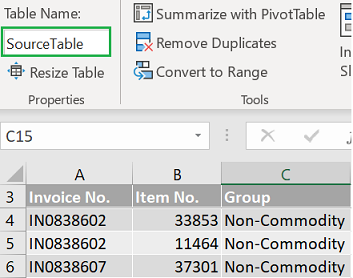
1/ Click somewhere is that table > Go to Data tab > From Table/Range (Power Query Editor opens)
2/ From the Home tab > Advanced Editor > Select all > Replace with the following M code
let
    Source = Excel.CurrentWorkbook(){[Name="SourceTable"]}[Content],
    ChangedTypes = Table.TransformColumnTypes(Source,
        {{"Invoice No.", type text}, {"Item No.", Int64.Type}, {"Group", type text}}
    ),
    GroupedRows = Table.Group(ChangedTypes, {"Invoice No."},
        {"InvoiceTable", each _, type table}
    ),
    RemovedOtherColumns = Table.SelectColumns(GroupedRows,{"InvoiceTable"}),
    AddedKeep = Table.AddColumn(RemovedOtherColumns, "Keep", each
        List.Contains([InvoiceTable][Group],"Commodity"),
        type logical
    ),
    FilteredRows = Table.SelectRows(AddedKeep, each [Keep]),
    CombinedTables = Table.Combine(FilteredRows[InvoiceTable])
in
    CombinedTables
3/ Click Done at the bottom of the Advanced Editor window
4/ Click Close & Load (top left of the Power Query Editor)
Sample available here
Thank you Lz-3068 for the response.
How do I make this work? Do I add the codes above as custom column?
What is ChangedTypes and AddedKeep?
Cheers
Jojemar
@Jojemar Landicho . I assumed you were a bit familiar with Power Query >> Updated my answer with a complete query code + a sample to download
@Lz._ Got it! Perfect solution. Exactly what I needed.
Thanks so much for your help and guidance.
Jojemar
Glad I could help @Jojemar Landicho & Thanks for posting back