As appropriate please download and run the System Update Readiness Tool – 32 bit (x86 version)
http://www.microsoft.com/en-us/download/details.aspx?id=3132
or
Download and run the System Update Readiness Tool -64 bit version
http://www.microsoft.com/en-us/download/details.aspx?id=20858
The System Update Readiness Tool creates a log file that captures any issues that the tool found or fixed. The log file is located at the following location:
•%SYSTEMROOT%\Logs\CBS\CheckSUR.log
•%SYSTEMROOT%\Logs\CBS\CheckSUR.persist.log
The system root is normally
C. If the files are not there, checkC:\windows\ logs\CBS.
You may need to change your settings in Windows to be able to see the file. To show hidden files type Folder Options in the search box above the Start
button and select View, Advanced Settings and verify that the box before "Show hidden files and folders" is checked and "Hide protected operating system files" is unchecked. You may need to scroll down to see the second item. You should also make certain that
the box before "Hide extensions for known file types" is not checked.
Do not use Search to find the files. Open Windows Explorer (keyboard shortcut Win+E), locate and expand the file path (item
1 in the image below) Computer>Local Disk (C:)>Windows>Logs>CBS (item
2
below). Expand by clicking the arrowhead pointing right immediately before each folder in turn to see the next folder in the file path until you see the CheckSUR.log and CheckSUR.persist.log (item
3
below).
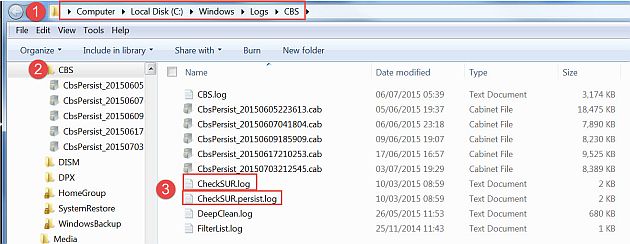
Please upload a copy of these logs to your OneDrive as shared files and post a link here.
For help with OneDrive see paragraph 9.3:
http://www.gerryscomputertips.co.uk/MicrosoftCommunity1.htm
Notes on using Windows Update:
http://www.gerryscomputertips.co.uk/WinUpdate1.htm
' cx='32' cy='32' r='32' /%3E%3Ctext x='50%25' y='55%25' dominant-baseline='middle' text-anchor='middle' fill='%23FFF' %3EA%3C/text%3E%3C/svg%3E)
