Share via

Microsoft Update Catalog- Help Code 800F020B - Windows 7

Anonymous
2017-05-02T15:08:14+00:00

I have Windows 7 - 64 bit and it does have Service Pack 1 installed. I am not able to scan to computer and the update will not work.

Hewlett-Packard - USB - 2/10/2017 12:00:00 AM - 40.11.1108.1741

Installation status: Failed

Error details: Code 800F020B

Update type: Recommended

Hewlett-Packard USB  driver update released in  February 2017

I wient to Microsoft Update Catalog and search 40.11.1108.1741 and found an option to download, however it is saved as a Cabinet File and I thought after I download, I would be able to install?

See the pictures and please let me know how I may get this added so hopefully I may utilize my all in one HP Envy 4520 printer. I can't scan and it's so frustrating.

Cabinet File

Windows for home | Previous Windows versions | Windows update

Locked Question. This question was migrated from the Microsoft Support Community. You can vote on whether it's helpful, but you can't add comments or replies or follow the question.

0 comments No comments

12 answers

Sort by: Most helpful
  1. Anonymous
    2017-05-03T02:20:06+00:00

    Hi,

    It seems that you are having difficulty with Windows Update, and an option device driver update. The error code 0x800F020b indicates that the “device instance does not exist”. This error code suggests that this optional device driver update does not necessarily apply to your system. Kindly refer to this link as we found a similar discussion to what you are currently experiencing. Check out José Antonio Pontón Posada CEO's post for troubleshooting purposes.

    Let us know if will need further assistance.

    Was this answer helpful?

    6 people found this answer helpful.
    0 comments No comments
  2. Anonymous
    2017-05-12T06:20:11+00:00

    Most of the updates that show failed are hardware driver updates.

    If you want your system to behave you should not accept or install any hardware driver updates offered by Windows Update.  Microsoft does not know what the best drivers are for your system and will often send you out of date or incompatible updates which can render your working system unusable and sometimes unbootable.

    You should hide any of those updates and hope you never see them again and not get hung up trying to install them when those kinds of updates fail to install - quit trying to install them.

    You should only install hardware driver updates from the system manufacturer (HP in your case).

    Accepting hardware driver updates from Microsoft is one reason there are so many topics in the community that start with "Windows update broke my computer...".

    One rule of thumb is "if it ain't broke don't fix it" so if you are not having a problem with video, audio, network, printer don't accept or install those driver updates offered from Microsoft.  If you are having a problem like that you should only get driver updates from the hardware manufacturer.

    If you see and can recognize those hardware driver updates offered you should right click and hide them:
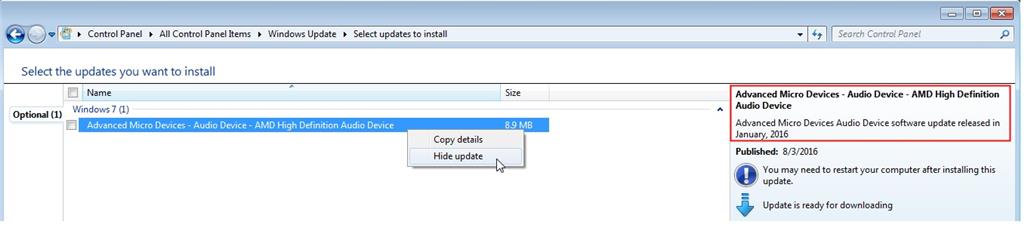
    Pretty soon you might have quite a few hidden hardware updates:
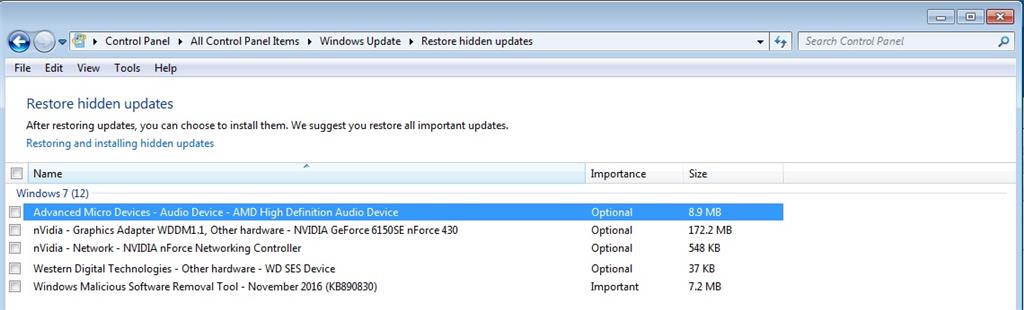
    Windows has a way built in to not allow these kinds of updates and I'm not 100% sure it works as advertised but this is a safe adjustment that may prevent a whoops event in the future and how you might undo them if they happen:

    Windows 7 has built in ways to disable driver updates from Windows Update that you can read about here:

    https://support.microsoft.com/en-us/kb/2500967

    Hopefully the Microsoft engaged alleged "expert" will tell you the consequences of resetting your update components.

    Was this answer helpful?

    4 people found this answer helpful.
    0 comments No comments
  3. Anonymous
    2017-05-03T21:18:38+00:00

    Thank you for your response. Since running the scans didn't help us with this update error, we suggest you try to run this troubleshooter. Kindly refer to this article for troubleshooting purposes: Fix Windows Update errors.

    We will be looking forward for your reply.

    Was this answer helpful?

    1 person found this answer helpful.
    0 comments No comments
  4. Anonymous
    2017-05-06T17:24:56+00:00

    I ran this as well I received the following error. I am back at not being able to scan again. Scan to computer is unavailable. See attached error that wasn't able to repair after I ran the windows update.

    I think I just need to give up, as I tried everything. I even reinstalled windows 7 and had to reinstall all of my other programs, such as Microsoft Office.

    This is the new error and after searching, it appears I had to run the window update, which I already did and it gave me the following, which it did not fix/repair.

    At a wit's end here. I also followed instructions to run the network trouble shooter, but that is not the solution. The options it gives me is not what I am trying to fix. I do not want any other computer to connect with this computer. So that tool isn't applicable.

    Doubt this is the solution since I am not having internet issues.

    Was this answer helpful?

    0 comments No comments
  5. Anonymous
    2017-05-03T15:11:04+00:00

    I have done all of that and I am able to scan, however I am getting lines. See attached scan. This happened before, a bit frustrating, especially when I really need my scanner to work.

    On the notifications Area Icons, under the control panel, it shows this: Scan to PC currently unavailable. 

    I am at my wits end here and I have also change the settings under WU, see image. I hope I will be able to resolve the scanning issue.

    WU: 

    Scan to PC:

    Scan: All I get is lines. 

    Was this answer helpful?

    0 comments No comments
