Share via

windows defender scheduling multiple extra scans displaying:  The process terminated unexpectedly.  (0x8007042B)

Anonymous
2017-03-13T06:17:20+00:00

On this computer I had run a windows defender quick scan followed by a full scan many hours ago.

Within the past thirty minutes the action center displayed that there were four new windows defender scans.
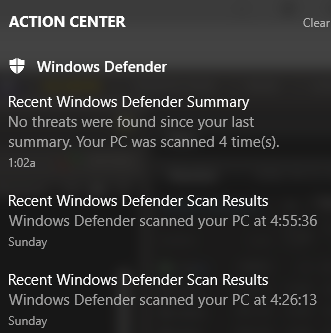
This computer somehow is making multiple windows defender scans during a scheduled time.  Somehow it may be set for repetitive attempts if an automatic scan fails to start.

Would someone please evaluate the scheduling menu and indicate what they think the problem is and how to fix windows defender so that one scan runs properly.  The repeat scans can be maintained if a prior scan was missed but running four scans immediately after the other seems to be a malfunction.

This is the scheduling menu:  https://1drv.ms/i/s!AhdfDD74t\_q2ixmqHG6-O536ik89

Windows defender cache maintenance?

Windows defender cleanup?

Windows defender verification?

All displaying:  The process terminated unexpectedly.  (0x8007042B)

And one out for the four scans, one scheduled, the others (malfunctions?) scanned normally?

Today is 3 13 2017 and these four scans ran today 3 13 2017.  The last quick and full scans were yesterday 3 12 2017.

How come the active center indicated that it just ran a scan at 1:04 AM on 3 13 2017 and that no threats were found since your last scan and when viewing windows defender it still displays last scan 3 12 2017 at 4:55 PM (Full Scan).

Current view (3 13 2017) view of windows defender:  https://1drv.ms/i/s!AhdfDD74t\_q2ixpndBxH1m4vpGGT

Questions:

  1. how come there were 4 new scans?
  2. how come 3 of the 4 scans display the process terminated unexpectedly?
  3. how come none of the 4 news scans are displayed when viewing windows defender with its last manual scan yesterday a full scan?
  4. what if anything in the scheduling menu needs to be changed to fix the scanning?
  5. how does the process terminated unexpectedly get fixed?
Windows for home | Windows 10 | Security and privacy

Locked Question. This question was migrated from the Microsoft Support Community. You can vote on whether it's helpful, but you can't add comments or replies or follow the question.

0 comments No comments

8 answers

Sort by: Most helpful
  1. Anonymous
    2017-03-13T23:06:10+00:00

    On this computer with the windows defender scheduling problem I just had a telephone call from Microsoft and they will schedule an engineer to call me tomorrow evening to work on the windows defender offline blue screen boot loop, as well as the action center reporting multiple defender scans.

    Thx.

    Was this answer helpful?

    0 comments No comments
  2. Anonymous
    2017-03-13T23:00:35+00:00

    All of the threads are active in that any email reply is set up for update at the email address.  So if someone posts on a link six months or one year ago it should still arrive in the email.  And then I can reply to their post.  When I perform a search on the micrsoftanswers web site doesn't the search finds links by the title?  If there is important information within a post that is not related to the title isn't it unlikely to show up in search results? 

    Which is better method to find information about a problem?   to post questions that have a title for the problem irrespective of the computer or to post numerous different topics on one computer in the same title over time?  For example one computer could have a driver, or blue screen, or windows defender or microsoft office or device problem over time.  If the same link is used indefinitely for one computer wouldn't the title or topic displayed be unrelated to the content over time?  Or is that a better way to keep track of prior studies?  If you format or sanitize the drive then how should you post?  Please clarify how you prefer the postings.

    Was this answer helpful?

    0 comments No comments
  3. Anonymous
    2017-03-13T22:26:30+00:00

    Approximately two weeks ago one of the Microsoft tech support people using remote access had the windows defender scheduling settings modified to fix some of the prior error codes with windows defender...Since the Microsoft technical support remote access there have been numerous active center reports of multiple windows defender spontaneous scans during each action center post and I'm looking for a fix.

    If the "Microsoft tech support people" broke something, you should be contacting them again to fix it, especially since (a) we have no idea what they did to your computer and (b) what problems you were having.

    Did you pay for the support?

    Do you have a restore point which predates "Microsoft tech support people" messing around with the computer?

    Is it the same computer - not necessarily the same problem - as in one or more of your many, many other recent threads (to which many of which I've replied, most of which you've abandoned)?

    Was this answer helpful?

    0 comments No comments
  4. Anonymous
    2017-03-13T21:51:24+00:00

    PA

    This windows defender problem is unrelated to the other.  All of the computers had had windows driver verifier produced blue screens followed by windows defender offline scans.  The computers that had repeat windows driver verifier scans went into the blue screen boot loops.  One of them was serviced again in the Microsoft store and had its internal hard drive sanitized using the bios again and then had drivers, files and office reinstalled.  The other notebook with the blue screen loop was not able to be fixed with windows 10 flash drive iso advanced troubleshooting and is pending reinstallation of the operating system and follow up from a Microsoft level III engineer. 

    Approximately two weeks ago one of the Microsoft tech support people using remote access had the windows defender scheduling settings modified to fix some of the prior error codes with windows defender.  This post is regarding the newest notebook and this computer has not had any other recent major problems.  It may be at risk for blue screen boot loop if the windows driver verifier is run after the prior windows defender offline scan.  Since the Microsoft technical support remote access there have been numerous active center reports of multiple windows defender spontaneous scans during each action center post and I'm looking for a fix.

    Thx

    Was this answer helpful?

    0 comments No comments
  5. Anonymous
    2017-03-13T18:43:03+00:00

    OPTION A: To avoid confusion & duplication of effort, please post any/all further follow-up in replies to your original thread => https://answers.microsoft.com/en-us/protect/forum/protect_defender-protect_scanning/problem-with-offline-windows-defender-and-windows/dacf1e94-de1c-4f7a-b873-e84a2afc0050

    OPTION B: You may obtain Microsoft-sponsored (but not necessarily free) support via the Answer Desk => http://answerdesk.microsoftstore.com

    OPTION C: Stay in school.

    OPTION D: Go back to school.

    Was this answer helpful?

    0 comments No comments
