Hello, I have an MS Server 2008 R2 which I have installed a Policy in the GPO that was supposed to assist with the prevention of Wannacry but also ended up taking out the 'Workstation' service. This is the Policy which updated the registry.
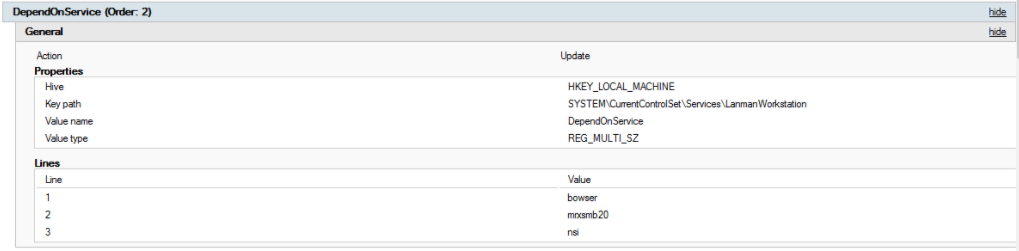
Now when I try to start the service I receive 'Error 2: The system cannot find the file specified.' Because I can't start the Workstation Service, the Netlogon service depends on the Workstation service so I can't start that either.
I have since removed the registry entry in SYSTEM\CurrentControlSet\Services\LanmanWorkstation and reinstalled the 'Client for Microsoft Networks' Network feature (this worked on my Win 10 machine) but still I get the error 2 when starting 'Workstation'
service. I have also run SFC /scannow which did not find anything. The DLLs are in the System32 folder and the SYSTEM\CurrentControlSet\Services\LanmanWorkstation is matched exactly with another machine with the 'Workstation' service running.
I really do not want to have to reinstall windows at this point.
Any suggestions to get the Workstation service back up and running would be greatly appreciated.
Thank you,
Matt
' cx='32' cy='32' r='32' /%3E%3Ctext x='50%25' y='55%25' dominant-baseline='middle' text-anchor='middle' fill='%23FFF' %3EA%3C/text%3E%3C/svg%3E)
