Hi,
I've installed windows 10 from scratch on my dell xps 9560. I have used my office 365 account to create user which is now connected to Azure AD. Drive is encrypted with BitLocker.
After I enter my password to log into windows I get the following screen:
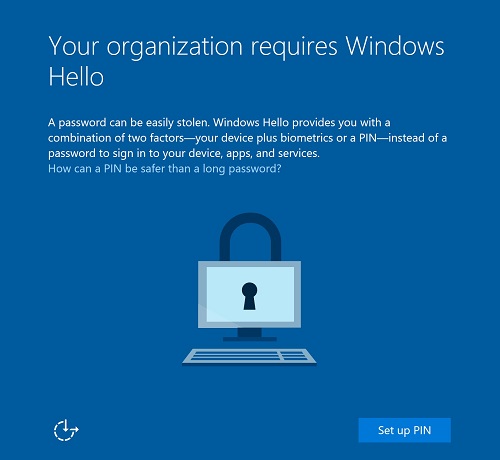
Then after i click on set up PIN I receive following message:
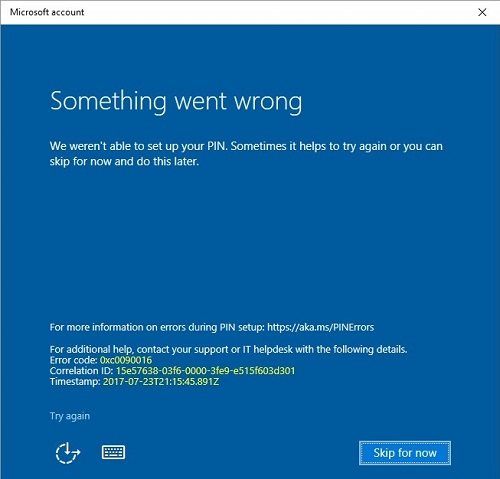
After clicking skip for now I can normally log into windows. Same thing happens when I go to Settings -> Accounts -> Sing-in options -> PIN -> Add.
This happens every time I log in to windows after reboot or start-up. If my laptop is not connected to the network then this screen does not appear. I guess it's related to Azure AD. Other people in my company have same laptops and setup with their Office
365 accounts and connected to Azure AD but they don't have this issue. Difference is that they installed their PCs with local admin user and after install created their AD user and deleted local admin user.
I cannot remove PIN because I don't have it set up.
I've tried playing with options in gpedit.msc with setting Turn on PIN but that did not help. Also I've tried deleting NGC folder and that did not help either.
I've also logged in to my company Microsoft Intune account to set up Admin -> Windows -> Windows Hello for Business -> Enable and no luck.
I've created local admin account which is not connected to Azure AD and for that account I can create and remove PIN option for signing in with no issues.
Any suggestions ?
BR,
Davorin
' cx='32' cy='32' r='32' /%3E%3Ctext x='50%25' y='55%25' dominant-baseline='middle' text-anchor='middle' fill='%23FFF' %3EA%3C/text%3E%3C/svg%3E)
