System Information:
Processor: Intel(R) Core(TM)2 Duo CPU E7400 @ 2.80GHz 2.79GHz
Installed memory (RAM): 2.00 GB
System type: 32-bit Operating System
Windows Edition: Windows 7 Ultimate
Copyright 2009 Microsoft Corporation. All rights reserved.
[I forgot my Microsoft account way too fast in my other account...]
By neutral processes I meant the processes that have nothing to do with using too much CPU usage. This only happens in once process, and then, every time I end that process, another process will use high CPU... ridiculous... I've screenshot examples
to prove what in the tarnation is happening in my Computer.
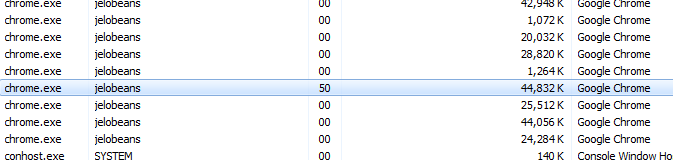
This one, it's not the fault of Chrome, in fact, my Chrome data has just been reset a hour ago. I was forced to end process this to check the next process it will infect. One down. And I wasn't doing anything in my Chrome aside from typing here.

And this one, the app that I'm using to screenshot had became the victim.
Closed process.
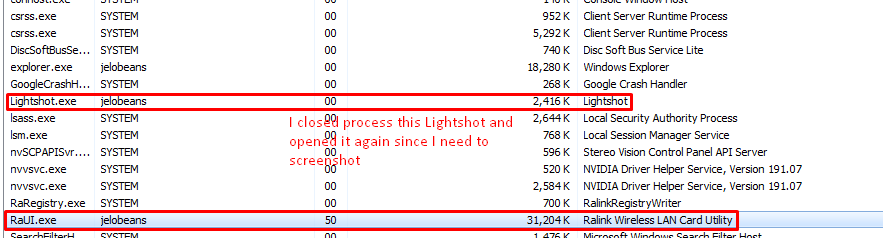
That's only taking like 0% always of my CPU.
Closed Process. A few seconds later.
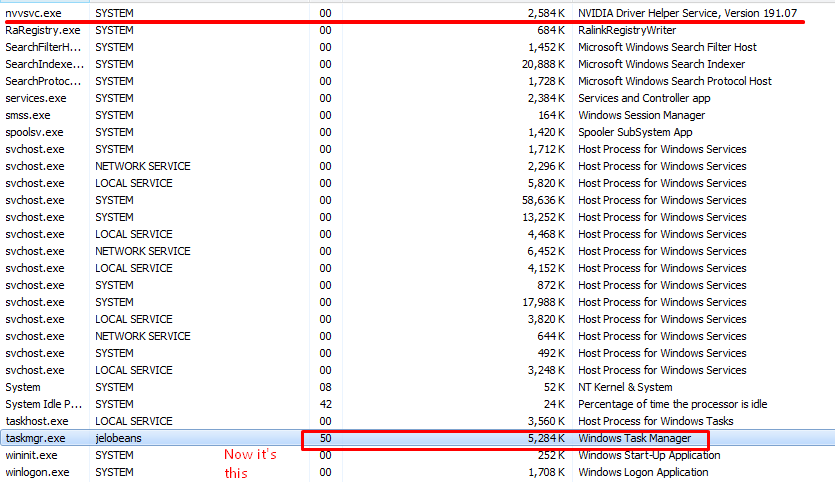
Closed the Wireless LAN Utility, and then the task manager itself became the new victim. Well, it ain't stopping me.
Closed and then opened Task Manager, then.

Well at first, it was explorer.exe that was taking my CPU. Everytime I open my pc it's either Desktop Window Manager, Windows Explorer, or Taskhost that is taking high CPU usage. Then, when I end those processes it just passes to another process till it
revolves back to Desktop Window Manager.
So that's it. I don't know what's happening in my computer but this happened before, but I just ignored it. I already tried many things such as making a full scan, creating another user account and deleting the old one, performance checks, etc.
By the way, this only happened after the technician fixed it, I didn't have any problems before.
I haven't tried to re-install Windows yet, I'm trying to solve this without using any help from a technician, since, my computer was just fixed by one just recently, and it had another problem already.
' cx='32' cy='32' r='32' /%3E%3Ctext x='50%25' y='55%25' dominant-baseline='middle' text-anchor='middle' fill='%23FFF' %3EA%3C/text%3E%3C/svg%3E)
