Developer technologies | Windows Presentation Foundation
A part of the .NET Framework that provides a unified programming model for building line-of-business desktop applications on Windows.
This browser is no longer supported.
Upgrade to Microsoft Edge to take advantage of the latest features, security updates, and technical support.
' cx='32' cy='32' r='32' /%3E%3Ctext x='50%25' y='55%25' dominant-baseline='middle' text-anchor='middle' fill='%23FFF' %3EXS%3C/text%3E%3C/svg%3E)
Hi,
Recently, we are looking at the option of moving from coded UI tests to WinAppDriver for testing our windows based WPF applications. But we can't find a way to get code coverage for the application code. Is code coverage supported by WinAppDriver? If not, what is the recommended approach for UI automation tests that could provide code coverage?
Thanks!
Xuyang

You can get the Code Coverage Results for the Application in Visual Studio by the steps: Test>Code Coverage Results (My Visual Studio is Enterprise 2019 Version 16.8.3). WinAppDriver supports performing UI automation against Windows applications, regardless of the technology used to build it (UWP, WPF, Windows Forms, Win32, etc.).
Here is my steps to use WinAppDriver to test the project.
1.Install WinAppDriver from here.
2.Download the demo from UI Testing for WPF apps.
3.Update the WpfAppId in WpfUiTesting.Tests according to your environment.
4.Open Analyze Code Coverage for All Tests by steps Test>Analyze Code Coverage for All Tests. as below picture shown:
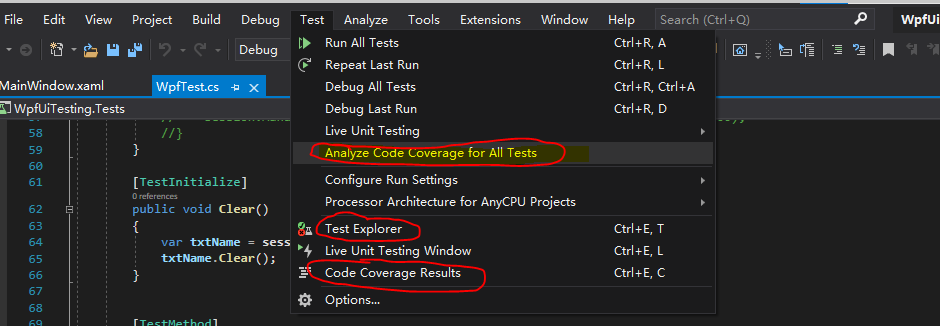
5.Run WinAppDriver.exe and run the Test units , then you can see test details in Test Explorer and Code Coverage Results.
For more detailed steps and info, please refer to UI testing for Windows apps with WinAppDriver and Appium. By the way, if I misunderstand your question, please point out and give me more details to analyze.
If the response is helpful, please click "Accept Answer" and upvote it.
Note: Please follow the steps in our documentation to enable e-mail notifications if you want to receive the related email notification for this thread.
Hi,
Thank you very much for the answer. I apologize for not being clear before. It's not that there is no code coverage result, but the code coverage result is only on the test code instead of production code. Even with the code mentioned above, when I tried to get the coverage, it was only showing coverage in the test project, not the WPF project. So I was wondering if there is anything I did wrong or didn't setup correctly to get the code coverage for the WPF projects. Currently we are mostly using 2017 Enterprise and our target framework version is 4.6.1. Would it make a difference?

@Xuyang Song
From Use code coverage to determine how much code is being tested and Unit test basics, we can get the detailed info about Visual Studio Code Coverage and Units test, and there is no relevant result window for showing proportion for the WPF projects mentioned. May be some third party tool can meet your needs.
hmm... using the WpfUiTesting as a sample, with WinAppDriver, it seems on my side the code coverage only covers/instruments the WpfUiTesting.Test.dll. However, when using the old coded-UI tests, both the wpfuitesting.test.dll and the WpfUiTesting.WPF projects will be instrumented and it is the coverage from the WPF project that we are interested in since it shows the coverage on production code.
That's why I'm wondering, is there a way for WinAppDriver to instrument the code coverage on the WPF assemblies that it is running/testing. If so, what do I need to do to get that coverage data.
@Xuyang Song
Your issue is more related WinAppDriver than native WPF, Could you ask your question in here where you may be assistered better.
Sure. Thanks for all the help!