Community Center | Not monitored
Tag not monitored by Microsoft.

This browser is no longer supported.
Upgrade to Microsoft Edge to take advantage of the latest features, security updates, and technical support.
' cx='32' cy='32' r='32' /%3E%3Ctext x='50%25' y='55%25' dominant-baseline='middle' text-anchor='middle' fill='%23FFF' %3EPA%3C/text%3E%3C/svg%3E)
Hi I am trying to work out how to dynamically set which fields to sum in a grouped rows function using a list of fields to sum
The following code works well, and I can use lst_o_lstSumFlds list to choose which fields to sum in the group by.
However I want to be able to create this list dynamically from a separate list of fields names.
let
lst_o_lstSumFlds = {{"Field1", each List.Sum([Field1]), type nullable number},{"Field2", each List.Sum([Field2]), type nullable number},{"Field3", each List.Sum([Field3]), type nullable number}},
Source = Excel.CurrentWorkbook(){[Name="Table2"]}[Content],
#"Grouped Rows" = Table.Group(Source, {"GrpString"}, lst_o_lstSumFlds)
in
#"Grouped Rows"
In the past I have used List.Repeat to create the type element of the lst_o_lstSumFlds as in:
List.Repeat({type text},List.Count(lstSumFields)) and then use List.Zip to create the List of Lists,
However I am struggling to create the function element with the 'each' portion being recognised as a function, not as a string.
List.Repeat({each List.Sum([Field1])},List.Count(lstSumFields)) works but all fields have the same name so I need to be able to set the Field1 to Fieldx from the list of fields in the sum list.
Thanks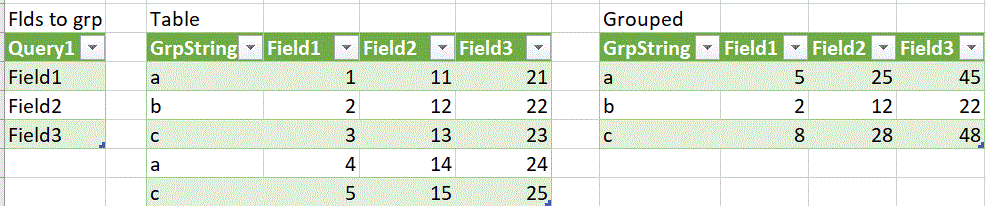

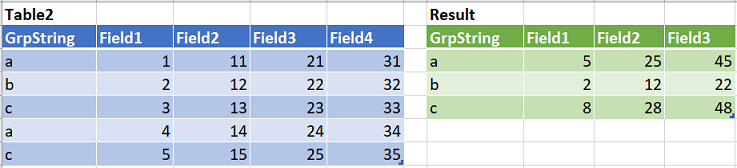
I did not understand where your list of fields were "computed" as Query1 (in your pics) so I sumilated it as Query1 in the below code that is one way to doing what you want:
let
    Query1 = {"Field1", "Field2", "Field3"},
    lst_o_lstSumFlds = List.Transform(Query1, (field)=>
        {field, each List.Sum(Record.Field(_, field)), type nullable number}
    ),
    Source = Excel.CurrentWorkbook(){[Name="Table2"]}[Content],
    GroupedRows = Table.Group(Source, {"GrpString"}, lst_o_lstSumFlds)
in
    GroupedRows
@Peter and Helen Phillips . A clarification as I realized using (field)=> could be confusing. Use whatever you want inside ()=>, i.e. :
lst_o_lstSumFlds = List.Transform(Query1, (xyz)=>
{xyz, each List.Sum(Record.Field(_, xyz)), type nullable number}
)
Hi @Peter and Helen Phillips . Have you had an opportunity to look at the above code and to test it with your actual scenario? Problem solved? Need more help/clarification? Thanks