I found this old computer tower in my house and I've been wanting to see whats in it and what I can do with it, but I've been running into a variety of problems. The computer is a Vaio RS model PCV-C12L running on Windows XP Home Edition. It's been several
years since this computer has been touched so I don't know of any updates this computer has. The first problem I ran into was the password, which didn't really matter because I simply went into Safe mode and ran as Administrator but every time i do this i'm
greeted with this screen-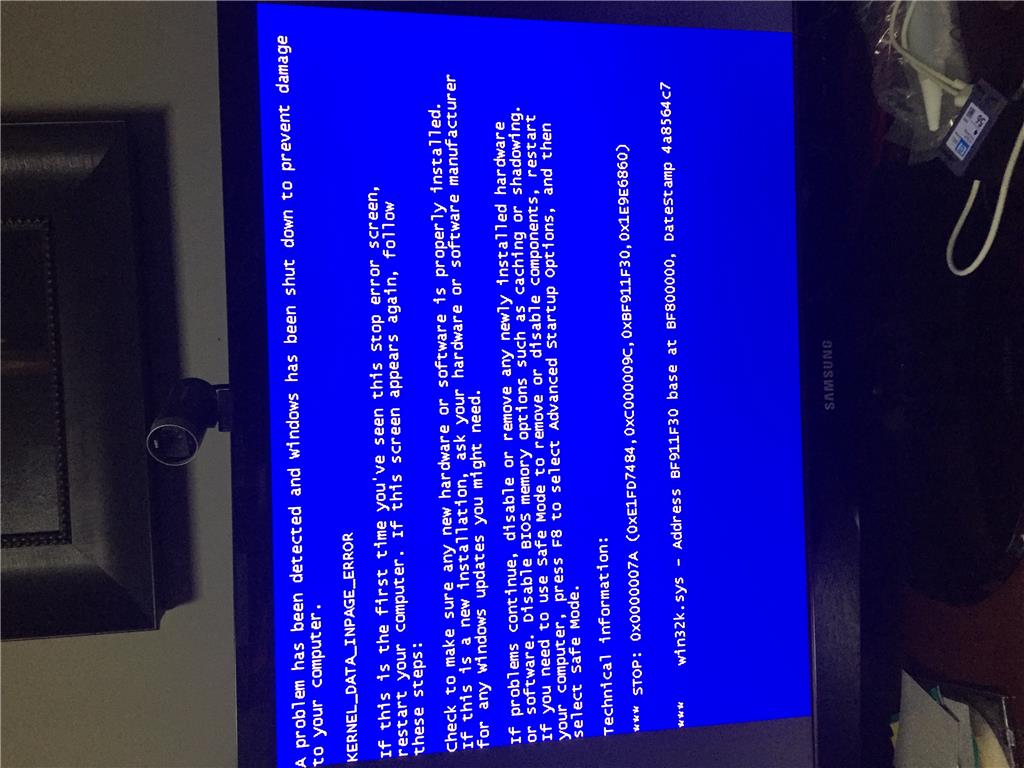 KERNAL_DATA_INPAGE_ERROR
Technical Information:
*** STOP: 0x0000007A (0xE1FD7484 , 0xC000009C, 0xBF911F30, 0x1E9E6860)
wink32k.sys - Address BF911F30 base at BF800000, DateStamp 4a8564c7
This is actually the screen that pops up a bit later in my problems but I was an idiot and did not take a picture of that screen, so this is the closest I have. After that, i searched the web I decided to run "chkdsk
C: /f /r /x".
It stopped at stage 4 of 5 at 54% so then I decided to hard reset, did some research and found out that this
process takes a long time. I restarted the computer and it gave me the American Megatrends screen. Again, didn't get to snap a picture but it said something about the status of my hard drive being bad and it needed to be replaced. Of course i couldn't really
get past this screen and by now I could care less about what's on the hard drive (other than Backyard Skateboarding), so I opened up the computer and removed all sorts of dust bunnies and cleaned everything safely, got back in then removed the option to quit
warning me about the hard drive and american megantrends screen. The ChkDsk scan started up again and this time i waited 3 hours. Got impatient and reset and waited for 6 hours at the same spot. Didn't want the computer running all night so I woke up this
morning and started the scan at 11:00 AM and went to the same spot, Stage 4 of 5 at 54% complete and stayed that way for
12 hours. By now i've become concerned and just went into safe mode, and this screen (above) popped up. Please, any help is appreciated and if there's no hope I'm willing to buy a new and cheap hard drive.
' cx='32' cy='32' r='32' /%3E%3Ctext x='50%25' y='55%25' dominant-baseline='middle' text-anchor='middle' fill='%23FFF' %3EA%3C/text%3E%3C/svg%3E)
