Developer technologies | .NET | Xamarin
A Microsoft framework for building cross-platform mobile apps using .NET and C# with native performance and user interfaces.
This browser is no longer supported.
Upgrade to Microsoft Edge to take advantage of the latest features, security updates, and technical support.
' cx='32' cy='32' r='32' /%3E%3Ctext x='50%25' y='55%25' dominant-baseline='middle' text-anchor='middle' fill='%23FFF' %3EM%3C/text%3E%3C/svg%3E)
Hi,
I am building a small and simple drum sequencer for fun and to experiment with MVVM in Xamarin Forms.
The idea is that through databinding of the viewmodel sequencer lanes and steps are rendered in the view. For now the core project are referenced to an UWP project and Android project.
I tested the app in UWP.
Basically 2 collection views with some other grid and stackpanels with are applied to generate the lanes and the steps based on nested viewmodel objects. The steps toggle buttons that I found in the documentation of xamarin forms in the xamarin forms website.
However after the startup of the UWP app the first 'column' of the sequencer lanes the steps are not displayed (see image 1)

When I press on randomize the toggle is displayed because its value is changed. However there seems to be a sizing isue.
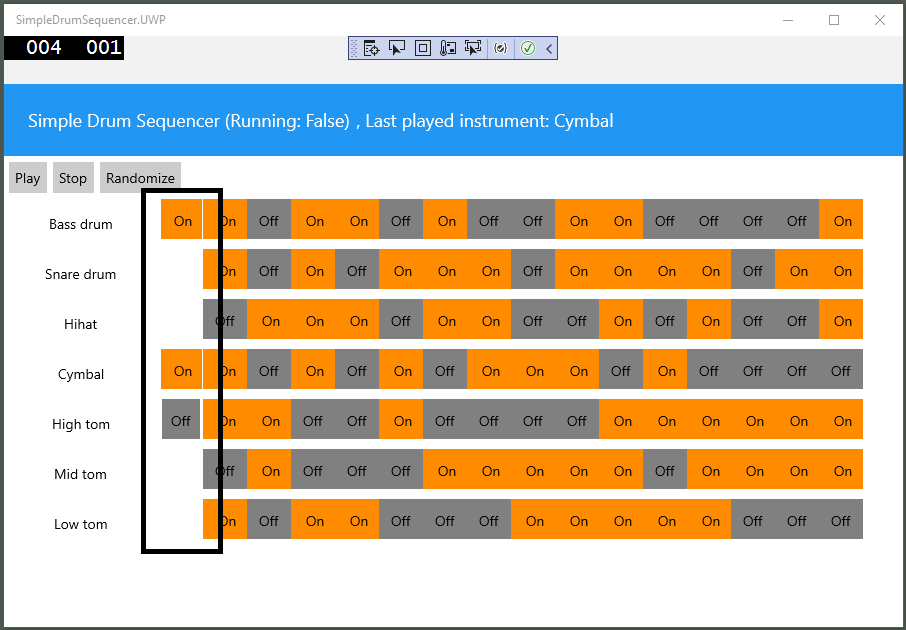
The repository of the app can be found to provide a full picture:
https://github.com/marinusklaassen/simpledrumsequencer
I made a code sample to provide a shorter illustration of the issue and of what I try to achieve:
<?xml version="1.0" encoding="utf-8" ?>
<ContentPage xmlns="http://xamarin.com/schemas/2014/forms"
xmlns:x="http://schemas.microsoft.com/winfx/2009/xaml"
xmlns:localcontrols="clr-namespace:SimpleDrumSequencer.Controls"
xmlns:xct="http://xamarin.com/schemas/2020/toolkit"
xmlns:vm="clr-namespace:SimpleDrumSequencer.ViewModels"
x:Class="SimpleDrumSequencer.Views.SimpleDrumSequencerView"
        <StackLayout>
        <CollectionView ItemsSource="{Binding SequenceLanes}">
            <CollectionView.ItemTemplate
                ItemSizingStrategy="MeasureAllItems">
                <DataTemplate>
                    <CollectionView Grid.Row="0" Grid.Column="1"
                                        HeightRequest="50"
                                        ItemsSource="{Binding SequenceSteps}"
                                        >

                        <CollectionView.ItemsLayout>
                            <GridItemsLayout
                                    Orientation="Horizontal"
                                    />
                        </CollectionView.ItemsLayout>
                        <CollectionView.ItemTemplate>
                            <DataTemplate>
                                <Button/>
                            </DataTemplate>
                        </CollectionView.ItemTemplate>
                    </CollectionView>
                </DataTemplate>
            </CollectionView.`enter code here`ItemTemplate>
        </CollectionView>
    </StackLayout>
</ContentPage>
The xaml code results in not displaying the first step/column of the lanes.

What can I do to solve this issue? Are there any work arounds that I can try? And am I on the right page to use the CollectionView?
Many thanks in advice!
With kind regards,
Marinus
' cx='32' cy='32' r='32' /%3E%3Ctext x='50%25' y='55%25' dominant-baseline='middle' text-anchor='middle' fill='%23FFF' %3EJ%3C/text%3E%3C/svg%3E)
Hello,
Welcome to our Microsoft Q&A platform!
CollectionView is available on iOS and Android, but is only partially available on the Universal Windows Platform. Using a single collectionView to display the button also doesn't work well on uwp. Try using another control instead to display the buttons.
   <CollectionView HeightRequest="50" ...>
       <CollectionView.ItemsLayout>
           <GridItemsLayout Orientation="Horizontal"/>
       </CollectionView.ItemsLayout>
       <CollectionView.ItemTemplate>
           <DataTemplate>
               <Button />
           </DataTemplate>
       </CollectionView.ItemTemplate>
   </CollectionView>
Tutorial:
https://learn.microsoft.com/en-us/xamarin/xamarin-forms/user-interface/collectionview/introduction
Best Regards,
Jarvan Zhang
If the response is helpful, please click "Accept Answer" and upvote it.
Note: Please follow the steps in our documentation to enable e-mail notifications if you want to receive the related email notification for this thread.
Thanks Jarvan for the heads up!
The StackLayout & BindableLayout classes solved my issue.
   <?xml version="1.0" encoding="utf-8" ?>
     <ContentPage xmlns="http://xamarin.com/schemas/2014/forms"
                    xmlns:x="http://schemas.microsoft.com/winfx/2009/xaml"
                    xmlns:localcontrols="clr-namespace:SimpleDrumSequencer.Controls"
                    xmlns:xct="http://xamarin.com/schemas/2020/toolkit"
                    xmlns:vm="clr-namespace:SimpleDrumSequencer.ViewModels"
                    x:Class="SimpleDrumSequencer.Views.SimpleDrumSequencerView"
                    >
            <StackLayout>
               <StackLayout BindableLayout.ItemsSource="{Binding SequenceLanes}">
                   <BindableLayout.ItemTemplate>
                       <DataTemplate>
                           <StackLayout Orientation="Horizontal" BindableLayout.ItemsSource="{Binding SequenceSteps}">
                               <BindableLayout.ItemTemplate>
                                   <DataTemplate>
                                       <Button/>
                                   </DataTemplate>
                               </BindableLayout.ItemTemplate>
                           </StackLayout>
                       </DataTemplate>
                   </BindableLayout.ItemTemplate>
               </StackLayout>
           </StackLayout>
       </ContentPage>
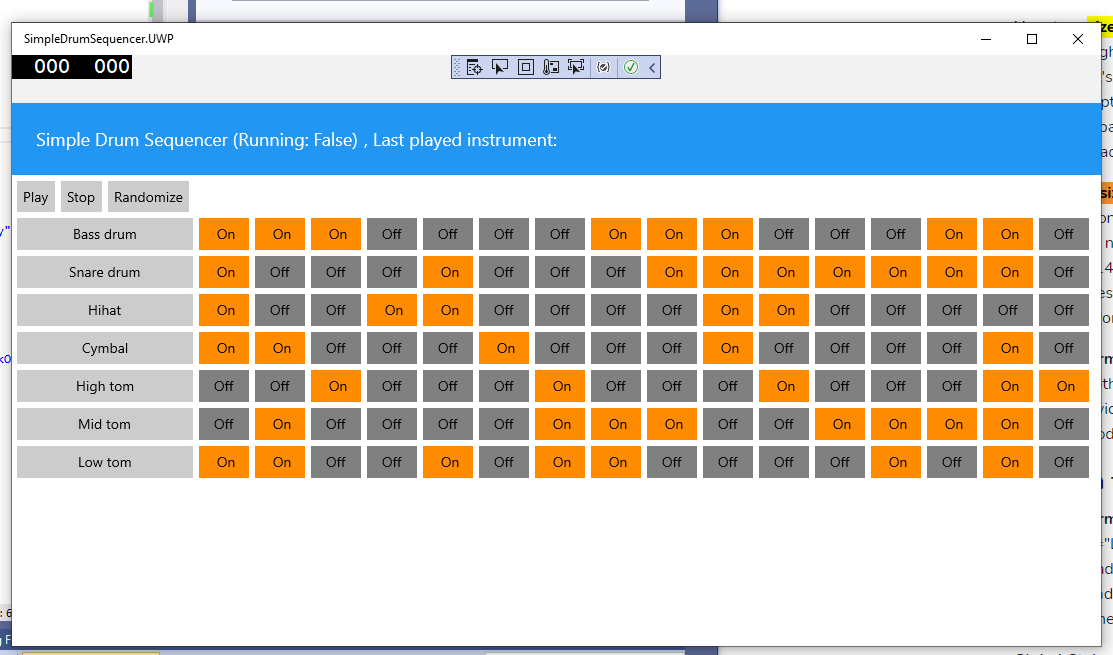
The accompanying XAML:
With regards,
Marinus